Ievads
The Amazon Fire TV Soundbar Plus is a 3.1 channel all-in-one soundbar designed to enhance your home audio experience. It features integrated bass, clear dialogue, and supports advanced audio formats like Dolby Atmos and DTS:X, providing immersive sound for movies, music, and more. This manual provides detailed instructions for setting up, operating, maintaining, and troubleshooting your Fire TV Soundbar Plus.

1. attēls. Priekšpuse view of the Fire TV Soundbar Plus, highlighting its key audio technologies.
Iestatīšana
Iepakojuma saturs
Pirms sākat darbu, pārliecinieties, vai kastē ir visi priekšmeti:
- Fire TV Soundbar Plus
- Tālvadības pults
- HDMI 2.0 kabelis
- Maiņstrāvas kabelis
- 2 AAA baterijas
- Sienas stiprinājuma komplekts
- Īsā lietošanas pamācība

Figure 2: Contents included in the Fire TV Soundbar Plus package and product dimensions.
Fiziskais izvietojums
The soundbar measures approximately 6.4 cm (height) x 94 cm (width) x 13.2 cm (depth) and weighs 4 kg. For optimal audio performance, place the soundbar centrally in front of your television. Ensure there are no obstructions in front of the soundbar. The included wall mount kit allows for wall installation if preferred.
Soundbar pievienošana
Lai pievienotu Fire TV Soundbar Plus televizoram, veiciet šīs darbības:
- HDMI (eARC/ARC) Connection: Connect one end of the included HDMI 2.0 cable to the HDMI (eARC/ARC) port on the back of the soundbar. Connect the other end to the HDMI eARC/ARC port on your television. This connection ensures optimal audio quality and allows your TV remote to control the soundbar's volume.
- Strāvas pieslēgums: Connect the AC power cable to the Power port on the soundbar and then plug it into a wall outlet.
- Optical Connection (Optional): Ja jūsu televizoram nav HDMI eARC/ARC porta, skaņas joslu varat pievienot televizora optiskajai audio izejai, izmantojot optisko kabeli (nav iekļauts komplektā).
- USB-A ports: The USB-A port is typically used for service or firmware updates and is not for general user connection.

3. attēls. Aizmugure view of the soundbar displaying available connection ports.
Sākotnējā ieslēgšana
Once connected, the soundbar will typically power on automatically with your TV if using the HDMI eARC/ARC connection. If not, press the Power button on the included remote control.
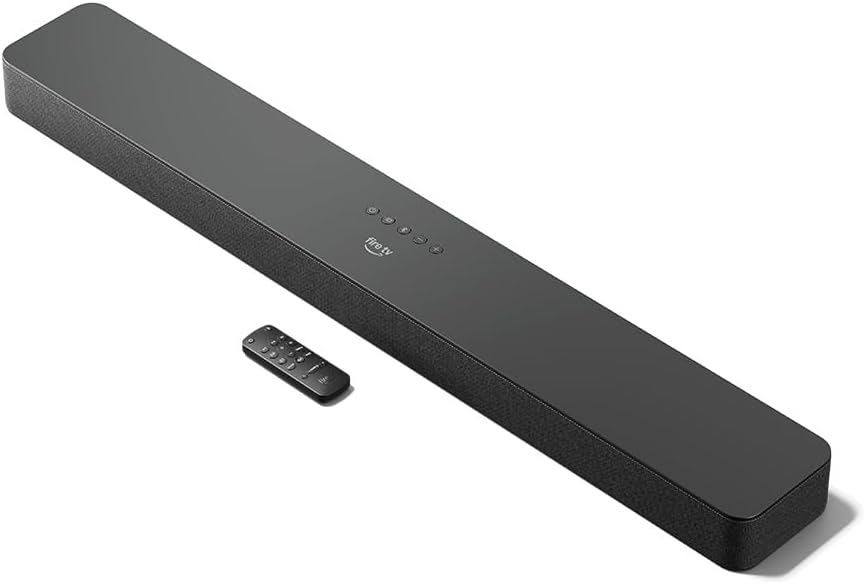
Figure 4: The Fire TV Soundbar Plus and its compact remote control.
Soundbar darbība
Pamata vadīklas
Use the included remote control to manage your soundbar's functions:
- Barošanas poga: Ieslēdz vai izslēdz skaņas joslu.
- Skaļuma palielināšana/ samazināšana: Regulē galveno skaļuma līmeni.
- Izslēgt pogu: Izslēdz vai ieslēdz skaņu.
- Ievades izvēle: Switches between HDMI, Optical, and Bluetooth inputs.
- Skaņas režīmi: Cycles through optimized audio presets.
Skaņas režīmi
The Fire TV Soundbar Plus offers several equalizer modes to optimize audio for different content types:
- Filmas režīms: Enhances cinematic soundscapes with dynamic range and surround effects.
- Mūzikas režīms: Provides balanced audio for music playback, emphasizing clarity and bass.
- Sporta režīms: Optimizes audio for sports broadcasts, often enhancing commentary and crowd noise.
- Nakts režīms: Samazina dinamisko diapazonu, lai novērstu pēkšņas skaļas skaņas, ideāli piemērots vēlam vakaram viewing.
The soundbar features a dedicated central channel for dialogue, ensuring clear conversations in all modes, especially beneficial for movies and TV shows.

Figure 5: Internal components illustrating the integrated speakers, tweeters, and subwoofer for rich sound.

Figure 6: The soundbar delivering immersive audio with Dolby Atmos and DTS:X in a home environment.
Bluetooth straumēšana
You can stream audio from your phone or tablet to the Fire TV Soundbar Plus via Bluetooth. To connect:
- Press the Bluetooth button on the remote control or select Bluetooth input.
- Mobilajā ierīcē atveriet Bluetooth iestatījumus un pieejamo ierīču sarakstā atlasiet “Fire TV Soundbar Plus”.
- Kad ierīce ir savienota pārī, audio no tās tiks atskaņots skaņas joslā.

Figure 7: Connecting a mobile device via Bluetooth to stream music or podcasts.
Fire TV Integration
For seamless integration with Fire TV devices (sold separately), you can control both your TV and the soundbar with a single remote. Audio settings can be customized directly within the Fire TV interface on selected models.
Apkope
To ensure the longevity and optimal performance of your Fire TV Soundbar Plus, follow these maintenance guidelines:
- Tīrīšana: Skaņas joslas virsmas tīrīšanai izmantojiet mīkstu, sausu drānu. Nelietojiet šķidrus tīrīšanas līdzekļus vai abrazīvus materiālus, jo tie var sabojāt apdari.
- Ventilācija: Pārliecinieties, vai skaņas joslas ventilācijas atveres nav bloķētas, lai novērstu pārkaršanu.
- Programmatūras atjauninājumi: Periodically check for firmware updates to ensure your soundbar has the latest features and performance improvements. Updates are typically delivered automatically when connected to a Fire TV device or can be performed via USB if available.
Problēmu novēršana
If you encounter issues with your Fire TV Soundbar Plus, refer to the following common problems and solutions:
| Problēma | Iespējamais cēlonis | Risinājums |
|---|---|---|
| No skaņas joslas nav skaņas. |
|
|
| Skaņa ir izkropļota vai neskaidra. |
|
|
| Tālvadības pults nedarbojas. |
|
|
| Problēmas ar Bluetooth savienošanu pārī. |
|
|
Specifikācijas
| Funkcija | Detaļas |
|---|---|
| Soundbar Dimensions (LxWxH) | 94 cm x 13.2 cm x 6.4 cm |
| Soundbar Svars | 4 kg (Actual dimensions and weight may vary based on configuration and manufacturing process) |
| Skaļruņu kanāli | 3.1 (integrated subwoofer) |
| Ekvalaizera režīmi | Movie, Music, Sport, Night |
| Telpiskās skaņas atbalsts | Dolby Atmos, DTS:X |
| Ostas | HDMI (eARC/ARC), Optical, AC Power, USB-A |
| Bluetooth atbalsts | Jā |
| Saderība | Viedie televizori un televizori ar straumēšanas multivides atskaņotājiem |
| Iekļauts kastē | Fire TV Soundbar Plus, remote control, HDMI 2.0 cable, 1 AC power cable, 2 AAA batteries, wall mount kit, Quick Start Guide |
Garantija un atbalsts
The Fire TV Soundbar Plus comes with a one-year limited warranty provided by the manufacturer. This limited warranty is in addition to, and does not compromise, consumer rights. Consumers may have additional rights provided by law even after the limited warranty expires. Use of the Fire TV Soundbar Plus is subject to the terms indicated by Amazon.
For further assistance, please refer to the official Amazon support channels or the Quick Start Guide included with your product.


