1. Ievads
Thank you for choosing the ASD Security Flood Light Camera Outdoor. This smart floodlight camera is designed to provide enhanced security and illumination for your outdoor spaces. Featuring a 180° motion sensor, adjustable light heads, and smart app control, it integrates seamlessly with your smart home ecosystem, including Alexa and Google Assistant. This manual provides essential information for safe installation, operation, and maintenance of your device.
2. Svarīga drošības informācija
Pirms uzstādīšanas un lietošanas, lūdzu, uzmanīgi izlasiet visus norādījumus. Saglabājiet šo rokasgrāmatu turpmākai uzziņai.
- Elektriskā drošība: Uzstādīšanu drīkst veikt kvalificēts elektriķis vai persona ar elektrotehniskām zināšanām. Pirms uzstādīšanas vai apkopes pārliecinieties, vai strāvas padeve ir izslēgta ar drošinātāju.
- Voltage: This product is designed to operate on 120V circuits.
- Montāža: Mount the fixture securely to a junction box. Ensure the mounting surface can support the weight of the fixture.
- Mitrās vietas: This product is Wet Locations rated (IP54), suitable for outdoor use. However, avoid submerging the unit in water.
- Siltums: Do not operate the fixture near flammable materials. Allow the fixture to cool before handling.
- Kameras objektīvs: Avoid touching the camera lens directly to prevent smudges or damage.
3. Iepakojuma saturs
Pirms instalēšanas sākšanas pārliecinieties, vai ir visas sastāvdaļas:
- ASD Security Flood Light Camera Outdoor (1 unit)
- Mounting Crossbar
- Montāžas Skrūves
- Stiepļu uzgriežņi
- EVA spilventiņš
- Lietotāja rokasgrāmata (šis dokuments)
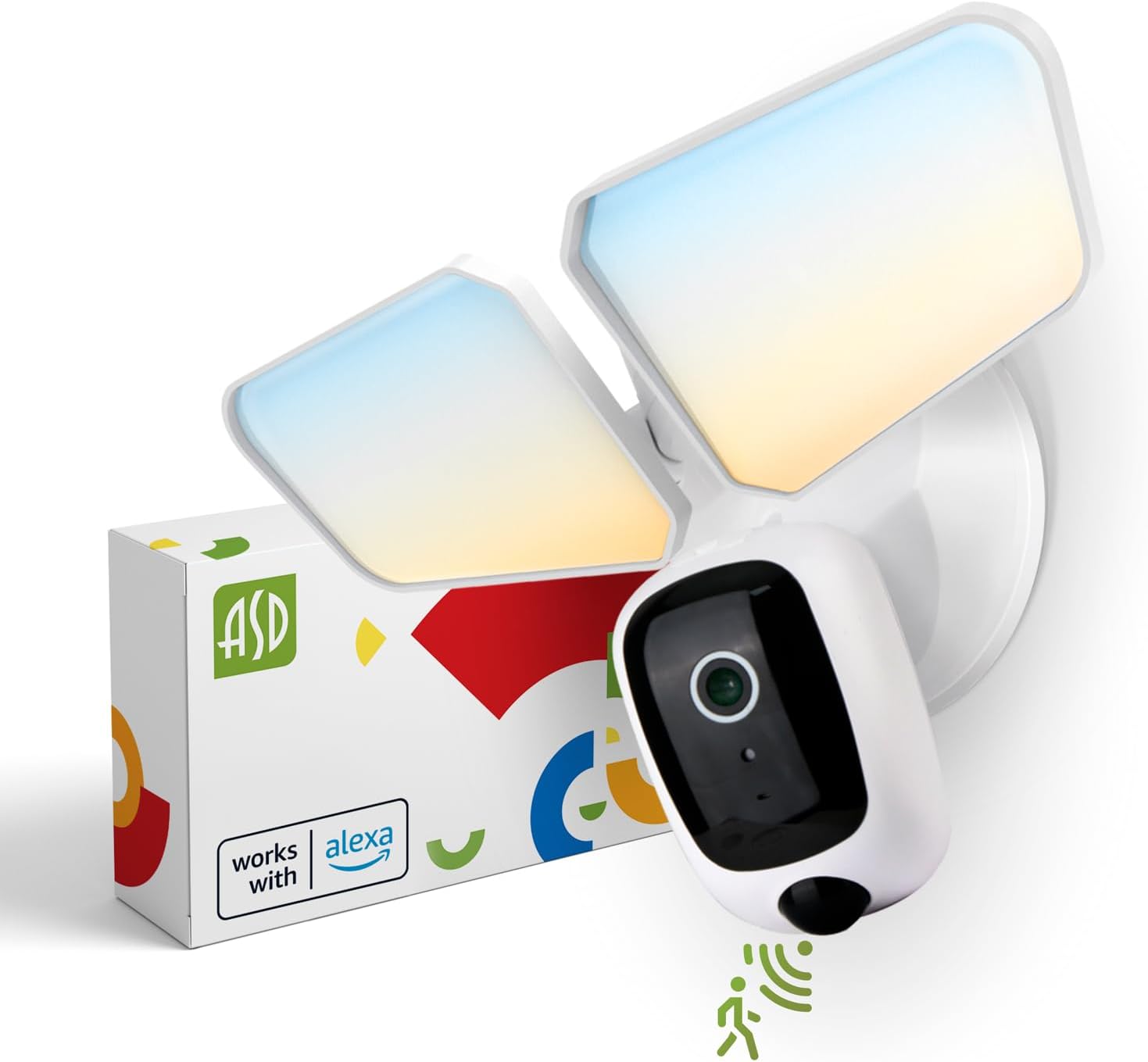
Image 1: ASD Security Flood Light Camera Outdoor and its packaging.
4. Produkta īpašības
- Regulējamas gaismas galviņas: Side-to-side (150°) and up-and-down (180°) rotatable light heads for directional illumination.
- Integrated Smart Camera: Monitor, record, and engage in two-way audio communication.
- 180° Motion Sensor: Automatically activates light and camera recording upon motion detection.
- Fotoelements no krēslas līdz rītausmai: Automatically turns the light on at dusk and off at dawn.
- Krāsa, ko var izvēlēties: Choose from 5 color temperatures: 2700K (Soft White), 3000K (Warm White), 3500K (Neutral White), 4000K (Cool White), or 5000K (Daylight).
- Viedās mājas integrācija: Savietojams ar Amazon Alexa un Google Assistant balss vadībai.
- Lietotņu vadība: Pārvaldīt iestatījumus, view live feed, and receive motion-activated push notifications via the dedicated app.
- Uzglabāšanas iespējas: Records can be stored on a Micro SD card (not included) or in a Cloud service (subscription may be required).
- Izturīga konstrukcija: Made from Aluminum and Polycarbonate.
- Sertifikāti: UL and DLC Premium certified, ensuring quality and safety.

Image 2: Key features of the ASD Security Flood Light Camera.
5. Tehniskās specifikācijas
| Specifikācija | Detaļas |
|---|---|
| Modeļa numurs | A-SFL-20WH-SC |
| Barošanas avots | Ar vadu |
| Voltage | 120 volts |
| Wattage | 20 vati |
| Gaismas avota veids | LED |
| Krāsu temperatūra (CCT) | 2700K, 3000K, 3500K, 4000K, 5000K (pēc izvēles) |
| Kustības sensora noteikšanas leņķis | 180° |
| Kustības sensora noteikšanas attālums | 16.4–32.9 pēdas (5–10 m) |
| Stara leņķis | 100° |
| Materiāls | Alumīnijs, polikarbonāts |
| Produkta izmēri | 10.24 collu garums × 4.45 collu platums × 7.68 collu augstums |
| Preces svars | 1.2 mārciņas |
| Lietošana iekštelpās/ārā | Ārā |
| Apgabala apgaismojuma klasifikācija | IP54 (Wet Locations Rated) |
| Savienojamības protokols | Wi-Fi |
| Kontrollera tips | Amazon Alexa, Google palīgs, lietotne |
| Dzīves ilgums | 145,000 stundas |

3. attēls: Detalizētas produkta specifikācijas un izmēri.
6. Uzstādīšanas soļi
Pirms sākat: Turn off power at the circuit breaker. Ensure you have the necessary tools (screwdriver, wire strippers, etc.).
- Sagatavojiet stiprinājumu:
Attach the crossbar to the outlet box using two mounting screws. Remove the cover on the top of the camera. Insert a Micro SD card (sold separately) into the slot until it clicks. Place the cover back on. Change the position of the CCT switch on the housing to the desired color temperature (2700K, 3000K, 3500K, 4000K, or 5000K). - Mount and Wire:
Tear off the EVA pad adhesive and stick it on the rear cover (pay attention to the direction of the gap). Thread the fixture wire through the gasket. Connect the wires: Black to Black, White to White, and Green to Green (ground). Secure the connection with wire nuts. - Nostipriniet armatūru:
Drive the bracket screw through the center hole of the fixture base to the crossbar and secure it by tightening.

4. attēls: Vizuāla pamācība instalēšanas procesam.
7. Lietošanas instrukcijas
7.1 Kustības sensora darbība
The built-in 180° motion sensor detects movement within its range (16.4-32.9 ft or 5-10 m). When motion is detected, the floodlight will illuminate, and the camera will begin recording. You can adjust the sensitivity and duration settings via the ASD SMART app.

Image 5: The built-in motion sensor detects movement.
7.2 Dusk-to-Dawn Photocell
The integrated photocell automatically senses ambient light levels. It will turn the floodlight on when it gets dark and turn it off when daylight returns, ensuring efficient operation without manual intervention.

Image 6: Built-in dusk-to-dawn photocell for automatic operation.
7.3 Color Temperature Selection (CCT)
Before final installation, you can select your preferred color temperature using the switch located on the fixture's housing. Choose from 2700K (Soft White), 3000K (Warm White), 3500K (Neutral White), 4000K (Cool White), or 5000K (Daylight) to match your aesthetic and lighting needs.

Image 7: Selectable color temperature options.
8. App Control and Smart Integration
8.1 ASD SMART App Setup
To unlock the full potential of your floodlight camera, download and set up the ASD SMART app:
- Lejupielādēt ASD SMART app no App Store (iOS) vai Google Play Store (Android).
- Reģistrējieties vai piesakieties savā kontā.
- Select "Add a device" and choose "Camera and lock".
- Follow the on-screen instructions to connect your device to your Wi-Fi network.
- Scan the QR code on your camera when prompted.
For a detailed guide, please refer to the full manual PDF: ASD Security Flood Light Camera Manual PDF
Lejupielādējiet lietotni:
- iOS App Store: ASD SMART on App Store
- Android Google Play: ASD SMART on Google Play

Image 8: App control interface and smart assistant compatibility.
8.2 Remote Monitoring and Two-Way Audio
Through the ASD SMART app, you can:
- View live video feed from your camera anytime, anywhere.
- Engage in two-way audio communication with visitors or deter intruders.
- Receive instant motion-activated push notifications on your smartphone.
8.3 Recording Storage
Video recordings can be stored in two ways:
- Micro SD karte: Insert a Micro SD card (up to 128GB, not included) into the designated slot on the camera for local storage.
- Mākoņpakalpojums: Opt for a cloud storage subscription (available through the app) for secure, remote access to your recordings.

Image 9: Remote monitoring and recording storage options.
8.4 Viedā asistenta integrācija
Connect your ASD Security Flood Light Camera to Amazon Alexa or Google Assistant for convenient voice control. Follow the instructions within the ASD SMART app to link your accounts and enable features like turning the light on/off or viewkameras plūsmas attēlošana saderīgos viediekrānos.
9. Apkope
- Tīrīšana: Ensure power is off before cleaning. Wipe the fixture with a soft, damp audums. Neizmantojiet abrazīvus tīrīšanas līdzekļus vai šķīdinātājus.
- Lēcu kopšana: Lai saglabātu skaidru attēla kvalitāti, uzmanīgi notīriet kameras objektīvu ar mikrošķiedras drānu.
- Regulāras pārbaudes: Periodically check for any loose connections or damage to the wiring and housing.
10. Traucējummeklēšana
| Problēma | Iespējamais cēlonis | Risinājums |
|---|---|---|
| Gaisma neieslēdzas. | No power, faulty wiring, photocell issue, CCT switch not set. | Check circuit breaker. Verify wiring connections. Ensure photocell is not obstructed. Confirm CCT switch is set. |
| Kustības sensors nekonstatē. | Incorrect sensitivity settings, obstruction, improper installation height. | Adjust motion sensor sensitivity in the app. Clear any obstructions. Ensure installation height is appropriate (approx. 9.8 ft / 3 m). |
| Kamera neizveido savienojumu ar Wi-Fi. | Nepareiza Wi-Fi parole, vājš signāls, problēmas ar maršrutētāju. | Double-check Wi-Fi password. Move router closer or use a Wi-Fi extender. Restart router. Ensure 2.4GHz Wi-Fi network is used. |
| Slikta video kvalitāte. | Netīrs objektīvs, vājš Wi-Fi signāls, vājš apgaismojums. | Clean camera lens. Improve Wi-Fi signal strength. Ensure adequate lighting. |
| Divvirzienu audio nedarbojas. | Microphone/speaker issues, app permissions. | Check app permissions for microphone. Ensure volume is up on your device. |
11. Informācija par garantiju
ASD nodrošina 5 gads ierobežota garantija for this Security Flood Light Camera. This warranty covers defects in materials and workmanship under normal use. Please retain your proof of purchase for warranty claims. For full warranty terms and conditions, please refer to the official ASD webvietni vai sazinieties ar klientu atbalsta dienestu.
12. Klientu atbalsts
For additional assistance, technical support, or warranty inquiries, please visit the ASD Lighting Corporation website or refer to the comprehensive manual available online.
- ASD Lighting Corporation Store: Visit ASD Store on Amazon
- Full Product Manual (PDF): Lejupielādēt PDF rokasgrāmatu


