1. Ievads
This manual provides detailed instructions for the installation, operation, and maintenance of your Alarm.com ADC-VC728PF Pro Series 4MP Bullet PoE Camera. This camera is designed for both indoor and outdoor surveillance, offering advanced features such as a motorized varifocal lens, 4MP video resolution, and intelligent analytics for enhanced security monitoring.
Pirms ierīces uzstādīšanas vai lietošanas rūpīgi izlasiet šo rokasgrāmatu, lai nodrošinātu pareizu darbību un drošību.
2. Iepakojuma saturs
Pārliecinieties, vai iepakojumā ir visas preces:
- Alarm.com ADC-VC728PF Camera
- Montāžas aparatūra
- Weather Resistant RJ45 Cap
- Uzstādīšanas rokasgrāmata
- Torx uzgriežņu atslēga
3. Produkts beidziesview
The Alarm.com ADC-VC728PF is a robust Power over Ethernet (PoE) bullet camera featuring a 4MP sensor and a motorized varifocal lens. This design allows for flexible installation and remote adjustment of the camera's field of view without compromising image quality. It supports 24/7 recording to an optional onboard microSD card or a Commercial-Grade Stream Video Recorder (CSVR126), and integrates advanced analytics for object detection and business activity tracking.
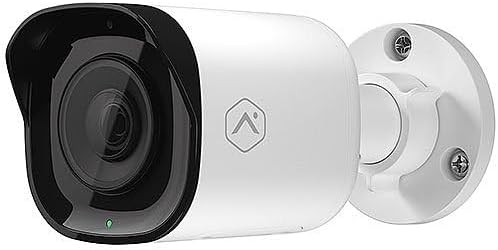
Priekšpuse view of the Alarm.com ADC-VC728PF Pro Series 4MP Bullet PoE Camera, showing the lens, LED indicator, and the adjustable mounting base.
Galvenās funkcijas:
- 4MP WDR and HDR Video: Delivers high-resolution video with Wide Dynamic Range and High Dynamic Range capabilities (4MP recording supported on Commercial SVR).
- Motorized Varifocal Lens: Allows remote adjustment of the camera's field of view (3.2-9.8 mm).
- Barošana, izmantojot Ethernet (PoE): Vienkāršo uzstādīšanu, nodrošinot barošanu un datus, izmantojot vienu Ethernet kabeli.
- SD Card Local Storage: Supports optional onboard microSD card for 24/7 continuous recording.
- IR nakts vīzija: Provides clear video surveillance in low-light or no-light conditions.
- Perimeter Guard: Supports LED and Audio Alert features (requires firmware version 0.6.3.601+).
- Business Activity Analytics: Enables intelligent object detection and tracking for commercial applications.
- Lietošana iekštelpās/ārā: Designed for versatile deployment in various environments.
4. Iestatīšana un instalēšana
Follow these steps for proper installation of your camera.
4.1 Kameras uzstādīšana
- Izvēlieties atrašanās vietu: Choose a suitable indoor or outdoor location for wall mounting. Ensure the area provides a clear field of view and is within reach of your network infrastructure.
- Sagatavojiet virsmu: Use the included mounting hardware to secure the camera base to the chosen surface. Drill pilot holes if necessary.
- Pievienojiet kameru: Securely attach the camera to the mounting base. The adjustable ball joint allows for flexible positioning.
4.2 Wiring and Connectivity
- Pievienojiet Ethernet kabeli: Connect a standard Ethernet cable from your PoE-enabled network switch or injector to the camera's RJ45 port.
- Apply Weather Resistant Cap: For outdoor installations, use the included weather-resistant RJ45 cap to protect the Ethernet connection from environmental elements.
- Ieslēgšana: Once connected to a PoE source, the camera will power on automatically. The status LED on the camera will indicate its operational status.
- Tīkla konfigurācija: Access the Alarm.com platform or your network management interface to discover and configure the camera. Refer to the Alarm.com documentation for specific network setup procedures.
5. Darbība
After successful installation and network configuration, you can begin operating your ADC-VC728PF camera.
5.1 Varifocal Lens Adjustment
- The motorized varifocal lens can be adjusted remotely through the Alarm.com app or web saskarne.
- Navigate to the camera settings to widen or narrow the field of view to optimize surveillance coverage.
5.2 SD Card Recording
- If an optional microSD card is installed, the camera supports 24/7 continuous recording.
- Piekļuve ierakstītajam footage via the Alarm.com platform. Ensure the microSD card is properly formatted as per Alarm.com guidelines.
5.3. Intelligent Analytics
- Configure object detection and business activity tracking settings within the Alarm.com platform.
- Utilize the Perimeter Guard feature for LED and audio alerts, if supported by your camera's firmware version.
6. Apkope
Regulāra apkope nodrošina jūsu kameras optimālu veiktspēju un ilgmūžību.
- Tīrīšana: Periodiski tīriet kameras objektīvu un korpusu ar mīkstu,amp audums. Izvairieties no abrazīviem tīrīšanas līdzekļiem.
- Programmaparatūras atjauninājumi: Ensure your camera's firmware is up to date. Firmware updates are typically managed through the Alarm.com platform and provide performance enhancements and new features.
- Kabeļa pārbaude: Regularly inspect all cables and connections for wear or damage, especially in outdoor environments.
7. Traucējummeklēšana
Biežāk sastopamās problēmas un to risinājumus skatiet tālāk esošajā tabulā.
| Problēma | Iespējamais cēlonis | Risinājums |
|---|---|---|
| Nav strāvas / Kamera neieslēdzas | No PoE connection; Faulty Ethernet cable; PoE switch issue. | Verify Ethernet cable connection; Ensure PoE source is active; Try a different cable or PoE port. |
| Nav video plūsmas | Network connectivity issue; Incorrect camera configuration; Firewall blocking. | Check network connection; Verify camera settings in Alarm.com; Ensure network allows camera traffic. |
| Slikta attēla kvalitāte | Dirty lens; Incorrect focus (varifocal); Low light conditions; Network bandwidth. | Clean the lens; Adjust varifocal lens remotely; Ensure adequate lighting or check IR functionality; Verify network bandwidth. |
| SD Card Recording Not Working | SD card not installed; SD card full or corrupted; Incorrect recording settings. | Install a compatible microSD card; Format or replace SD card; Check recording settings in Alarm.com. |
8. Specifikācijas
Detailed technical specifications for the Alarm.com ADC-VC728PF camera.
| Funkcija | Specifikācija |
|---|---|
| Modeļa nosaukums | Alarm.com VC728PF |
| Efektīva nekustīga izšķirtspēja | 4 MP |
| Video uzņemšanas izšķirtspēja | 1080p, 1920p |
| Objektīva tips | Motorized Varifocal (3.2-9.8mm) |
| Savienojamības tehnoloģija | Vadu (Ethernet) |
| Barošanas avots | PoE (barošana, izmantojot Ethernet) |
| Lietošana iekštelpās/ārā | Iekštelpās, Ārā |
| Montāžas veids | Sienas stiprinājums |
| Formas faktors | Lode |
| Izmēri (G x P x A) | 6.8 x 3 x 3 collas |
| Preces svars | 1.86 mārciņas |
| UPC | 850010773322 |
| Īpašas funkcijas | PoE, 4MP, WDR, HDR, IR Night Vision, Business Activity Analytics, Perimeter Guard |
9. Garantija un atbalsts
For warranty information, technical support, or service inquiries, please contact Alarm.com directly or refer to their official webvietne. Saglabājiet pirkuma čeku garantijas apstiprināšanai.
- Tiešsaistes atbalsts: Visit the official Alarm.com support portal for FAQs, troubleshooting guides, and software downloads.
- Sazinieties ar klientu apkalpošanas dienestu: Refer to your Alarm.com service provider for direct customer support.