1. Ievads
This user manual provides comprehensive instructions for the setup, operation, and maintenance of your SingularXYZ E1 Lite GNSS RTK Surveying Equipment. Designed for high-precision satellite positioning, this system offers centimeter-level accuracy for various surveying applications. Please read this manual thoroughly before using the equipment to ensure optimal performance and safety.
2. Kas ir iekļauts
Upon opening the transport case, verify that all components are present:
- E1 Lite GNSS Receiver (x2)
- Transport Case (x2)
- USB-Type C Cable (x2)
- Super Charger (x2)
- SingularPad Software (x1)
- SC200 Data Collector (x1)
- USB kabelis (x1)
- Super Charger (x1)
- Kronšteins (x1)
- Īsā darba sākšanas rokasgrāmata (x1)
- Quick Start Card (x1)
- Whip Antenna (x2)
- Tape Measure (x1)
- 20 cm extension rod plugged on tribrach (x1)

Figure 2.1: E1 Lite GNSS RTK Surveying Equipment components.

2.2. attēls: Produkta iepakojums un saturs.
Īpaša piezīme: Poles, tripods, and tribrachs are not included with this product and must be acquired separately if needed for your surveying tasks.
3. Iestatīšana un sākotnējais savienojums
3.1 Ierīču uzlāde
The E1 Lite RTK handheld GPS provides over 20 hours of continuous operation on a single charge. Use the provided Type-C chargers to fully charge both the E1 Lite GNSS Receivers and the SC200 Data Collector before initial use. Fast charging is supported.
3.2. Ierīce ir beigusiesview un saskarnes
Familiarize yourself with the device's front panel indicators and various connection interfaces:

Figure 3.1: Front Panel and Interfaces of the E1 Lite GNSS Receiver.
- Priekšējais panelis: Satellite Tracking Indicator, Static & Network Indicator, Power Indicator, Function Button.
- Saskarnes: NFC (Touch connection), Bluetooth, USB Type-C (for charging and data download), WiFi, TNC Connector (for UHF Antenna), RS232 Serial Port.
3.3 Connecting Devices via SingularPad Software
The SingularPad software is essential for controlling and configuring your E1 Lite GNSS RTK equipment. Follow these steps to connect your devices:
Video 3.1: Singular Software Tutorial - Device Connection. This video demonstrates how to connect your GNSS device to the SingularPad software via Bluetooth, including steps for SingularXYZ RTK Receivers, other brand NMEA devices, and SingularXYZ GNSS Tablets.
Vispārīgi savienojuma izveides soļi:
- Turn on your GNSS device.
- On the SC200 Data Collector, open the SingularPad software.
- Dodieties uz Device >> Communication lai savienotu ierīci.
- For SingularXYZ RTK Receivers (e.g., Y1 GNSS receiver): Select SingularXYZ >> RTK >> Bluetooth. Meklēt your device's Serial Number (SN) and connect.
- For GNSS NMEA Devices (other brands): Select Other >> RTK(NMEA0183) >> Bluetooth. Search and connect the device.
- For SingularXYZ GNSS Tablets (e.g., T8 Pro GNSS tablet): Select Other >> Internal GPS >> Internal GPS and connect the device.
- After successful connection, you can go to Device >> Device Information uz view current device information.

Figure 3.2: Setting up Rover and Base units in SingularPad.
Setting up Rover and Base (for Base + Rover mode):
- Ensure you have two E1 Lite GNSS receivers. Designate one as the base and the other as the rover.
- Connect both to your PDA device via Bluetooth.
- Place both your E1 Lite base and rover in an open view no debesīm.
- Connect the whip antenna to both E1 Lite base and rover.
- Setting up the Base: Connect E1 Lite base to your PDA, go to Device >> Base. Par Base Startup Mode, you can input known point coordinates or select Viens punkts mode for automatic setup. Set Datalink as Internal Radio, and customize radio channels, frequency, and protocol. Save settings and Start Base.
- Setting up the Rover: Disconnect E1 Lite base and connect to the rover in the software. Go to Device >> Rover, komplekts Datu saite as Internal Radio. Match and set the same protocol and frequency as the base setting. Click Kolekcija to save settings and click Pieteikties.
4. Lietošanas instrukcijas
4.1 Darba režīmi
The E1 Lite GNSS RTK system supports two primary working modes:
- Base + Rover Mode: Provides millimeter-level positioning. Compatible with base stations of other brands. Not subject to network and regional restrictions.
- Rover + CORS Mode: Provides centimeter-level positioning. Requires a network signal. CORS account is not included and must be purchased from your local CORS provider.

Figure 4.1: E1 Lite Working Modes.
4.2 Working with CORS/RTK Correction Service
To utilize the CORS/RTK correction service, ensure you have purchased a CORS/RTK Correction Service account in your local area. Your PDA device (phone/tablet/data collector) must have network access and support Bluetooth connection. Place your E1 Lite GNSS receiver in an open view no debesīm.
- Open SingularPad software.
- Noklikšķiniet "Communication" and connect to your E1 Lite receiver's SN via Bluetooth.
- Noklikšķiniet Saņem to obtain Mount-Point list and select appropriate one. Click Sākt un Pieteikties.
- Noklikšķiniet "Rover". Iestatiet Datu saite as Phone Internet. Then go to Savienojuma režīms and fill in your CORS/RTK Correction Service account details.

Figure 4.2: Connecting to CORS/RTK Correction Service.
4.3 Viewing RTK Positioning Status
After completing your E1 Lite RTK setup, check the current RTK solution status in the upper left corner of the SingularPad software:
- FIXED: E1 Lite is receiving corrections stably and obtaining a Fixed RTK solution with centimeter-level accuracy. Typically, E1 Lite achieves a Fixed RTK solution in a few seconds under good environments.
- PLŪDĪT: E1 Lite receives corrections from the base/CORS, but due to obstructions or magnetic field interference, the signal reception is not very stable and the accuracy is sub-meter level. In tougher conditions, it may take a bit longer to achieve FIXED status.
- AUTONOMS: Single-point satellite positioning without receiving RTK correction data. The accuracy is around meter-level.

Figure 4.3: RTK Positioning Status Indicators.
Padoms: Before surveying, make sure E1 Lite has a clear sky, free from obstacles like buildings, trees, cars, and more.
4.4. Papildfunkcijas
- 60° Tilt Surveying: The E1 Lite GNSS Surveying System with IMU initializes in 5 seconds and supports tilt measurements up to 60°, compatible with regular 5/8" thread poles. This allows for surveying in challenging locations without needing perfect vertical alignment.
- 5 Kilometers UHF Range: The radio range between the rover and the base can reach 5 kilometers (3.1 miles). The E1 Lite is compatible with base stations of other brands in both Radio and CORS mode and supports RTCM v3/CMR correction data transmission.
- Robust Signal Tracking: Supports Full-Constellation Tracking (GPS/GLONASS/Galileo/BDS/QZSS/IRNSS/SBAS etc.), allowing for fixed RTK solutions in seconds even in challenging environments like multipath, trees, and city canyons.
- Easy Data Download via Web UI: Access E1's WiFi to conduct static data download, firmware upgrade, and configuration via its web lapā.

Figure 4.4: Advanced IMU Tilt Measurement in action.

Figure 4.5: Superior Performance in Challenging Environments.

Figure 4.6: Easy Data Download via Web Lietotāja interfeiss
5. Apkope
The E1 Lite GNSS RTK equipment is designed for durability and reliability in harsh environments. It features an IP68 vērtējums, making it waterproof, dustproof, and shock-resistant.
- Regulāri tīriet ierīci ar mīkstu, damp audums. Izvairieties no abrazīviem tīrīšanas līdzekļiem.
- Ensure all ports (Type-C, TNC) are free from debris and properly sealed when not in use.
- Store the equipment in its transport case when not in use to protect it from physical damage and environmental factors.
- Periodically check cables and connectors for wear and tear. Replace if damaged.

Figure 5.1: E1 Lite's Rugged Design and Battery Life.
6. Traucējummeklēšana
If you encounter issues with your E1 Lite GNSS RTK Surveying Equipment, consider the following common points:
- Savienojuma problēmas: Ensure Bluetooth is enabled on both the data collector and the receiver. Verify that the correct device type and manufacturer are selected in the SingularPad software. Try restarting both devices.
- Poor Accuracy/No Fixed Solution:
- Ensure the receiver has a clear view of the sky, free from obstructions like buildings, dense trees, or large metal objects.
- Check the status indicator on the device and in the SingularPad software (refer to Section 4.3).
- Verify that the base station (if in Base+Rover mode) or CORS service (if in Rover+CORS mode) is active and providing corrections.
- Confirm that the radio frequency and protocol settings match between the base and rover units.
- Akumulatora darbības laiks: Ensure devices are fully charged before use. Check the battery indicator in the SingularPad software.
- Programmatūras problēmas: Ensure your SingularPad software is up to date. Refer to the software's help section or online tutorials for specific software-related problems.
For persistent issues or problems not covered here, please contact SingularXYZ customer support for assistance. Refer to the "Support" section for contact details.
7. Specifikācijas
| Funkcija | Specifikācija |
|---|---|
| Preces svars | 1.91 mārciņas |
| Produkta izmēri | 2.64 x 5.26 x 5.26 collas |
| Preces modeļa numurs | SingularXYZ-E1 Lite-1+1 |
| Baterijas | Nepieciešamas 3 litija jonu baterijas (iekļautas komplektā) |
| Akumulatora darbības laiks | 20 stundas |
| Display Size (SC200 Data Collector) | 5.5 inches (SC200) / 1 inch (E1 Lite receiver display) |
| Tilt Survey Accuracy | ±2.5cm at 60° tilt |
| Kanāli | 1408 kanāli |
| UHF Radio Range | Up to 5 kilometers (3.1 miles) |
| Constellation Tracking | GPS/GLONASS/Galileo/BDS/QZSS/IRNSS/SBAS etc. |
| Savienojamība | NFC, Bluetooth, USB Type-C, WiFi, TNC Connector, RS232 Serial Port |
| Iekļūšanas aizsardzības (IP) vērtējums | IP68 (Waterproof, Dustproof, Shock-resistant) |
| Izcelsmes valsts | Ķīna |
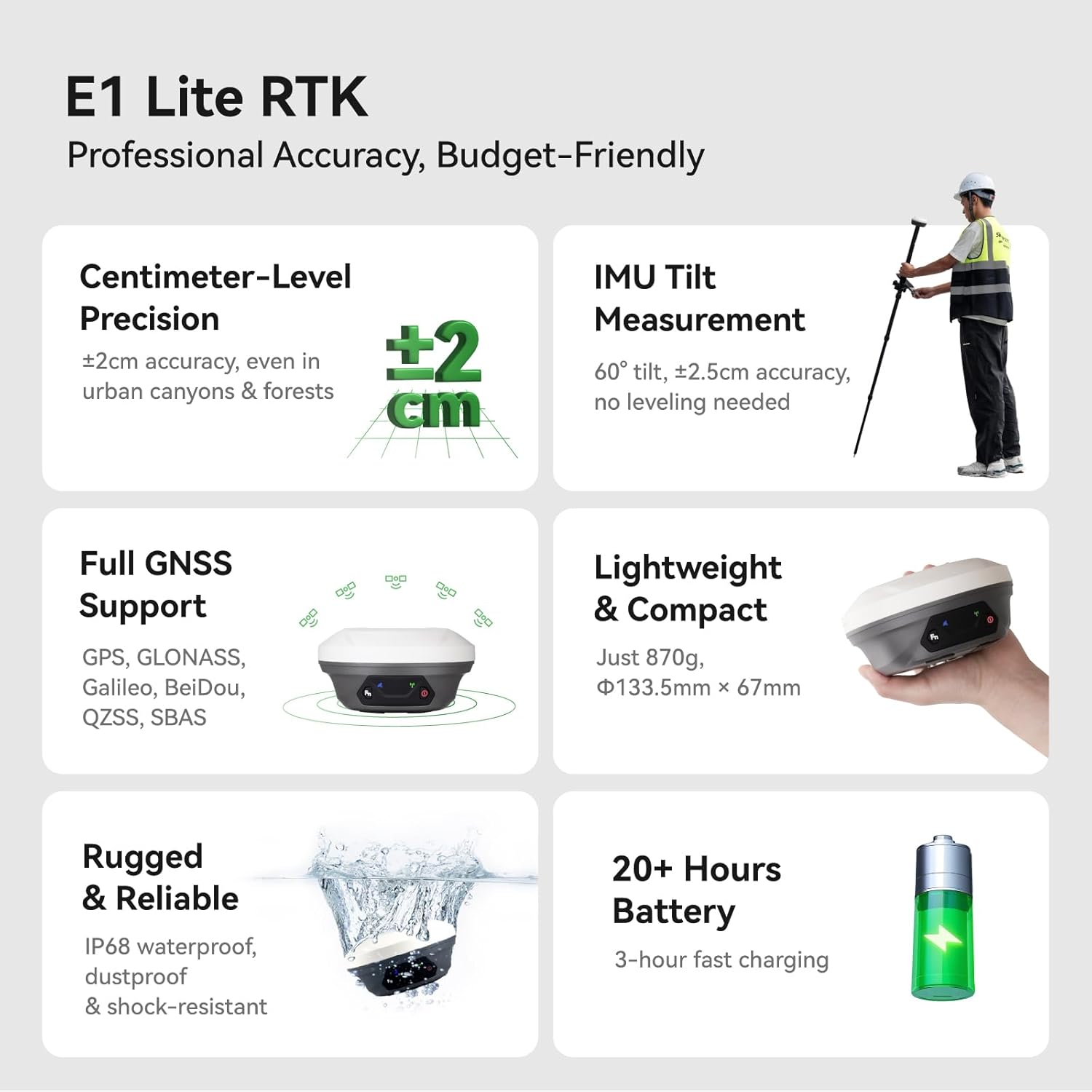
Figure 7.1: E1 Lite RTK Key Specifications.

Figure 7.2: Lightweight and Portable Design.
8. Garantija
The SingularXYZ E1 Lite GNSS RTK Surveying Equipment comes with a viena gada garantija from the date of purchase. This warranty covers manufacturing defects and ensures the product meets its specified performance standards. Please retain your proof of purchase for warranty claims.
9. Atbalsts un resursi
SingularXYZ is committed to providing excellent customer support. For any inquiries, technical assistance, or service requests, please utilize the following resources:
- 1-On-1 Support Service: Direct technical support is available to assist you with any operational or technical challenges.
- Lietotāja rokasgrāmata (PDF): A comprehensive PDF version of the user manual is available for download. Lejupielādēt lietotāja rokasgrāmatu PDF formātā
- Video pamācības: Access a library of video tutorials to help you get started and master various functions of your equipment.
- Programmatūras jauninājumi: Enjoy permanent free software upgrades and update services for the SingularPad and Post-processing Software.
- FCC Radio License Note: U.S. users must apply for an FCC radio license for commercial use (e.g., surveying, construction) with the UHF function (450–470 MHz). The device is FCC certified, and supporting information can be provided if needed.
For direct contact, please visit the official SingularXYZ webvietnē vai skatiet kontaktinformāciju, kas sniegta kopā ar produkta dokumentāciju.


