1. Ievads
This manual provides essential instructions for the safe and efficient use of your Meizu Note 21 Pro smartphone. Please read this manual thoroughly before operating the device and retain it for future reference.
2. Kas ir kastē
- Meizu Note 21 Pro Smartphone
- Strāvas adapteris
- (Other accessories such as USB cable, SIM ejector tool, and documentation may vary by region.)
3. Ierīces izkārtojums
Familiarize yourself with the physical components of your Meizu Note 21 Pro.
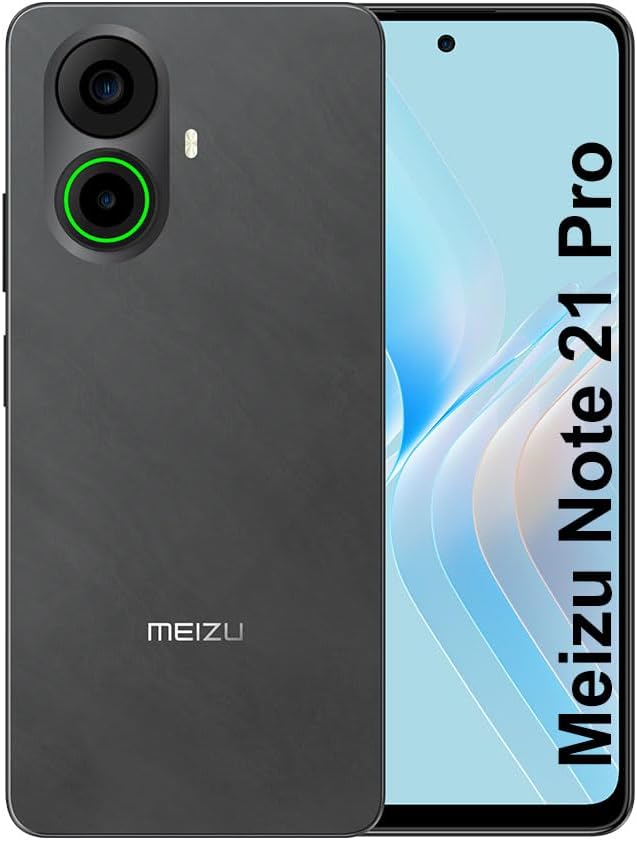
3.1. attēls: Priekšā un aizmugurē view of the Meizu Note 21 Pro. The front displays the screen with a punch-hole camera. The rear shows the dual camera module with a green accent ring on one lens, a flash, and the "MEIZU" logo at the bottom.
- Priekšējais displejs: 6.78-inch FHD+ screen with a 120Hz refresh rate.
- Priekšējā kamera: Atrodas displeja augšdaļas centrā.
- Aizmugurējās kameras: Dual camera system, including a 64MP main camera.
- Sānu pirkstu nospiedumu sensors: Integrated for secure access.
- USB ports: Uzlādei un datu pārsūtīšanai.
- 3.5 mm audio ligzda: Austiņām.
- SIM/MicroSD kartes paliktnis: Supports Dual Nano SIM and MicroSD cards.
4. Iestatīšana
4.1. SIM un MicroSD karšu ievietošana
- Atrodiet SIM kartes paliktni ierīces sānos.
- Ievietojiet SIM kartes izņemšanas rīku mazajā caurumā blakus paliktnim un uzmanīgi piespiediet, līdz paliktnis iznirst.
- Place your Nano SIM card(s) and/or MicroSD card into the designated slots on the tray. Ensure the gold contacts face downwards.
- Uzmanīgi ievietojiet paplāti atpakaļ ierīcē, līdz tā noklikšķ.
4.2. Sākotnējā ieslēgšana un iestatīšana
- Press and hold the Power button until the Meizu logo appears.
- Izpildiet ekrānā redzamos norādījumus, lai izvēlētos valodu, izveidotu savienojumu ar Wi-Fi tīklu un iestatītu savu Google kontu.
- During setup, you will be guided to configure security features such as a PIN, pattern, or password.
4.3. Fingerprint Recognition Setup
- Dodieties uz Iestatījumi > Drošība un privātums > Atbloķēšana ar pirkstu nospiedumu.
- Follow the on-screen instructions to register your fingerprint by repeatedly touching the side-mounted sensor.
- Lai nodrošinātu optimālu veiktspēju, reģistrācijas laikā pārliecinieties, vai jūsu pirksts nosedz visu sensora laukumu.
5. Ierīces lietošana
5.1. Displejs un navigācija
- The 6.78-inch FHD+ display operates at a 120Hz refresh rate for smooth visuals.
- Navigate the Android 14 operating system using touch gestures: tap, swipe, pinch-to-zoom.
- Piekļūstiet ātrajiem iestatījumiem, velkot uz leju no ekrāna augšdaļas.
5.2. Kameras funkcijas
- Atveriet lietotni Kamera no sākuma ekrāna vai lietotņu atvilktnes.
- The rear camera system features a 64MP main sensor for high-resolution photos and a 2MP depth-of-field camera for portrait effects.
- The 13MP front-facing camera is suitable for selfies and video calls.
- Tap on the screen to focus, and use the on-screen shutter button to capture images. Explore various modes like Portrait, Night, and Pro within the camera app.
5.3. Veiktspēja un uzglabāšana
- The MediaTek G99 Octa Core processor ensures efficient performance for applications and multitasking.
- The device comes with 256GB of internal storage and 8GB of RAM.
- Storage can be expanded using a MicroSD card (sold separately).
5.4. Akumulators un uzlāde
- The Meizu Note 21 Pro is equipped with a 5000mAh battery.
- Use the provided Power Adapter for 30W fast charging.
- To charge, connect the USB cable to the phone's USB port and the power adapter, then plug the adapter into a wall outlet.
5.5. Savienojamība
- 4G LTE: Supports various LTE FDD and TDD bands for cellular data. Note: This international version works on T-Mobile in the USA and globally with other carriers.
- Wi-Fi 5: Izveidojiet savienojumu ar bezvadu tīkliem, lai piekļūtu internetam.
- Bluetooth: Savienojiet pārī ar bezvadu piederumiem, piemēram, austiņām un skaļruņiem.
- NFC: Bezkontakta maksājumiem un ātrai savienošanai pārī ar saderīgām ierīcēm.
- GPS: Atrašanās vietas pakalpojumiem un navigācijai.
6. Apkope
- Tīrīšana: Ierīces ekrāna un korpusa tīrīšanai izmantojiet mīkstu, nepūkojošu drānu. Izvairieties no spēcīgām ķīmiskām vielām vai abrazīviem materiāliem.
- Akumulatora kopšana: Avoid extreme temperatures. Do not fully discharge the battery frequently. For optimal battery longevity, keep the charge between 20% and 80%.
- Programmatūras atjauninājumi: Regulāri pārbaudiet un instalējiet sistēmas atjauninājumus, lai nodrošinātu optimālu veiktspēju un drošību. Dodieties uz Iestatījumi > Sistēma > Sistēmas atjauninājums.
7. Traucējummeklēšana
| Problēma | Iespējamais risinājums |
|---|---|
| Ierīce neieslēdzas | Ensure the battery is charged. Connect the device to the power adapter and try again. If unresponsive, press and hold the Power button for 10-15 seconds to force a restart. |
| Slikts tīkla signāls | Check if the SIM card is correctly inserted. Move to an area with better network coverage. Restart the device. Verify with your carrier that your plan is active. |
| Lietotnes darbojas lēni vai avarē | Aizveriet fona lietojumprogrammas. Notīriet lietotņu kešatmiņu (Iestatījumi > Lietotnes > atlasīt lietotni > Krātuve un kešatmiņa > Notīrīt kešatmiņu). Restartējiet ierīci. Pārliecinieties, vai ir pietiekami daudz vietas atmiņā. |
| Pirkstu nospiedumu sensors nedarbojas | Ensure your finger and the sensor are clean and dry. Re-register your fingerprint in settings. |
8. Specifikācijas
- Modelis: Meizu Note 21 Pro
- Operētājsistēma: Android 14
- Procesors: MediaTek G99 Octa Core (2.2GHz)
- Displejs: 6.78 inches FHD+ (1080 x 2160 resolution), 120Hz Refresh Rate
- RAM: 8 GB
- Iekšējā atmiņa: 256 GB
- Aizmugurējā kamera: 64MP galvenā kamera + 2MP dziļuma kamera
- Priekšējā kamera: 13 MP
- Akumulators: 5000 mAh, 30 W ātrā uzlāde
- Savienojamība: 4G LTE (FDD:1,2,3,4,5,7,8,12,17,18,19,20,26,28,66; TDD:38,40,41), 3G WCDMA, 2G Quad Band, Wi-Fi 5, Bluetooth, NFC, GPS
- Audio ligzda: 3.5 mm
- Izmēri: 6.64 x 2.96 x 0.33 collas
- Svars: 1.1 mārciņas
9. Garantija un atbalsts
For warranty information and technical support, please refer to the warranty card included with your product or visit the official Meizu webvietne. Saglabājiet pirkuma apliecinājumu garantijas prasību iesniegšanai.
For further assistance, you may contact Meizu customer service through their official channels.