1. Ievads
Thank you for choosing the VEVOR SF-400D Analytical Lab Balance. This high-precision digital scale is designed for accurate and stable weighing results in various professional and personal settings. With a maximum capacity of 600g and a precision of 0.01g, it offers quick 3-second response times and multiple unit conversions. This manual provides essential information for the safe and efficient operation of your balance.

Image 1.1: VEVOR 0.01g High Precision Lab Scale, demonstrating its accuracy and quick response.
2. Drošības instrukcijas
- Always operate the balance on a stable, level, and vibration-free surface.
- Avoid placing the balance near strong electromagnetic fields, heat sources, or direct sunlight.
- Nepārslogojiet svarus, pārsniedzot to maksimālo svērtspēju 600 g.
- Keep the balance clean and dry. Avoid exposure to liquids or corrosive substances.
- Use only the provided power adapter or recommended batteries.
- Nemēģiniet paši izjaukt vai remontēt svarus. Lai saņemtu apkopi, sazinieties ar kvalificētu personālu.
3. Iepakojuma saturs
Pārliecinieties, vai iepakojumā ir visi priekšmeti:
- 1 x VEVOR Analytical Lab Balance (SF-400D)
- 1 x Lietotāja rokasgrāmata
- 1x strāvas adapteris
- 1 x Metal Tray (Weighing Pan)
- 4 x Plastic Feet Pads
- 1 x USB to DC Cable (Note: May be included only for specific regions like AU)
4. Produkts beidziesview
Familiarize yourself with the main components and controls of your analytical balance.
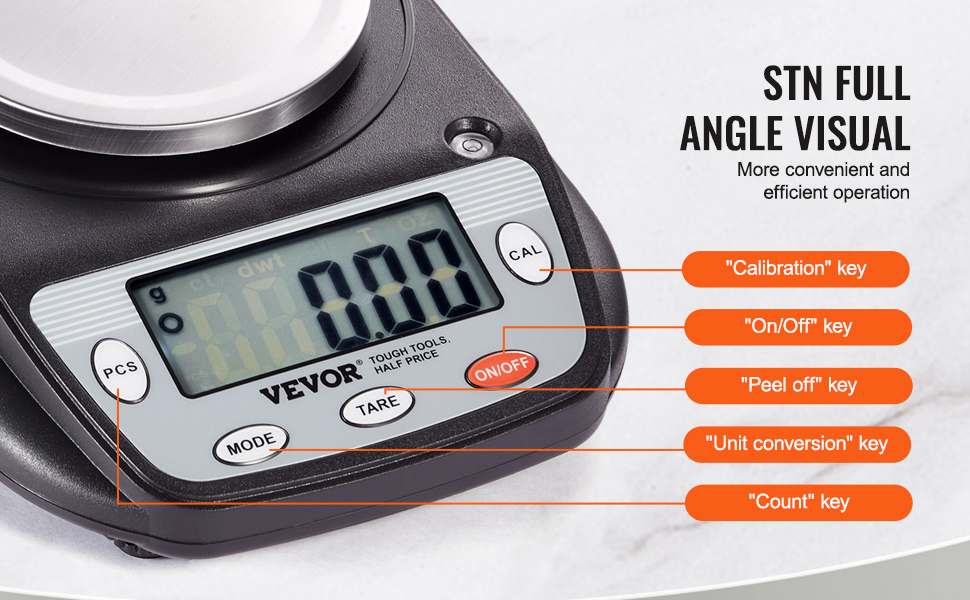
Image 4.1: LCD Display and Unit Conversion Options.
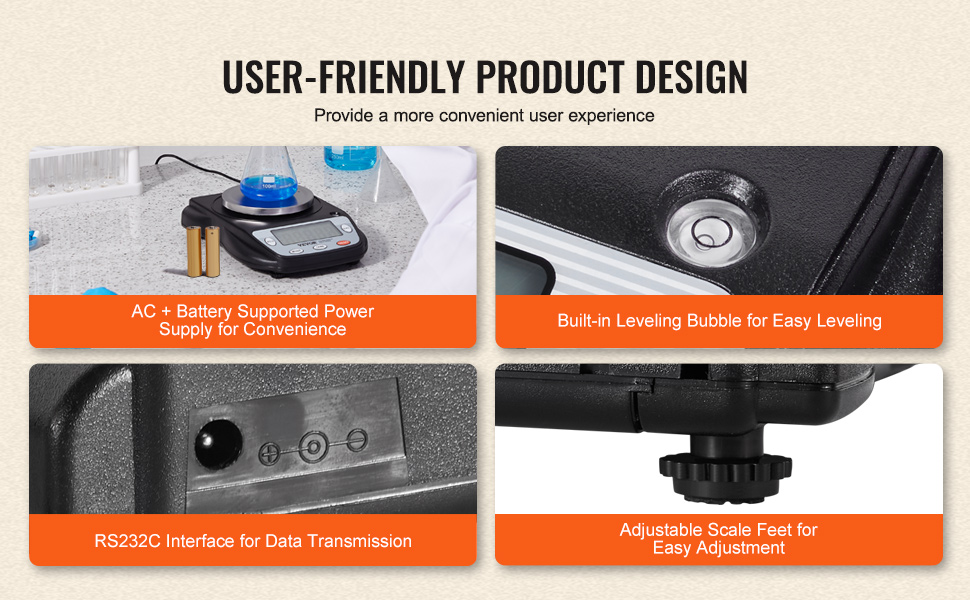
Image 4.2: Dual Power Modes and Key Features.
Vadības panelis:
- IESLĒGTS/IZSLĒGTS: Powers the balance on or off.
- REŽĪMS: Cycles through different weighing units (g, ct, dwt, GN, T, oz).
- TĀRA: Zeros the display, typically used to subtract the weight of a container.
- PCS (Count): Activates the counting function for uniform items.
- KAL (kalibrēšana): Uzsāk kalibrēšanas procesu.
Citas funkcijas:
- LCD displejs: Provides clear, easy-to-read weight data and unit indicators.
- 4.2" Round Weighing Pan: Made of stainless steel, designed to minimize airflow interference.
- Built-in Leveling Bubble: Helps ensure the balance is perfectly level for accurate readings.
- Adjustable Scale Feet: Used in conjunction with the leveling bubble to level the balance.
- RS232C Interface: For data transmission to printers or computers (cable not always included).
5. Iestatīšana
5.1 Izpakošana
Uzmanīgi izņemiet visas sastāvdaļas no iepakojuma. Saglabājiet iepakojumu turpmākai uzglabāšanai vai transportēšanai.
5.2. Izvietošana
Place the balance on a firm, level, and stable surface, away from drafts, vibrations, and direct heat or cold sources. Ensure adequate space around the balance for operation.
5.3 Līdzsvara izlīdzināšana
For accurate measurements, the balance must be perfectly level.
- Locate the built-in leveling bubble, usually found near the display or on the side of the balance.
- Adjust the four adjustable feet at the bottom of the balance until the air bubble is centered within the circle of the leveling bubble indicator.
Image 5.1: Leveling Bubble and Adjustable Feet for precise setup.
5.4 Strāvas pieslēgums
The balance supports dual power modes: AC adapter or batteries.
- Maiņstrāvas jauda: Connect the provided power adapter to the DC 5V input port on the balance and then plug it into a suitable wall outlet.
- Akumulatora jauda: If using batteries (not included), open the battery compartment and insert the required batteries, ensuring correct polarity.
6. Lietošanas instrukcijas
6.1 Ieslēgšana/izslēgšana
Nospiediet pogu IESLĒGTS/IZSLĒGTS button to turn the balance on. Press and hold the IESLĒGTS/IZSLĒGTS pogu uz dažām sekundēm, lai to izslēgtu.
6.2. Vienību konvertēšana
Nospiediet pogu REŽĪMS button repeatedly to cycle through the available weighing units: grams (g), carats (ct), pennyweights (dwt), grains (GN), taels (T), and ounces (oz).
6.3. Taras funkcija
The tare function allows you to subtract the weight of a container, so only the net weight of the contents is displayed.
- Novietojiet tukšu trauku uz svēršanas pannas.
- Pagaidiet, līdz rādījums stabilizējas.
- Nospiediet pogu TĀRA pogu. Displejs tiks atiestatīts uz nulli.
- Add the items to be weighed into the container. The display will show the net weight of the items.

Image 6.1: Step-by-step guide for using the Tare Function.
6.4 Skaitīšanas funkcija (PCS)
This function is useful for counting a large number of uniform items.
- Vieta kāampvienību skaits (piemēram, 10, 20, 50 vai 100 vienības) uz svēršanas pannas.
- Nospiediet un turiet PCS button until a sample size option appears (e.g., "10 PCS").
- Nospiediet pogu REŽĪMS pogu, lai atlasītu sample size that matches the number of items you placed.
- Nospiediet PCS vēlreiz, lai apstiprinātu. Displejā tagad tiks parādīts sekunžu skaits.ample.
- Add more items to the pan, and the balance will display the total count.
6.5 Kalibrēšana (CAL)
Regular calibration ensures the accuracy of your balance. A calibration weight (not included) is required.
- Ensure the balance is on a level surface and nothing is on the weighing pan.
- Nospiediet un turiet CAL button until "CAL" appears on the display, followed by the required calibration weight (e.g., "600.00g").
- Carefully place the specified calibration weight onto the center of the weighing pan.
- The display will show "PASS" or a similar indication when calibration is complete. Remove the weight.
- The balance will return to normal weighing mode.
7. Apkope
7.1. Tīrīšana
To maintain accuracy and prolong the life of your balance:
- Wipe the balance with a soft, damp drānu. Nelietojiet abrazīvus tīrīšanas līdzekļus un neiegremdējiet ierīci ūdenī.
- The stainless steel weighing pan can be removed for separate cleaning. Ensure it is dry before reattaching.
- Keep the display and buttons free from dust and debris.

Image 7.1: High-Quality Materials for durability and easy cleaning.
7.2. Uzglabāšana
When not in use, store the balance in a clean, dry, and stable environment. If storing for an extended period, remove batteries to prevent leakage.
8. Traucējummeklēšana
If you encounter issues with your balance, refer to the following common problems and solutions:
- Nav displeja/barošanas:
- Pārbaudiet, vai strāvas adapteris ir droši pievienots un vai kontaktligzda darbojas.
- If using batteries, ensure they are correctly inserted and not depleted. Replace if necessary.
- Neprecīzi rādījumi:
- Ensure the balance is on a stable, level surface and properly leveled using the bubble indicator.
- Perform a calibration using a known calibration weight.
- Avoid drafts, vibrations, or sudden temperature changes during weighing.
- Ensure nothing is touching the weighing pan or the balance body during measurement.
- "EEEE" or Overload Indication:
- The balance is overloaded. Remove items immediately to prevent damage.
Ja problēma joprojām pastāv pēc šo risinājumu izmēģināšanas, lūdzu, sazinieties ar VEVOR klientu atbalsta dienestu, lai saņemtu palīdzību.
9. Specifikācijas
Detailed technical specifications for the VEVOR SF-400D Analytical Lab Balance:

Image 9.1: VEVOR Lab Balance Specifications.
| Funkcija | Specifikācija |
|---|---|
| Modeļa numurs | SF-400D |
| Rated Voltage | 5V |
| Barošanas avots | AC Adapter + Battery Supported |
| Vienību veidi | 6 (g, ct, dwt, GN, T, oz) |
| Displejs | LCD |
| Error / Precision | ±0.01g |
| Atbildes laiks | 3 sekundes |
| Max Weighing Capacity | 0.6 kg (600 g) |
| Displeja precizitāte | 0.01g |
| Produkta svars | 1.26 mārciņas / 0.57 kg |
| Produkta izmēri (G x P x A) | 8.07 x 6.30 x 2.36 collas/205 x 160 x 60 mm |
| Materiāls | Plastic, Stainless Steel, Metal |
10. Garantija un atbalsts
Lai saņemtu informāciju par garantiju, tehnisko atbalstu vai servisa jautājumus, lūdzu, skatiet produktam pievienoto garantijas karti vai apmeklējiet oficiālo VEVOR vietni. webvietne. Saglabājiet pirkuma čeku kā pirkuma apliecinājumu.