Laipni lūdzam
Thank you for choosing the BYTECH BICONIC True Wireless Earbuds. This manual provides essential information on how to set up, operate, maintain, and troubleshoot your new earbuds. Please read this manual thoroughly before use to ensure optimal performance and longevity of your device.
Svarīgi drošības norādījumi
- Nepakļaujiet austiņas vai uzlādes futrāli ekstremālām temperatūrām, mitrumam vai šķidrumiem.
- Izvairieties no ierīces nomešanas, triecieniem vai izjaukšanas.
- Austiņu vai korpusa tīrīšanai neizmantojiet abrazīvus tīrīšanas līdzekļus vai spēcīgas ķīmiskas vielas.
- Klausieties mērenā skaļumā, lai novērstu dzirdes bojājumus. Ilgstoša skaļas skaņas iedarbība var izraisīt neatgriezenisku dzirdes zudumu.
- Glabāt bērniem un mājdzīvniekiem nepieejamā vietā.
- Dispose of the device responsibly according to local regulations. Do not dispose of with household waste.
Kas ir iekļauts
Lūdzu, pārbaudiet iepakojuma saturu, lai pārliecinātos, ka visi priekšmeti ir klāt:
- BYTECH BICONIC True Wireless Earbuds (Left and Right)
- Uzlādes futrālis
- Uzlādes kabelis
- Lietotāja rokasgrāmata
Produkts beidziesview
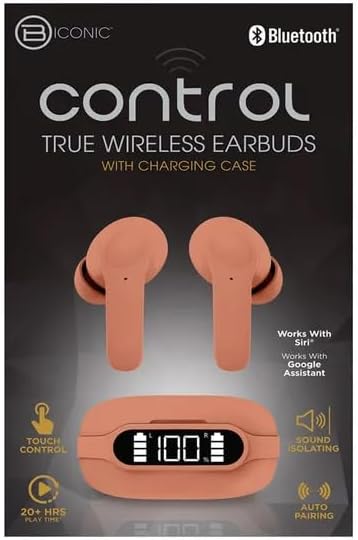
Familiarize yourself with the components of your BYTECH BICONIC True Wireless Earbuds.

Darba sākšana
Austiņu un futrāļa uzlāde
The BYTECH BICONIC earbuds come with a rechargeable battery in both the earbuds and the charging case. Ensure both are fully charged before first use.
- Place the earbuds into the charging case, ensuring they are correctly seated in their respective slots (L for left, R for right).
- Pievienojiet komplektācijā iekļauto uzlādes kabeli korpusa uzlādes portam un otru galu — USB barošanas avotam (piemēram, datora USB portam, sienas adapterim).
- The digital display on the charging case will show the battery level. Allow sufficient time for a full charge.
- Kad tas ir pilnībā uzlādēts, atvienojiet uzlādes kabeli.
Bluetooth savienojums
Lai savienotu austiņas pārī ar Bluetooth ierīci, veiciet tālāk norādītās darbības.
- Pārliecinieties, vai austiņas ir uzlādētas un atrodas uzlādes futrālī.
- Atveriet uzlādes futrāli. Austiņas automātiski pārslēgsies pārī savienošanas režīmā, un uz tām mirgos indikators.
- Savā ierīcē (viedtālrunī, planšetdatorā utt.) atveriet Bluetooth iestatījumus un ieslēdziet Bluetooth.
- Meklēt available devices. You should see "BYTECH BICONIC" or a similar name appear in the list.
- Select "BYTECH BICONIC" to connect. Once connected, a voice prompt will confirm the successful pairing, and the indicator lights on the earbuds will stop flashing.
- Austiņas automātiski izveidos savienojumu ar pēdējo pārī savienoto ierīci, kad tās tiks izņemtas no maciņa, ja ierīcē ir iespējots Bluetooth.
Lietošanas instrukcijas
Pieskarieties vadīklām
The BYTECH BICONIC earbuds feature intuitive touch controls for easy management of your audio and calls.
| Darbība | Funkcija |
|---|---|
| Viens pieskāriens (kreisā/labā austiņa) | Atskaņot/apturēt mūziku, atbildēt/beigt zvanu |
| Veiciet dubultskārienu (labā austiņa) | Nākamais celiņš |
| Dubultskāriens (kreisā austiņa) | Iepriekšējais celiņš |
| Trīskāršais pieskāriens (kreisā/labā austiņa) | Aktivizēt balss palīgu (Siri/Google palīgs) |
| Ilgi nospiest (kreisā/labā austiņa) | Noraidīt zvanu |
Ieslēgšana un izslēgšana
- Ieslēgšana: Austiņas automātiski ieslēgsies, kad tās tiks izņemtas no uzlādes futrāļa.
- Izslēgt: Ievietojiet austiņas atpakaļ uzlādes futrālī un aizveriet vāku. Tās automātiski izslēgsies un sāks uzlādi.
Apkope un kopšana
Proper care will extend the life of your BYTECH BICONIC True Wireless Earbuds.
- Tīrīšana: Use a soft, dry, lint-free cloth to clean the earbuds and charging case. Do not use liquids or aerosol cleaners.
- Uzglabāšana: Kad austiņas netiek lietotas, vienmēr uzglabājiet tās to uzlādes futrālī, lai tās aizsargātu un uzlādētu.
- Izvairieties no ekstremāliem apstākļiem: Do not expose the device to extreme heat, cold, or direct sunlight.
- Ūdens izturība: Šīs austiņas nav ūdensizturīgas. Izvairieties no saskares ar ūdeni vai pārmērīgu mitrumu.
Problēmu novēršana
Ja rodas problēmas ar austiņām, skatiet tālāk norādītos bieži sastopamos risinājumus.
| Problēma | Risinājums |
|---|---|
| Austiņas netiek savienotas pārī | Pārliecinieties, vai austiņas ir uzlādētas. Izslēdziet un ieslēdziet Bluetooth savā ierīcē. Aizmirstiet ierīci Bluetooth iestatījumos un atkārtoti savienojiet pārī. |
| Darbojas tikai viena austiņa | Place both earbuds back into the charging case, close the lid, wait a few seconds, then take them out again. Ensure both are charged. |
| Nav skaņas | Check volume levels on both your device and the earbuds. Ensure earbuds are properly connected. Try playing different audio. |
| Uzlādes futrālis netiek uzlādēts | Pārliecinieties, vai uzlādes kabelis ir droši pievienots gan korpusam, gan strāvas avotam. Izmēģiniet citu USB portu vai strāvas adapteri. |
Tehniskās specifikācijas
Detailed specifications for your BYTECH BICONIC True Wireless Earbuds:
| Funkcija | Detaļas |
|---|---|
| Modeļa numurs | BC-AU-BE-144-TN |
| Savienojamības tehnoloģija | Bezvadu (Bluetooth) |
| Formas faktors | In-Ear (Intraurales) |
| Krāsa | Kafejnīca |
| Īpašas funkcijas | Rechargeable Battery, Touch Control, Sound Isolating, Auto Pairing |
| Iekļautie komponenti | Kabelis |
| Estimated Play Time | 20+ stundas (ar uzlādes futrāli) |
Garantijas informācija un klientu atbalsts
BYTECH products are designed and manufactured to the highest quality standards. For information regarding warranty coverage, please refer to the warranty card included with your purchase or visit the official BYTECH webvietne.
If you require further assistance or have questions not covered in this manual, please contact BYTECH customer support through their official channels. Please have your model number (BC-AU-BE-144-TN) and purchase details ready when contacting support.


