1. Ievads
This manual provides comprehensive instructions for the safe and effective use, maintenance, and troubleshooting of your Dasqua 3230-8115-A Digital Dual-Column Height Gauge. Please read this manual thoroughly before operating the device to ensure optimal performance and longevity.
1.1 Produkts beidziesview
The Dasqua 3230-8115-A is a precision digital height gauge designed for accurate measurement of height, depth, and step dimensions. It features a robust dual-column design for stability and a clear digital display for easy reading.

1.1. attēls. Priekšpuse view of the Dasqua 3230-8115-A Digital Dual-Column Height Gauge, showing the digital display and measuring jaw.

1.2. attēls. Aizmugure view of the height gauge, showing the handwheel for precise vertical adjustment.

1.3. attēls: detalizēti view highlighting key features such as the fine adjustment mechanism, measuring scale, and stable base.
2. Drošības instrukcijas
To ensure safe operation and prevent damage to the instrument or injury to the user, please observe the following safety guidelines:
- Always handle the height gauge with care to avoid dropping or impacting the instrument, which can affect its precision.
- Keep the instrument clean and free from dust, debris, and corrosive liquids.
- Do not attempt to disassemble or modify the height gauge. Repairs should only be performed by qualified personnel.
- Store the height gauge in its protective case when not in use to prevent damage.
- Nepakļaujiet instrumentu ārkārtējai temperatūrai vai mitrumam.
3. Iestatīšana
3.1 Izpakošana un sākotnējā pārbaude
Carefully remove the height gauge from its packaging. Inspect the instrument for any signs of damage that may have occurred during transit. Ensure all components listed in the packing list are present.
3.2 Akumulatora uzstādīšana
The digital display requires a CR2032 lithium coin cell battery. To install or replace the battery:
- Locate the battery compartment cover on the side of the digital display unit.
- Atbīdiet vāku bultiņas norādītajā virzienā.
- Ievietojiet jaunu CR2032 bateriju ar pozitīvo (+) pusi uz augšu.
- Droši aizveriet akumulatora nodalījuma vāku.
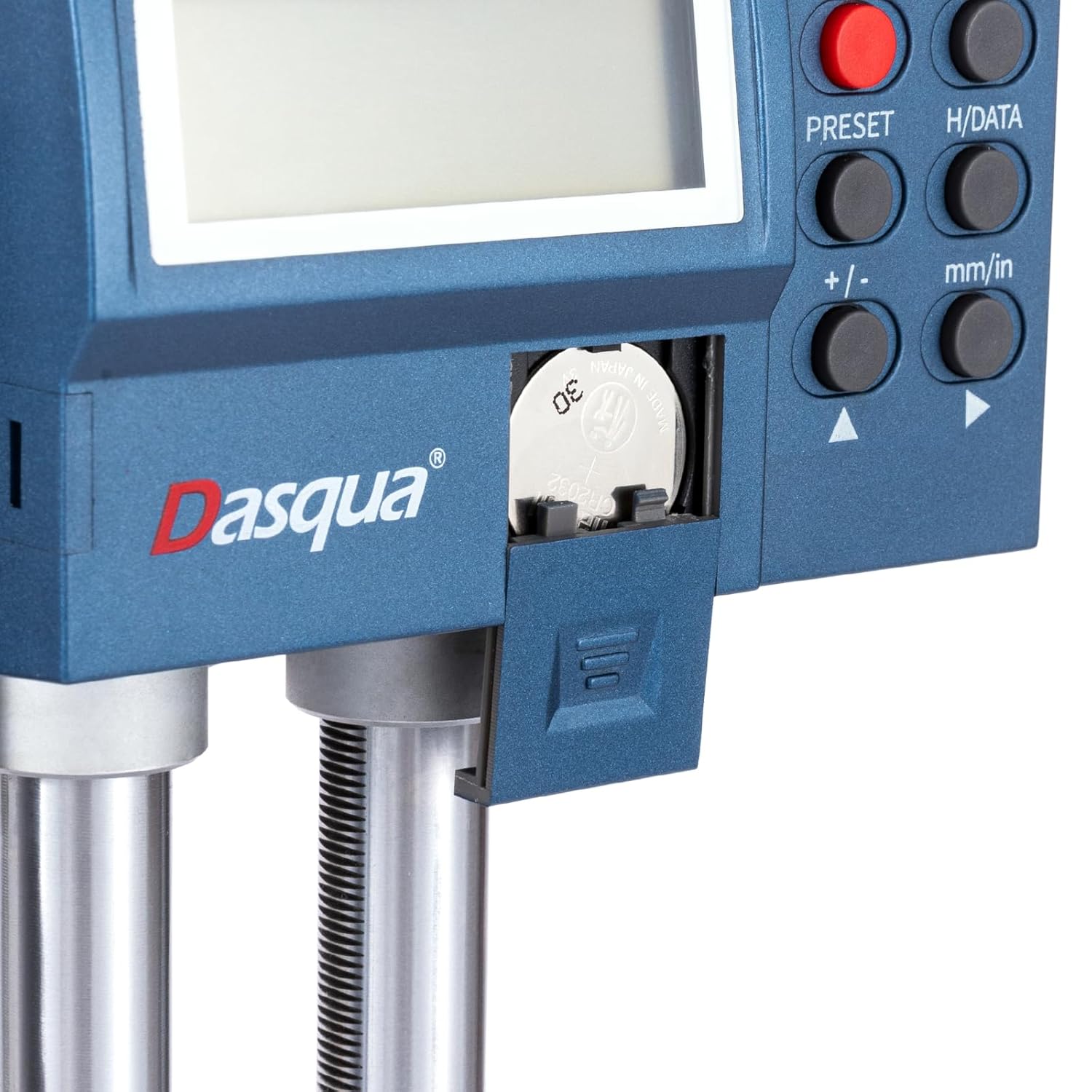
Figure 3.1: Close-up of the battery compartment, showing the location for CR2032 battery insertion.
3.3 Sagatavošanās mērījumiem
Place the height gauge on a stable, flat, and clean surface. Ensure the measuring surface of the workpiece is also clean and free of burrs or debris.
4. Lietošanas instrukcijas
4.1 Vadības panelis beidziesview
Familiarize yourself with the functions of the buttons on the digital display unit:

Figure 4.1: Digital display control panel with numbered buttons and their corresponding functions.
- 1. IESLĒGŠANA/IZSLĒGŠANA: Ieslēdz vai izslēdz ierīci.
- 2. ZERC/ABS: Switches between Absolute (ABS) and Incremental (INC) measurement modes.
- 3. H/DATI: Holds the displayed value.
- 4. IEPRIEKŠIESTATĪTS: Sets a preset value or origin.
- 5. mm/collas: Pārslēdzas starp milimetru (mm) un collu (in) mērvienībām.
- 6. +/- / Direction Arrows: Adjusts preset values or moves the cursor in certain modes.
4.2 Basic Measurement Procedure
- Nospiediet pogu IESLĒGTS/IZSLĒGTS button to power on the height gauge.
- Select the desired unit of measurement (mm or inch) by pressing the mm/in pogu.
- Clean the measuring surface of the height gauge base and the workpiece.
- Lower the measuring jaw until it makes contact with the reference surface (e.g., the surface the workpiece rests on).
- Nospiediet pogu ZERC/ABS button to set the display to zero at this reference point. This establishes your measurement origin.
- Carefully raise the measuring jaw using the handwheel until it makes contact with the feature you wish to measure on the workpiece.
- Nolasiet mērījumu tieši no digitālā displeja.
4.3 Adjusting the Measuring Jaw
The measuring jaw can be adjusted for different measurement tasks. Loosen the locking screw, slide the jaw to the desired position, and then tighten the screw to secure it.

Figure 4.2: Illustration of how to adjust and secure the measuring jaw for various applications.
5. Apkope
5.1. Tīrīšana
Regular cleaning is essential for maintaining the accuracy and lifespan of your height gauge. Use a clean, soft, lint-free cloth to wipe down all surfaces. For stubborn dirt, a small amount of isopropyl alcohol can be used, but avoid contact with the digital display. Never use abrasive cleaners or solvents.
5.2. Uzglabāšana
When not in use, store the height gauge in its original protective case in a dry, temperature-controlled environment. Avoid areas with high humidity, dust, or direct sunlight. Ensure the measuring jaw is not clamped tightly to prevent unnecessary stress on the mechanism.
5.3. Akumulatora nomaiņa
Replace the CR2032 battery when the display becomes dim or shows a low battery indicator. Refer to Section 3.2 for detailed battery installation instructions.
6. Traucējummeklēšana
This section addresses common issues you might encounter with your height gauge. If the problem persists after attempting these solutions, please contact customer support.
| Problēma | Iespējamais cēlonis | Risinājums |
|---|---|---|
| Displejs neieslēdzas. | Izlādējusies vai nepareizi ievietota baterija. | Replace the battery (CR2032) and ensure it is installed with correct polarity. |
| Neprecīzi rādījumi. | Dirty measuring surfaces; instrument not zeroed correctly; environmental factors (temperature fluctuations). | Clean all measuring surfaces. Re-zero the instrument. Ensure stable operating environment. |
| Display flickering or unstable. | Low battery; electromagnetic interference. | Replace battery. Move the instrument away from strong electromagnetic fields. |
| Measuring jaw movement is stiff. | Accumulated dirt or debris on the columns; locking screw too tight. | Clean the columns thoroughly. Loosen the locking screw slightly. |
7. Specifikācijas
Technical specifications for the Dasqua 3230-8115-A Digital Dual-Column Height Gauge:
| Funkcija | Detaļas |
|---|---|
| Modeļa numurs | 3230-8115-A |
| Mērīšanas diapazons | 0–600 mm |
| Ražotājs | Dasqua |
| Iepakojuma izmēri | 89 x 30 x 18.5 cm |
| Preces svars | 10.92 kg |
| Pirmais pieejamais datums | 26. gada 2024. janvāris |
8. Garantija un atbalsts
Dasqua products are manufactured to high quality standards and are typically backed by a manufacturer's warranty. Please refer to the warranty letter included with your product for specific terms and conditions regarding coverage and duration.

Figure 8.1: The height gauge shown alongside its packaging and the included warranty letter.
For technical assistance, spare parts, or warranty claims, please contact your authorized Dasqua dealer or the customer support channel provided at the point of purchase. When contacting support, please have your model number (3230-8115-A) and purchase details ready.


