1. Ievads
The Fenton Pulse65 is a versatile portable party speaker designed for various events and environments. It delivers powerful sound, offers wireless connectivity, and features dynamic lighting. This manual provides essential information for the safe and optimal use of your Pulse65 speaker.
Galvenās funkcijas:
- 60W RMS (140W max) output for clear, powerful sound with deep bass.
- Bluetooth 5.3 for wireless streaming and stereo pairing (TWS).
- Dynamic multicolour light show synchronized with music.
- IPX4 splashproof design for outdoor use.
- Integrated 12-hour rechargeable battery.
- Includes a wireless UHF microphone and remote control.
- USB playback and FM radio functionality.
2. Drošības informācija
Pirms šī produkta lietošanas, lūdzu, izlasiet un izprotiet visus drošības norādījumus. Saglabājiet šo rokasgrāmatu turpmākai uzziņai.
- Ūdens izturība: The Pulse65 is IPX4 splashproof. Do not immerse the speaker in water or expose it to heavy rain. Ensure all port covers are securely closed when used near water.
- Barošanas avots: Use only the specified charging cable and power adapter. Do not attempt to open or modify the battery compartment.
- Ventilācija: Do not block any ventilation openings. Ensure adequate airflow around the speaker.
- Tīrīšana: Pirms tīrīšanas atvienojiet strāvas padevi. Izmantojiet mīkstu, sausu drānu. Nelietojiet šķidrus tīrīšanas līdzekļus vai aerosolus.
- Temperatūra: Avoid extreme temperatures. Do not expose to direct sunlight for extended periods or place near heat sources.
- Bērni: Sargāt no bērniem. Šis produkts nav rotaļlieta.
3. Iepakojuma saturs
Pārliecinieties, vai iepakojumā ir visi priekšmeti:
- Fenton Pulse65 Portable Party Speaker
- Bezvadu UHF mikrofons
- Tālvadības pults
- USB uzlādes kabelis
- Lietotāja rokasgrāmata
4. Iestatīšana
4.1. Sākotnējā uzlāde
Before first use, fully charge the speaker. Connect the provided USB charging cable to the speaker's charging port and a suitable USB power adapter (not included). The charging indicator will show the charging status. A full charge provides approximately 12 hours of playback, depending on usage volume and light effects.
4.2. Ieslēgšana/izslēgšana
Nospiediet un turiet Jauda pogu vadības panelī, lai ieslēgtu vai izslēgtu skaļruni.
4.3. Bezvadu mikrofona iestatīšana
The included wireless UHF microphone is pre-paired with the speaker. Ensure the microphone has fresh batteries (not included) and is powered on. The microphone's display will indicate its status.

Image: The Fenton Pulse65 speaker shown with its wireless microphone and remote control, illustrating the complete package.
5. Lietošanas instrukcijas
5.1. Control Panel Overview
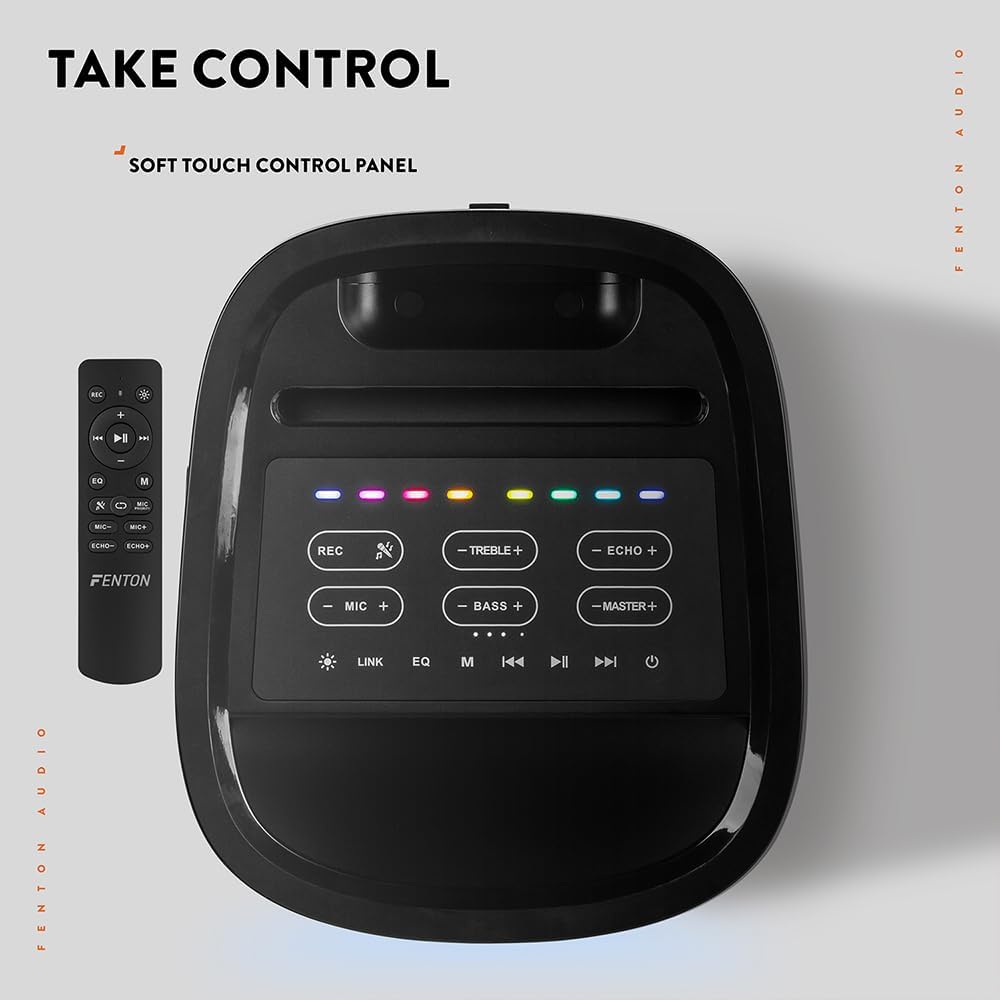
Attēls: No augšas uz leju view of the Fenton Pulse65 speaker's soft-touch control panel, alongside the remote control, highlighting various buttons for audio and light adjustments.
The top panel features soft-touch controls for various functions:
- REC: Ierakstīt audio.
- TREBLE +/-: Pielāgojiet augsto frekvenču līmeni.
- ECHO +/-: Pielāgojiet mikrofona atbalss efektu.
- MIC +/-: Pielāgojiet mikrofona skaļumu.
- BASS +/-: Pielāgojiet basa līmeņus.
- MASTER +/-: Adjust overall master volume.
- SAITE: Activate TWS (True Wireless Stereo) pairing.
- EQ: Cycle through equalizer presets.
- M (režīms): Switch between input modes (Bluetooth, USB, FM Radio, AUX).
- Atskaņot/pauzēt: Atskaņot vai apturēt audio atskaņošanu.
- Iepriekšējais/Nākamais: Skip tracks or tune FM radio stations.
- Jauda: Ieslēdziet/izslēdziet skaļruni.
5.2. Bluetooth savienojums
- Turn on the Pulse65 speaker.
- Nospiediet pogu M (režīms) button until the Bluetooth indicator lights up or you hear a Bluetooth pairing prompt.
- Savā mobilajā ierīcē iespējojiet Bluetooth un meklējiet pieejamās ierīces.
- Select "Fenton Pulse65" from the list.
- Once connected, the speaker will confirm with an audible prompt.

Image: The Fenton Pulse65 speaker with a smartphone placed in its integrated dock, illustrating the Bluetooth streaming and charging capabilities.
5.3. Patiesi bezvadu stereo (TWS) savienošana pārī
To link two Pulse65 speakers for stereo sound:
- Ensure both Pulse65 speakers are powered on and in Bluetooth mode, but not connected to any device.
- Vienā no skaļruņiem (tas būs primārais skaļrunis) nospiediet pogu SAITE button. It will search for another Pulse65.
- The primary speaker will automatically connect to the secondary speaker. Once connected, you will hear a confirmation tone.
- Now, connect your mobile device to the primary Pulse65 speaker via Bluetooth as described in section 5.2.
- Tagad audio tiks atskaņots stereo režīmā abos skaļruņos.
5.4. USB atskaņošana
Ievietojiet USB zibatmiņas disku, kurā ir MP3 audio ieraksts. files into the USB port on the back of the speaker. The speaker will automatically switch to USB mode and begin playback. Use the Play/Pause and Previous/Next buttons to control playback.
5.5. FM radio
- Nospiediet pogu M (režīms) pogu, lai pārslēgtos uz FM radio režīmu.
- Nospiediet un turiet Atskaņot/Pauzēt pogu, lai automātiski skenētu un saglabātu pieejamās FM stacijas.
- Izmantojiet Iepriekšējais/Nākamais pogas, lai pārvietotos pa saglabātajām stacijām.
5.6. Mikrofona un ģitāras ieejas
The speaker features dedicated inputs for a wired microphone and a guitar on the rear panel. Connect your devices to these ports. Use the MIC +/- un ECHO +/- controls on the top panel to adjust the microphone's volume and echo effect.

Image: A composite image showing the rear panel of the Fenton Pulse65 speaker with its various input ports, and a front view of the speaker with a microphone, illustrating connectivity options.
5.7. Gaismas režīmi
The multicolour LED lights on the speaker can be controlled via the remote control or specific buttons on the control panel (if available, refer to the remote for full control). Cycle through different light patterns or turn them off as desired.

Attēls: Tuvplāns view of the Fenton Pulse65 speaker, highlighting its multicolour LED light ring on the front grille, indicating its splashproof design.
6. Apkope
6.1. Tīrīšana
Noslaukiet skaļruņa ārpusi ar mīkstu, sausu vai viegli samitrinātu drānu.amp cloth. Do not use abrasive cleaners, waxes, or solvents. Ensure all port covers are closed before cleaning if using a damp audums.
6.2. Uzglabāšana
Uzglabājiet skaļruni vēsā, sausā vietā, pasargājot to no tiešiem saules stariem un ekstremālām temperatūrām. Ja skaļrunis tiek glabāts ilgstoši, ik pēc dažiem mēnešiem uzlādējiet akumulatoru līdz aptuveni 50%, lai uzturētu akumulatora darbības laiku.
6.3. Akumulatora kopšana
To prolong battery life, avoid fully discharging the battery frequently. Recharge the speaker when the low battery indicator appears. Do not expose the battery to excessive heat.
7. Traucējummeklēšana
If you encounter issues with your Fenton Pulse65, refer to the following common problems and solutions:
| Problēma | Iespējamais cēlonis | Risinājums |
|---|---|---|
| Skaļrunis neieslēdzas. | Zems akumulatora līmenis; Nav pareizi nospiesta ieslēgšanas/izslēgšanas poga. | Pilnībā uzlādējiet skaļruni. Nospiediet un dažas sekundes turiet nospiestu ieslēgšanas/izslēgšanas pogu. |
| Nav skaņas no skaļruņa. | Pārāk mazs skaļums; Nepareizs ievades režīms; Ierīce nav pievienota. | Increase master volume. Press 'M' to select correct input mode. Ensure Bluetooth device is connected or USB is inserted correctly. |
| Bluetooth savienošana pārī neizdodas. | Skaļrunis nav savienošanas pārī režīmā; ierīce ir pārāk tālu; traucējumi. | Ensure speaker is in Bluetooth mode and not connected to another device. Move device closer to speaker. Turn off other Bluetooth devices. |
| Mikrofons nedarbojas. | Microphone off; Low battery in mic; Mic volume too low. | Ensure wireless mic is powered on. Replace mic batteries. Increase MIC volume on speaker. |
| TWS savienošana pārī neizdodas. | Speakers already connected to a device; Speakers too far apart. | Disconnect both speakers from any Bluetooth devices. Ensure both are in Bluetooth mode. Place speakers close together during pairing. |
8. Specifikācijas
- Zīmols: Fentons
- Modelis: Pulss65
- Skaļruņa maksimālā izejas jauda: 140 vati (maksimālā jauda)
- Frekvences reakcija: 12000 Hz
- Savienojamības tehnoloģija: Bluetooth 5.3
- Audio izvades režīms: Stereo
- Montāžas veids: Galda virsma
- Skaļruņa tips: Ārā
- Produkta izmēri: 49 x 34.5 x 39.5 cm
- Svars: 7.6 kg
- Akumulators: 1 Nonstandard Battery (included), 12-hour playback
- IP vērtējums: IPX4 (izturīgs pret šļakatām)
- Ražotājs: Tronios BV
- Izcelsmes valsts: Ķīna

Image: The Fenton Pulse65 speaker displayed with its approximate dimensions (40cm height, 32cm width, 27cm depth) and an icon indicating 12 hours of battery life.
9. Garantija un atbalsts
For warranty information and customer support, please refer to the documentation provided with your purchase or visit the official Fenton brand store. You can find more information and contact details at the Fenton Brand Store.


