1. Ievads
This manual provides comprehensive instructions for the installation, operation, and maintenance of the CHBMSS AI208 series intelligent temperature controllers. Please read this manual thoroughly before using the device to ensure safe and efficient operation.
Drošības pasākumi
- Pārliecinieties, ka visu elektroinstalāciju veic kvalificēts personāls un ka tā atbilst vietējiem elektrības noteikumiem.
- Pirms jebkādu uzstādīšanas, elektroinstalācijas vai apkopes darbu veikšanas atvienojiet strāvas padevi.
- Nedarbiniet ierīci vidē, kas pārsniedz tai noteiktos temperatūras un mitruma ierobežojumus.
- Avoid exposing the device to corrosive gases, strong vibrations, or direct sunlight.
2. Produkts beidziesview
The CHBMSS AI208 series intelligent temperature controller is a compact and reliable device designed for precise temperature regulation. It offers various features to ensure stable and accurate control in industrial and scientific applications.
Galvenās iezīmes
- Small, lightweight, and highly reliable design.
- Temperature calibration function for accurate readings.
- High-temperature alarm notification.
- Selectable cooling or heating modes.
- Adjustable maximum/minimum temperature limits for safety.

2.1. attēls: Priekšpuse view of the CHBMSS AI208 Intelligent Temperature Controller, showing the PV and SV displays, alarm indicators (AL1, AL2, AL3), output indicators (OUT1, OUT2, AT), and control buttons (SET, AT, R/S, Up, Down).
3. Tehniskās specifikācijas
| Specifikācija | Vērtība |
|---|---|
| Modeļa numurs | AI208 |
| Wattage / Jauda | 380V 10A |
| Darba princips | Elektroniskais temperatūras regulators |
| Temperatūras diapazons | -50 to 999 (Units not specified, typically Celsius or Fahrenheit) |
| Temperatūras kontroles funkcija | Pastāvīga temperatūra |
| Iepakojuma izmēri | 1.18 x 0.79 x 0.39 collas |
| Preces svars | 7.1 unces (200 grami) |
| Ražotājs | CHBMSS |
| Ievades veids | TC/RTD GPIO (for models like AI208-4-RB10, AI208-6-RB10, AI208-7-RB10) |
| Izvades veids | Relay (for models like AI208-4-RB10, AI208-6-RB10, AI208-7-RB10); SSR output (for models like AI208-8-SB10) |
Dimensions for Specific Models
The AI208 series includes various models with different physical dimensions. Please refer to the specific model's diagram for accurate measurements.
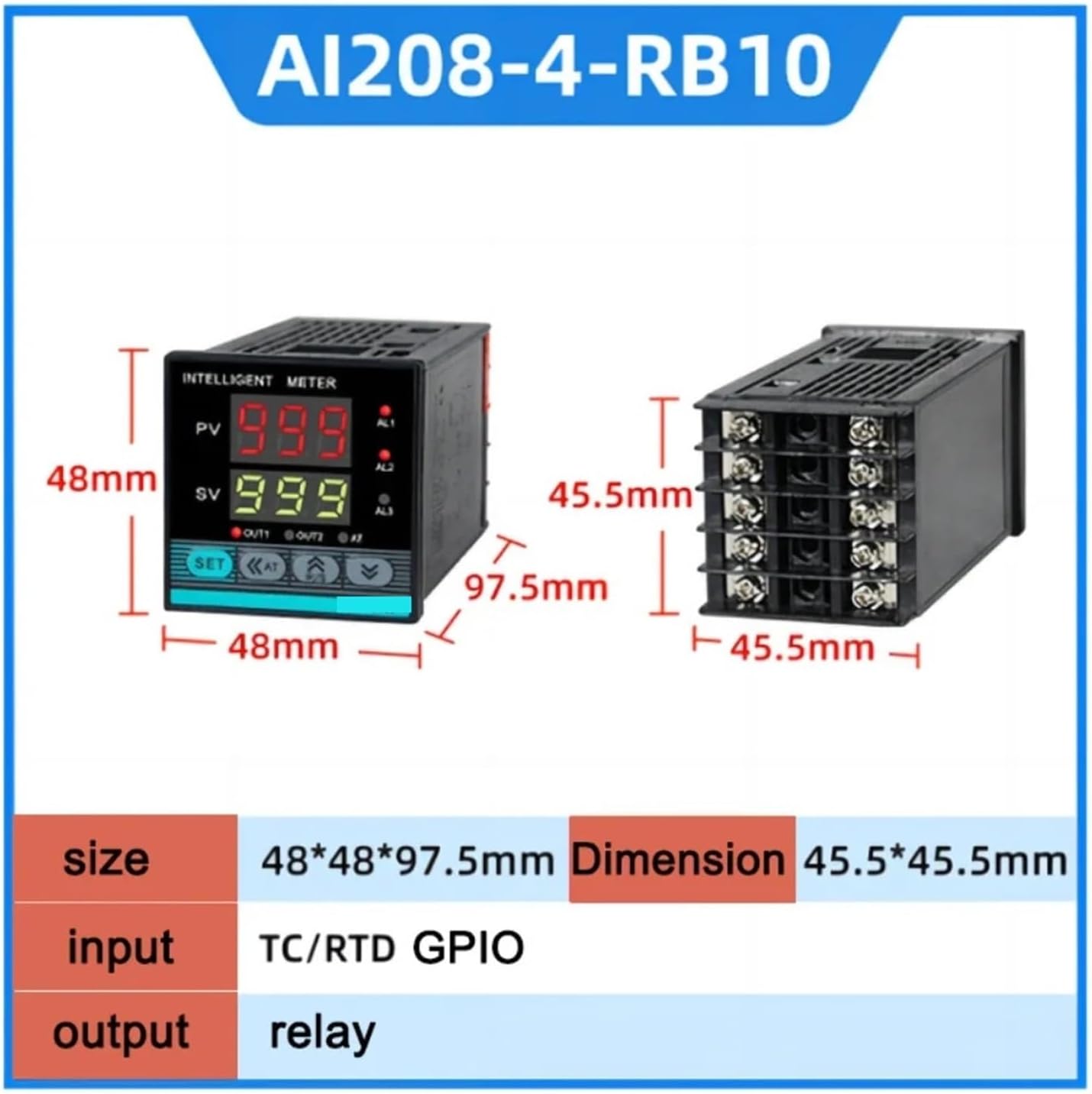
3.1. attēls: Dimensions for AI208-4-RB10 model. Size: 48*48*97.5mm. Dimension: 45.5*45.5mm. Input: TC/RTD GPIO. Output: Relay.

3.2. attēls: Dimensions for AI208-6-RB10 model. Size: 48*96*97.5mm. Dimension: 45.5*92mm. Input: TC/RTD GPIO. Output: Relay.
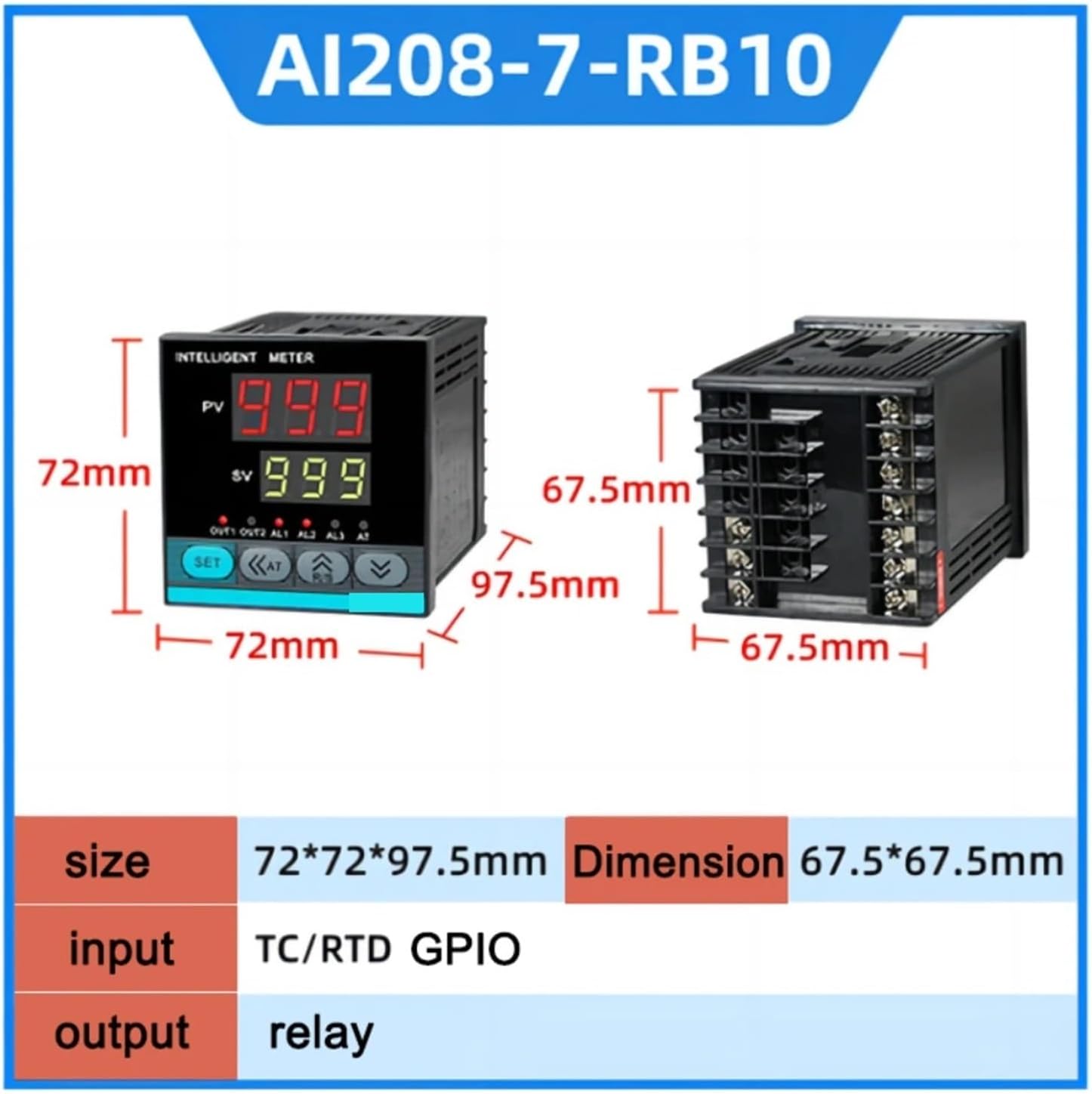
3.3. attēls: Dimensions for AI208-7-RB10 model. Size: 72*72*97.5mm. Dimension: 67.5*67.5mm. Input: TC/RTD GPIO. Output: Relay.

3.4. attēls: Dimensions for AI208-8-SB10 model. Size: 96*48*97.5mm. Dimension: 92*45mm. Input: TC/RTD GPIO. Output: SSR output.
4. Iestatīšana un instalēšana
4.1 Izpakošana
Carefully remove the temperature controller from its packaging. Inspect the device for any signs of damage during transit. Ensure all components are present.
4.2 Montāža
The controller is designed for panel mounting. Cut an opening in the control panel according to the dimensions specified for your particular AI208 model (refer to Section 3). Insert the controller into the opening and secure it using the provided mounting brackets. Ensure a snug fit to prevent movement.
4.3 Elektroinstalācija
Connect the power supply, temperature sensor (TC/RTD GPIO), and output load (relay or SSR) to the corresponding terminals on the rear of the controller. Refer to the wiring diagram provided with your specific product packaging for detailed connection instructions. Ensure all connections are secure and correctly polarized. Incorrect wiring can damage the device or lead to unsafe conditions.
5. Darbība
5.1. Pamata vadīklas
The front panel features several buttons for operation:
- KOMPLEKTS: Enters parameter setting mode or confirms a setting.
- <<AT: Auto-tuning function or shifts cursor during parameter setting.
- ^R/S: Increases value or scrolls through parameters.
- v: Decreases value or scrolls through parameters.
5.2 Setting Temperature Parameters
To set the desired temperature (SV - Set Value):
- Nospiediet pogu IESTATĪT button briefly to enter the set value adjustment mode. The SV display will flash.
- Izmantojiet ^R/S un v buttons to adjust the SV to your desired temperature. Use the <<AT button to shift the cursor for faster adjustment of individual digits.
- Nospiediet IESTATĪT again to confirm the new set value and exit the adjustment mode.
5.3 Temperatūras kalibrēšana
The controller includes a temperature calibration function to compensate for sensor inaccuracies or environmental factors. Access this function through the advanced parameter settings (typically by pressing and holding SET for a longer duration) and adjust the offset value as needed. Refer to the detailed programming guide for specific steps.
5.4 Signalizācijas funkcija
The controller is equipped with an alarm function that activates if the process variable (PV) reaches or exceeds a predefined high-temperature threshold. The AL1/AL2/AL3 indicators on the front panel will illuminate, and an audible alarm may sound depending on the model and configuration. The alarm threshold can be configured in the parameter settings.
5.5 Cooling or Heating Modes
The AI208 series supports both cooling and heating control modes. The desired mode can be selected within the controller's parameter settings to match your application requirements. Ensure the correct mode is selected for optimal performance and safety.
5.6 Maximum/Minimum Temperature Limits
To prevent accidental over-heating or over-cooling, you can set maximum and minimum temperature limits. If the set value (SV) attempts to exceed these limits, the controller will restrict it to the configured range. These limits are adjustable in the advanced parameter settings.
6. Apkope
6.1. Tīrīšana
Regularly clean the front panel of the controller with a soft, dry cloth. Do not use abrasive cleaners or solvents, as these can damage the display or casing. Ensure no dust or debris accumulates in the ventilation slots.
6.2. Regulāras pārbaudes
Periodically check all wiring connections for tightness and signs of corrosion. Ensure the temperature sensor is properly installed and free from damage. Verify that the controller's display and indicators are functioning correctly.
7. Traucējummeklēšana
This section provides solutions to common issues encountered during the operation of the AI208 temperature controller.
- Kontrolieris neieslēdzas: Check the power supply connection and ensure the voltage matches the controller's specifications. Verify that the circuit breaker or fuse is not tripped.
- Temperature reading inaccurate: Check the sensor wiring for correct polarity and secure connections. Ensure the sensor type configured in the controller matches the actual sensor being used. Perform temperature calibration if necessary.
- Output not activating/deactivating: Verify the set value (SV) and process variable (PV) are within the expected range. Check the output wiring and ensure the load is correctly connected. Confirm the control mode (heating/cooling) is set appropriately.
- Alarm constantly active: Check the alarm set points. Ensure the process temperature is not continuously exceeding the alarm threshold. Adjust alarm hysteresis if available.
- Pogas nereaģē: Disconnect power, wait a few minutes, and then reconnect. If the issue persists, contact support.
8. Garantija un atbalsts
Specific warranty information for the CHBMSS AI208 series intelligent temperature controller is not provided within this manual. For details regarding warranty coverage, technical support, or service, please refer to the documentation included with your purchase or contact the manufacturer directly through their official webvietne vai klientu apkalpošanas kanāli.