1. Ievads
This manual provides essential information for the safe and efficient operation of your Meizu mblu 21 smartphone. Please read it thoroughly before using the device.
The Meizu mblu 21 features a Prism Edge Design with a radiant gradient and a large immersive 6.79-inch HD display. It is equipped with a 13MP main camera and an 8MP front camera, powered by Android 14. The device includes a 4900mAh battery for extended use and supports 4G LTE connectivity, Dual-Band Wi-Fi, and Bluetooth 5.0.
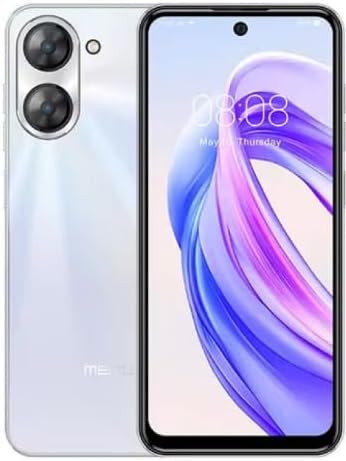
1.1. attēls: Priekšpuse un aizmugure view of the Meizu mblu 21 smartphone in White Diamond color.
2. Kas ir kastē
Pārliecinieties, vai iepakojumā ir visi priekšmeti:
- Meizu mblu 21 Smartphone
- Strāvas adapteris
- USB kabelis
- SIM izstumšanas rīks
- Īsā lietošanas pamācība

Figure 2.1: Meizu mblu 21 smartphone alongside its power adapter.
3. Iestatīšana
3.1. SIM karšu un MicroSD kartes ievietošana
The Meizu mblu 21 supports Dual Nano SIM cards and a MicroSD card for expandable storage. Locate the SIM tray on the side of the device.
- Power off the device before inserting or removing SIM/MicroSD cards.
- Lai atvērtu SIM kartes paliktni, izmantojiet komplektā iekļauto SIM kartes izņemšanas rīku.
- Carefully place the Nano SIM cards and/or MicroSD card into the designated slots on the tray, ensuring correct orientation.
- Viegli iebīdiet paplāti atpakaļ ierīcē, līdz tā ir vienā līmenī.
3.2. Sākotnējās ieslēgšanas un iestatīšanas vednis
- Press and hold the Power button until the Meizu logo appears.
- Follow the on-screen instructions to complete the initial setup, including selecting your language, connecting to a Wi-Fi network, and setting up your Google account.
4. Ierīces lietošana
4.1. Displejs un navigācija
The 6.79-inch HD display features a 90Hz adaptive refresh rate for smooth visuals. Navigate the interface using touch gestures: tap, swipe, pinch-to-zoom.
4.2. Kameras funkcijas
The device is equipped with a 13MP main camera and an 8MP front camera. Open the Camera application to capture photos and videos.
- 13MP Smart Camera: Ideal for capturing everyday moments with sharpness and true-to-life colors.
- 8MP priekšējā kamera: Designed for clear selfies and video calls.
4.3. Drošības līdzekļi
- Side Unlock: A fast and secure fingerprint sensor integrated into the side power button for instant access.
- Smart Face Unlock: Use the front camera to unlock your device quickly and conveniently.
4.4. Savienojamība
Your mblu 21 supports various connectivity options:
- 4G LTE: For mobile data connectivity. In the USA, this device is compatible with T-Mobile. Outside the USA, it works with any carrier worldwide.
- Divjoslu Wi-Fi: Supports both 2.4GHz and 5GHz bands for seamless internet access.
- Bluetooth 5.0: For connecting wireless accessories with improved energy efficiency.
- VoLTE HD Calls: Enjoy sharper, clearer voice calls over LTE networks.

Figure 4.1: Key technology features of the Meizu mblu 21, including Android 14, Dual-Band Wi-Fi, Bluetooth 5.0, and VoLTE.
5. Apkope
5.1. Akumulatora kopšana
The mblu 21 is equipped with a 4900mAh battery. To maximize battery lifespan:
- Izvairieties no ekstremālām temperatūrām.
- Use only the provided power adapter or certified compatible chargers.
- Izvairieties no biežas akumulatora pilnīgas izlādes.

5.1. attēls: iekšējais view of the Meizu mblu 21, showcasing the 4900mAh battery and internal components.
5.2. Ierīces tīrīšana
Telefona ekrāna un korpusa tīrīšanai izmantojiet mīkstu, nepūkojošu drānu. Izvairieties no spēcīgu ķīmisku vielu vai abrazīvu materiālu lietošanas.
5.3. Programmatūras atjauninājumi
Regularly check for and install software updates to ensure optimal performance and security. Updates can be found in the device's settings menu.
6. Traucējummeklēšana
If you encounter issues with your Meizu mblu 21, try the following solutions:
- Ierīce nereaģē: Nospiediet un apmēram 10–15 sekundes turiet ieslēgšanas/izslēgšanas pogu, lai piespiedu kārtā restartētu ierīci.
- Tīkla savienojamības problēmas:
- Pārliecinieties, vai SIM karte ir pareizi ievietota.
- Ieslēdziet un izslēdziet lidmašīnas režīmu.
- Check network settings (APN, preferred network type).
- Ātri izlādējas akumulators:
- Aizveriet neizmantotās lietotnes, kas darbojas fonā.
- Samaziniet ekrāna spilgtumu.
- Atspējojiet nevajadzīgās funkcijas, piemēram, GPS vai Bluetooth, kad tās netiek izmantotas.
- Veiktspējas problēmas:
- Clear cache and data of problematic apps.
- Atbrīvojiet vietu krātuvē.
- Consider a factory reset (Note: This will erase all data on your device. Back up important data first.).
7. Specifikācijas
| Funkcija | Detaļas |
|---|---|
| Modeļa nosaukums | mblu 21 |
| Modeļa numurs | M416L |
| Operētājsistēma | Android 14 |
| Ekrāna izmērs | 6.79 collas |
| Atmiņas krātuves ietilpība | 64 GB |
| Instalētās RAM atmiņas apjoms | 4 GB |
| Akumulatora ietilpība | 4900 miljoniamp Stundas |
| Galvenā kamera | 13 MP |
| Priekšējā kamera | 8 MP |
| Bezvadu operators (ASV) | T-Mobile |
| Šūnu tehnoloģija | 4G LTE |
| Savienojamības tehnoloģijas | 4G, Dual-Band Wi-Fi, Bluetooth 5.0 |
| Preces svars | 14 unces |
| Iepakojuma izmēri | 7 x 4 x 2 collas |
| Krāsa | White Diamond |
8. Garantija un atbalsts
Your Meizu mblu 21 smartphone comes with a manufacturer's warranty. Please refer to the warranty card included in your product packaging for specific terms and conditions.
For technical support, service, or further inquiries, please contact Meizu customer support through their official channels. Contact information can typically be found on the manufacturer's webvietnē vai produkta dokumentācijā.


