1. Ievads
Thank you for choosing the Noorio 2K 16G Magnetic Pro Wireless Camera. This camera is designed to provide comprehensive security for both indoor and outdoor environments. Featuring 2K HDR color night vision, advanced AI detection, and a long-lasting battery, it offers reliable surveillance with integrated 16GB local storage. This manual will guide you through the setup, operation, and maintenance of your new device.

Figure 1.1: Noorio 2K 16G Magnetic Pro Wireless Camera and companion app interface.
2. Kas ir kastē
- Noorio 2K 16G Magnetic Pro Wireless Camera
- Magnētiskais stiprinājuma kronšteins
- Screw Mounting Bracket
- USB uzlādes kabelis
- Montāžas skrūves un sienas dībeļi
- Urbšanas veidne
- Lietotāja rokasgrāmata
3. Iestatīšanas rokasgrāmata
3.1. Sākotnējā uzlāde
Before first use, fully charge the camera using the provided USB cable. The charging indicator will provide guidance on the charging status. A full charge can take several hours.
3.2 Lietotnes lejupielāde un konta izveide
- Download the Noorio app from your device's app store (iOS or Android).
- Atveriet lietotni un izveidojiet jaunu kontu vai piesakieties, ja jums tāds jau ir.
3.3 Kameras savienošana pārī
- In the Noorio app, tap 'Add Device' or the '+' icon.
- Follow the on-screen instructions to scan the QR code on the camera.
- Ensure your smartphone is connected to a 2.4GHz Wi-Fi network. The camera exclusively supports 2.4GHz Wi-Fi for stable connectivity, even through thick walls.
- Lietotne palīdzēs jums izveidot savienojumu ar kameru Wi-Fi tīklam.
3.4 Kameras uzstādīšana
Kamera piedāvā elastīgas uzstādīšanas iespējas:
- Magnētiskais stiprinājums: For quick and easy placement on metallic surfaces or with the magnetic bracket.
- Skrūvju montāža: For permanent installation using the screw mounting bracket and included hardware. Use the drilling template for precise hole placement.
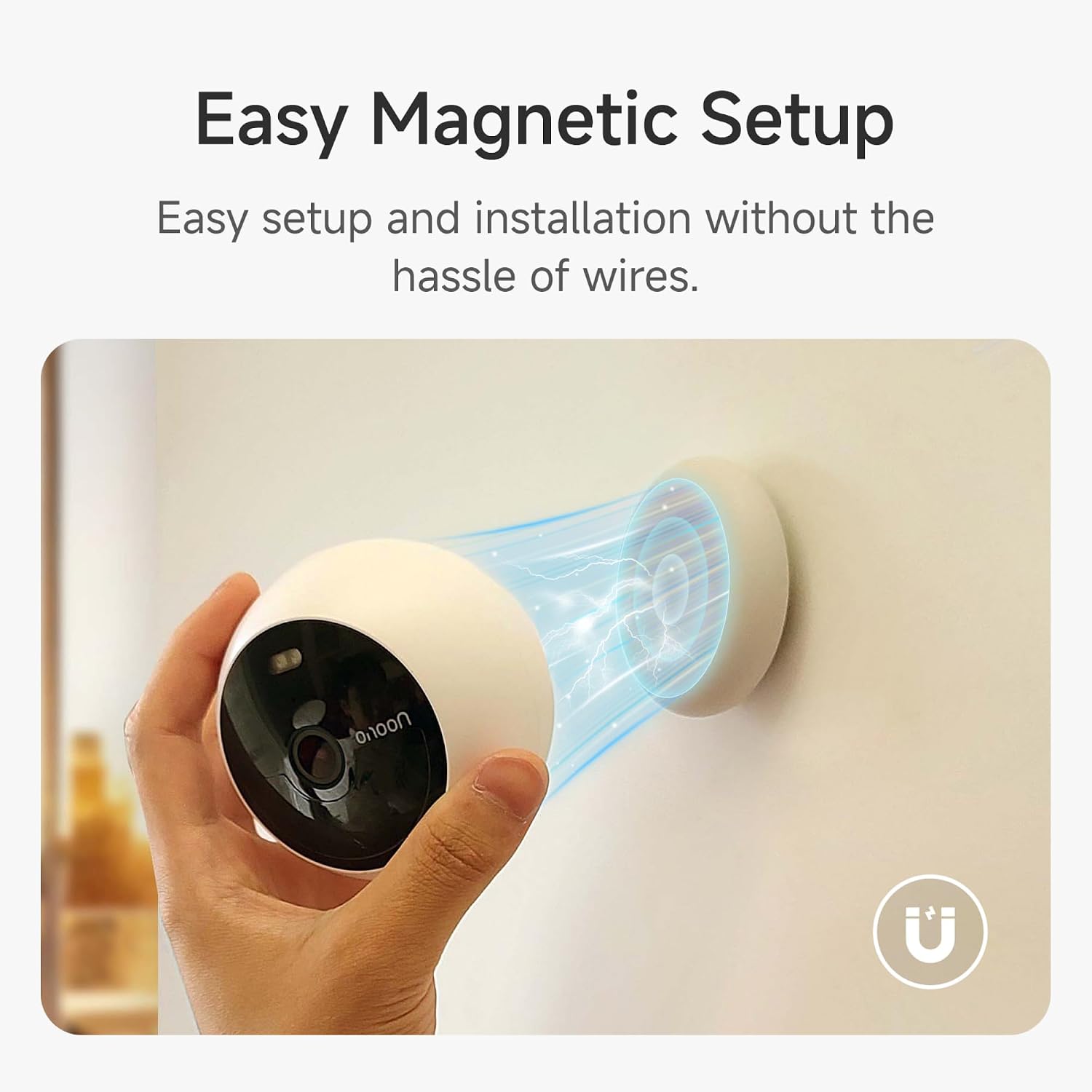
Figure 3.1: Easy magnetic setup of the Noorio camera.
3.5 Programmaparatūras atjauninājums
To ensure optimal performance and access to the latest features, including the smart charging indicator, update the camera firmware to v1.0.4.9728 or later. This can be done via the Noorio app: Go to Devices > My Camera > Top Right Arrow > Update.
4. Lietošanas instrukcijas
4.1. Tiešraide View and 2K Clarity
Access the live 2K stream through the Noorio app. You can zoom in and out of the 140° wide-angle view to see fine details.

Figure 4.1: Enhanced clarity with 2K QHD resolution.
4.2 Divvirzienu audio
The built-in microphone and speaker allow for two-way communication. Speak to visitors or deter unwanted guests directly through the app, even when you're away.

Figure 4.2: Using the 2-Way Audio feature via the app.
4.3 Nakts redzamība
The camera features premium night vision technology, offering both standard (PIR) and full-color night vision. The automatic HDR (High-Dynamic Range) helps capture more details in low-light conditions. The spotlight can be manually activated for enhanced visibility.

Figure 4.3: Regular vs. Color Night Vision capabilities.
4.4 Advanced AI Detection
The dual PIR/Infrared Radar system and customizable activity zones help minimize false notifications. The camera can distinguish between human motion and other movements, sending accurate alerts to your app.

Figure 4.4: AI Smart Detection in action.
4.5 Sirēna un prožektors
Manually activate the siren and the 100-lumen spotlight from the app to deter suspicious activity. These can also be set to activate automatically upon motion detection based on your preferences.
4.6 Uzglabāšanas iespējas
The camera includes 16GB of integrated local eMMC storage, capable of recording up to 6000 video clips without any hidden fees or subscriptions. An optional cloud service is available for additional storage and features.

Figure 4.5: Free 16GB eMMC Local Storage.
4.7 Viedās mājas integrācija
The Noorio camera works with Alexa, allowing you to control and view your live stream using voice commands.
5. Apkope
5.1 Akumulatora darbības laiks un uzlāde
The camera's battery can last up to 180 days on a single charge, depending on detection frequency and live viewing time. For continuous power, the camera is compatible with Noorio solar panels (sold separately).

Figure 5.1: Extended battery life of the Noorio camera.
5.2. Tīrīšana
To maintain optimal image quality, regularly clean the camera lens with a soft, dry cloth. Avoid using harsh chemicals or abrasive materials.
6. Traucējummeklēšana
- Kamera neizveido savienojumu ar Wi-Fi: Ensure your router is broadcasting a 2.4GHz Wi-Fi signal. The camera does not support 5GHz networks. Move the camera closer to the router if the signal is weak.
- Biežas viltus trauksmes: Adjust the AI detection sensitivity settings in the app. Configure custom activity zones to focus on specific areas and reduce triggers from irrelevant movements.
- Slikta nakts redzamības kvalitāte: Ensure the camera lens is clean and free from obstructions. Check if the HDR and color night vision settings are enabled in the app.
- Akumulators ātri izlādējas: High detection frequency, frequent live viewing, and extreme temperatures can reduce battery life. Consider connecting a Noorio solar panel for continuous charging.
- App issues (e.g., slow loading): Ensure your app is updated to the latest version. Check your internet connection speed. Restart the app or your smartphone if issues persist.
If you encounter persistent issues not covered here, please contact Noorio customer support.
7. Specifikācijas
| Funkcija | Detaļas |
|---|---|
| Modeļa numurs | B210-SE |
| Izmēri (LxWxH) | 7.62 x 8.38 x 10.16 cm |
| Svars | 454 g |
| Izšķirtspēja | 2K HD (4MP QHD) |
| Savienojamības tehnoloģija | Bezvadu (tikai 2.4 GHz Wi-Fi) |
| Akumulatora tips | Litija jonu akumulators (1 iekļauts) |
| Akumulatora darbības laiks | Līdz 180 dienām (atkarībā no lietošanas) |
| Vietējā krātuve | 16GB eMMC (integrated) |
| Īpašas funkcijas | 2K HD, Battery-powered, Night Vision (Color/PIR), Magnetic Setup, Two-way Talk, AI Detection |
| Lietošana iekštelpās/ārā | Ārā |
| Ieteicamie lietojumi | Spy, Pet Monitoring, Indoor Security, Outdoor Security |
8. Garantija un atbalsts
Noorio offers a 1-year warranty for return and replacement due to quality issues. Lifetime technical support is also provided.
Klientu atbalsta kontaktpersona:
- Tālrunis: 800 642 5905 (plkst. 9:00–18:00 pēc ET laika, darba dienās)
- E-pasts: support@nooriolife.com
Figure 8.1: Noorio Brand Logo.


