1. Ievads
The BAOFENG UV-K61 is a multi-functional two-way radio designed for reliable and versatile communication. This device features 999 channels, a dual display, USB-C charging, VOX hands-free operation, and NOAA weather alerts. This manual provides essential instructions for setting up, operating, and maintaining your UV-K61 radio.
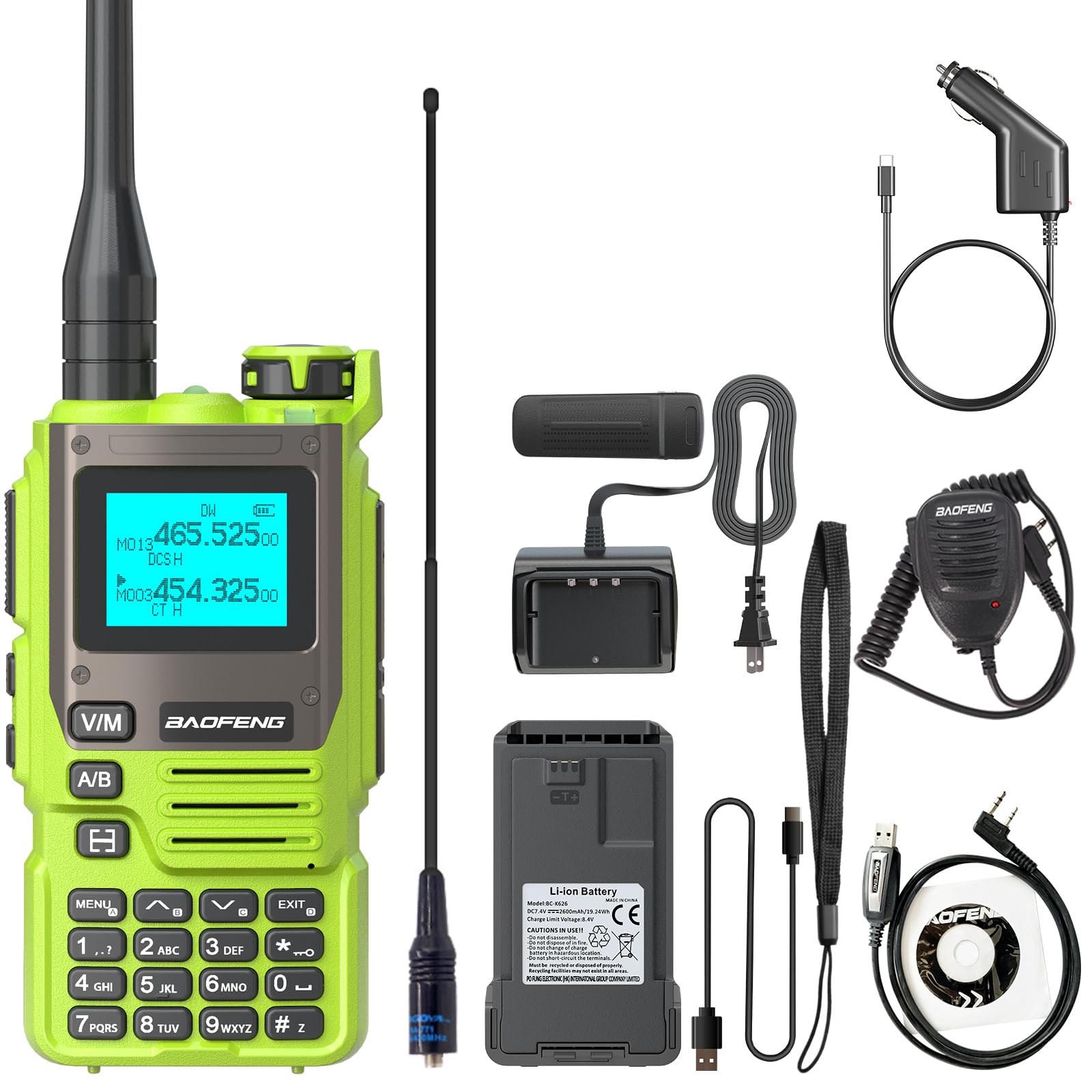
Image 1.1: BAOFENG UV-K61 Two Way Radio, front view.
2. Produkts beidziesview un komplekta saturs
Your BAOFENG UV-K61 radio comes with a comprehensive kit to ensure you have everything needed for immediate use.
2.1. Komplekta saturs
- 1x BAOFENG UV-K61 radio
- 1x 2600mAh lielas ietilpības akumulators
- 1x augstas jaudas antena
- 1x USB-C lādētāja kabelis
- 1x Charger Dock (US base charger)
- 1x jostas klips
- 1x rokas siksniņa
- 1x Lietotāja rokasgrāmata (šis dokuments)
- 1x 771 antena
- 1x programmēšanas kabelis
- 1x plecu skaļruņa mikrofons
- 1x USB-C Car Charger Cable

Image 2.1: Contents of the standard product kit.
2.2. Produkta izkārtojums un vadība
Familiarize yourself with the radio's physical components and controls for optimal use.

2.2. attēls: Detalizēts view of the radio's buttons, screen, and dimensions.
- Antena: Signāla pārraidei un uztveršanai.
- Volume & Power Knob: Rotate to adjust volume, press to power on/off.
- PTT taustiņš (Push-to-Talk): Nospiediet un turiet, lai pārraidītu, atlaidiet, lai saņemtu.
- Lukturītis/trauksmes slēdzis: Activates the built-in flashlight or alarm function.
- Radio/Monitor Key: Toggles between radio mode and monitor function.
- Sweep Key: Uzsāk frekvenču skenēšanu.
- Izvēlnes taustiņš: Piekļūst radio izvēlnes iestatījumiem.
- V/M-VFO/MR atslēga: Pārslēdzas starp VFO (frekvences režīmu) un MR (kanāla režīmu).
- A/B atlases atslēga: Selects the upper or lower display frequency/channel.
- Tastatūra: Tiešai frekvences ievadei un izvēlnes navigācijai.
- 1.44 collu LCD ekrāns: Parāda frekvenci, kanālu un statusa informāciju.
- Runātājs: Audio izvadei.
- 2-pin K Port: For connecting accessories like the shoulder speaker microphone or programming cable.
3. Iestatīšana
3.1. Akumulatora uzstādīšana un uzlāde
The UV-K61 is powered by a 2600mAh Lithium Ion battery. Ensure the battery is fully charged before first use.
- Novietojiet akumulatoru pretī rievām radio aizmugurē un pabīdiet to vietā, līdz tas droši noklikšķ.
- To charge, connect the USB-C cable directly to the radio or place the radio in the provided charger dock.
- The LED indicator on the radio or charger dock will show Sarkans uzlādes un pagrieziena laikā Zaļš kad tas ir pilnībā uzlādēts.
- The radio can be charged via a power bank, car charger, laptop, or any standard USB power source using the USB-C cable.

Image 3.1: Various methods for charging the UV-K61 radio.
3.2. Antenas piestiprināšana
Uzskrūvējiet antenu pulksteņrādītāja virzienā uz savienotāja radio augšpusē, līdz tā ir ar pirkstiem cieši pievilkta. Nepārvelciet.
3.3. Belt Clip and Hand Strap
Attach the belt clip to the back of the radio using the provided screws. The hand strap can be threaded through the loop on the top side of the radio for secure carrying.
4. Lietošanas instrukcijas
4.1. Ieslēgšana/izslēgšana un skaļuma regulēšana
To power on the radio, rotate the Volume & Power knob clockwise until you hear a click. Continue rotating to adjust the volume. To power off, rotate the knob counter-clockwise until it clicks off.
4.2. Kanāla un frekvences izvēle
The UV-K61 supports 999 channels and operates in both VFO (Frequency Mode) and MR (Channel Mode).
- Nospiediet pogu V/M-VFO/MR key to switch between VFO and MR modes.
- In VFO mode, use the keypad to directly input frequencies or the up/down arrow keys to scan.
- In MR mode, use the up/down arrow keys to select a stored channel.
- The A/B Izvēlieties key switches between the upper and lower display lines, allowing you to monitor two frequencies/channels simultaneously.

Image 4.1: The radio displaying NOAA weather alert information.
4.3. One Key Match Frequency (Wireless Frequency Copying)
This feature allows for quick and easy frequency programming by copying from another radio.
- 1. darbība: Ieslēdziet radio. Nospiediet un turiet EXIT key. The screen will display "SEARCH".
- 2. darbība: Press and hold the transmit button on the other radio you wish to copy from. The UV-K61 will search for and display the frequency and decode information.
- 3. darbība: Kad meklēšana ir pabeigta, nospiediet pogu IZVĒLNE key for confirmation. Switch to channel mode to select the channel. The screen will show the frequency of the other radio, allowing communication.

Image 4.2: Visual guide for the One Key Match Frequency function.
4.4. VOX brīvroku režīms
The Voice Operated Exchange (VOX) function allows you to transmit without pressing the PTT key. When VOX is enabled, the radio will automatically transmit when it detects your voice.
- To enable/disable VOX, navigate to the VOX setting in the menu.
- Adjust the VOX sensitivity level (usually 1-10) to suit your environment. A higher number requires a louder voice to activate transmission.
4.5. NOAA laikapstākļu kanāli
The UV-K61 includes a built-in NOAA receiver with 10 channels to provide real-time weather alerts.
- Access the NOAA weather channels through the radio's menu or a dedicated function key (if assigned).
- The radio will scan these channels and alert you to severe weather conditions, ensuring safety during outdoor activities.
4.6. Flashlight and AM/FM Radio
- Lukturis: Press the dedicated Flashlight/Alarm switch to turn the flashlight on or off.
- AM/FM radio: The UV-K61 supports AM/FM radio reception. Use the Radio/Monitor key to switch to radio mode and scan for stations.
5. Apkope
5.1. Akumulatora kopšana
- Lai pagarinātu akumulatora kalpošanas laiku, izvairieties no biežas pilnīgas izlādes.
- Uzlādējiet akumulatoru vēsā, sausā vidē.
- Ja radioaparāts ilgstoši netiek lietots, uzlādējiet akumulatoru līdz aptuveni 50% un izņemiet to no radioaparāta.
5.2. Tīrīšana
Notīriet radioaparāta ārpusi ar mīkstu,amp audumu. Nelietojiet spēcīgas ķīmiskas vielas vai abrazīvus tīrīšanas līdzekļus. Pirms lietošanas pārliecinieties, vai radio ir sauss.
5.3. Ūdensizturība
Note: The BAOFENG UV-K61 is NOT water resistant. Avoid exposing the radio to rain, splashes, or immersion in water to prevent damage.
5.4. Uzglabāšana
Uzglabājiet radio vēsā, sausā vietā, pasargājot to no tiešiem saules stariem un ekstremālām temperatūrām. Sargājiet to no putekļiem un mitruma.
6. Traucējummeklēšana
If you encounter issues with your BAOFENG UV-K61, refer to the following common problems and solutions:
| Problēma | Iespējamais cēlonis | Risinājums |
|---|---|---|
| Radio neieslēdzas | Zems vai izlādējies akumulators; nepareizi uzstādīts akumulators | Uzlādējiet akumulatoru; pārliecinieties, vai akumulators ir pareizi ievietots. |
| Nevar pārraidīt vai saņemt | Incorrect frequency/channel; antenna not attached; low battery | Verify frequency/channel settings; ensure antenna is securely attached; charge battery. |
| Slikta audio kvalitāte vai statiska skaņa | Weak signal; interference; antenna issue | Move to an open area; check antenna connection; adjust squelch level. |
| Tastatūra nereaģē | Tastatūras bloķēšana ir iespējota | Disable keypad lock (refer to menu settings). |
7. Specifikācijas
Detailed technical specifications for the BAOFENG UV-K61 Two Way Radio:
| Funkcija | Specifikācija |
|---|---|
| Modeļa numurs | UV-K61 |
| Kanālu skaits | 999 |
| Akumulatora tips | 1 litija jonu akumulators (iekļauts) |
| Akumulatora ietilpība | 2600 mAh |
| Produkta izmēri | 1.37 collu dziļums x 2.16 collu platums x 4.72 collu augstums (3.48 x 5.49 x 11.99 cm) |
| Preces svars | 1.7 pounds (approx. 27.16 ounces / 770 grams) |
| Voltage | 7.4 volti (līdzstrāva) |
| Maksimālais sarunu diapazons | 5 kilometri (aptuveni 3.1 jūdzes) |
| Ūdensizturības līmenis | Nav ūdensizturīgs |
| Īpašas funkcijas | 10 NOAA Weather Alarm, 2600mAh High Capacity Battery, Multi-Band (AM/FM), One Key Match Frequency, USB-C Charging |
8. Garantija un atbalsts
8.1. Informācija par garantiju
A 1-year warranty is provided exclusively through "Shiqun Electronics Co., Ltd". Please retain your proof of purchase for warranty claims.
8.2. Klientu atbalsts
For technical assistance, troubleshooting beyond this manual, or warranty inquiries, please contact the seller or authorized service center. Refer to your purchase documentation for specific contact details.


