1. Ievads
Thank you for choosing the Hama WK-300 Multi-Device Wireless Keyboard. This compact office keyboard is designed for wireless control of computers, smartphones, and tablets, offering versatile connectivity via Bluetooth or a 2.4 GHz radio connection with a USB-A receiver. It allows simultaneous connection to up to three devices, providing a seamless experience for various tasks.
2. Drošības instrukcijas
- Neatveriet ierīci un neturpiniet tās darbību, ja tā ir bojāta.
- Nemēģiniet pats apkopt vai remontēt izstrādājumu. Visus apkopes darbus uzticiet kvalificētiem speciālistiem.
- Sargājiet produktu no netīrumiem, mitruma un pārkaršanas un izmantojiet to tikai sausā vidē.
- Glabājiet šo izstrādājumu, tāpat kā visus elektriskos izstrādājumus, bērniem nepieejamā vietā.
- Neizmantojiet izstrādājumu vietās, kur nav atļauts izmantot elektroniskas ierīces.
- Nekavējoties atbrīvojieties no iepakojuma materiāla saskaņā ar vietējiem noteikumiem.
3. Iepakojuma saturs
Please check that the package contains the following items:
- 1 Hama WK-300 Multi-Device Wireless Keyboard
- 1 USB-A Receiver (typically stored in the battery compartment)
- 1 Lietošanas pamācība
Piezīme: AAA batteries are required for operation and are not included in the package.
4. Iestatīšana
4.1 Akumulatora uzstādīšana
- Atrodiet bateriju nodalījumu tastatūras apakšpusē.
- Atveriet akumulatora nodalījuma vāku.
- Ievietojiet vienu AAA bateriju, nodrošinot pareizu polaritāti (+/-).
- Droši aizveriet akumulatora nodalījuma vāku.
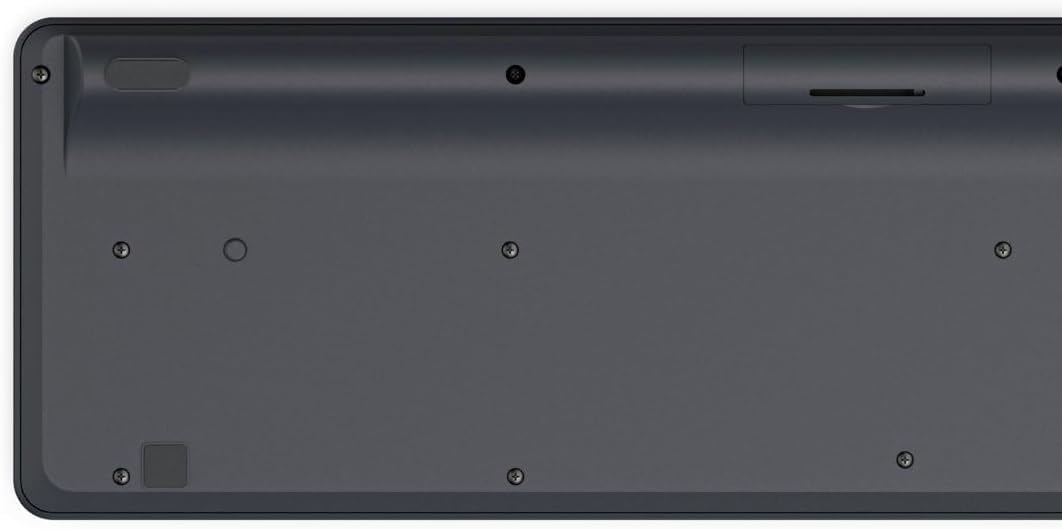
Image: Underside of the Hama WK-300 keyboard, illustrating the battery compartment and the storage slot for the USB receiver.
4.2 Savienojuma izveide ar ierīcēm
The Hama WK-300 keyboard supports connection to up to three devices simultaneously via 2.4 GHz radio (channel 1) and Bluetooth (channels 2 and 3).
4.2.1 2.4 GHz Radio Connection (Channel 1)
- Remove the USB-A receiver from its storage slot in the battery compartment.
- Plug the USB-A receiver into a free USB port on your computer.
- Switch the keyboard to channel 1 (usually indicated by a switch or button on the keyboard). The keyboard should automatically connect to your computer.
4.2.2 Bluetooth Connection (Channels 2 & 3)
- Switch the keyboard to either channel 2 or channel 3.
- Press and hold the pairing button (refer to keyboard layout for exact location, often combined with the channel switch) until the indicator light flashes, signifying pairing mode.
- Savā ierīcē (viedtālrunī, planšetdatorā, datorā) atveriet Bluetooth iestatījumus un meklējiet jaunas ierīces.
- Select "Hama WK-300" from the list of available devices to complete the pairing process.
4.3 Pārslēgšanās starp ierīcēm
To switch between connected devices, simply press the corresponding channel button (1, 2, or 3) on the keyboard. The keyboard will instantly connect to the selected device.
5. Tastatūras lietošana
5.1 Basic Typing Functions
The Hama WK-300 features a QWERTY layout with quiet keys, ensuring a comfortable and undisturbed typing experience. Simply begin typing after connecting to your device.

Attēls: No augšas uz leju view of the Hama WK-300 keyboard, highlighting its 90% layout and key functions, including the Fn key for multimedia controls.
5.2 Multimedia Functions (Fn Keys)
The F keys (F1-F12) have secondary assignments for multimedia control. To activate these functions, press and hold the Fn key simultaneously with the desired F key. This allows for quick control of media playback, volume, and other system functions without navigating through system settings.
5.3 AI Assist Button
The dedicated Assist button activates a cross-program AI assistant, enhancing productivity by providing quick access to intelligent features.
5.4 Enerģijas taupīšana
The keyboard is battery-operated and designed for efficiency, making it ideal for mobile use. It will enter a low-power state after a period of inactivity to conserve battery life.
6. Apkope
6.1 Tastatūras tīrīšana
To clean your keyboard, ensure it is turned off and disconnected from any devices. Use a soft, lint-free cloth slightly dampened with water or a mild cleaning solution. Avoid excessive moisture and abrasive cleaners. Do not immerse the keyboard in water.
6.2. Akumulatora nomaiņa
When the keyboard's performance diminishes or it stops responding, it may be time to replace the AAA battery. Follow the battery installation steps outlined in Section 4.1.
7. Traucējummeklēšana
- Tastatūra neizveido savienojumu: Ensure the keyboard has fresh batteries and is switched to the correct channel (1 for 2.4 GHz, 2 or 3 for Bluetooth). For Bluetooth, ensure the keyboard is in pairing mode and your device's Bluetooth is enabled. For 2.4 GHz, ensure the USB receiver is properly inserted into your device.
- Atslēgas nereaģē: Check battery level. If using 2.4 GHz, try plugging the USB receiver into a different USB port. If using Bluetooth, try re-pairing the keyboard with your device.
- Periodiska saziņa: Ensure there are no strong interference sources nearby (e.g., other wireless devices, large metal objects). Try moving closer to your device.
- Multivides taustiņi nedarbojas: Pārliecinieties, ka nospiežat Fn key simultaneously with the desired F key.
8. Specifikācijas
| Zīmols | Hama |
| Modeļa numurs | 182641 |
| Krāsa | Melns |
| Savienojamība | 2.4 GHz Radio (USB-A receiver), Bluetooth (2 channels) |
| Ierīču skaits | Up to 3 simultaneous devices |
| Tastatūras izkārtojums | QWERTY |
| Produkta izmēri (LxWxH) | 16 x 43.8 x 2.6 centimetri |
| Preces svars | 447 g |
| Nepieciešamas baterijas | 1 AAA baterija (nav iekļauta) |
9. Garantija
The Hama WK-300 Multi-Device Wireless Keyboard comes with a 5 gada garantija. Please retain your proof of purchase for warranty claims. For detailed warranty terms and conditions, refer to the official Hama webvietni vai sazinieties ar klientu atbalsta dienestu.
10. Atbalsts
For further assistance, technical support, or to inquire about spare parts, please contact Hama customer service. You can find contact information on the official Hama webvietne (www.hama.com) or through your local retailer.


