1. Ievads
This manual provides essential instructions for the setup, operation, and maintenance of your Bemi Cognita Tab 5 E-Reader. The Cognita Tab 5 is a lightweight e-reader designed for comfortable reading, featuring a 5.76-inch e-paper display, Android 8.1 operating system, and Wi-Fi connectivity. Please read this manual thoroughly to ensure proper use and to maximize your device's potential.
2. Iepakojuma saturs
Upon unpacking your Bemi Cognita Tab 5, please verify that all the following items are included:
- Bemi Cognita Tab 5 E-Reader
- USB uzlādes kabelis
- Īsā lietošanas pamācība
- Lietotāja rokasgrāmata (šis dokuments)
- Garantijas karte

Image: Contents of the Bemi Cognita Tab 5 E-Reader package, including the device, charging cable, and documentation.
3. Ierīce beigusiesview
Familiarize yourself with the physical components of your Bemi Cognita Tab 5.
3.1 priekšā View
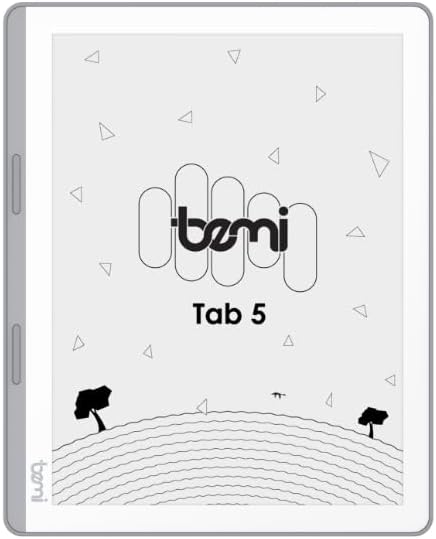
Attēls: priekšpuse view of the Bemi Cognita Tab 5 E-Reader, showing the e-paper display and side buttons.
- E-Paper Display: 5.76-inch screen with 920x680 resolution (198 ppi) and anti-glare coating.
- Lapu pāršķiršanas pogas: Located on the side for convenient navigation through content.
3.2 Atpakaļ View

Attēls: Atpakaļ view of the Bemi Cognita Tab 5 E-Reader, highlighting its textured surface and branding.
- Gumijots Casing: Provides a secure grip and durability.
3.3 Porti un pogas
- Barošanas poga: Izmanto, lai ieslēgtu/izslēgtu ierīci un pārslēgtu to miega režīmā.
- USB ports: Uzlādei un datu pārsūtīšanai.
- MicroSD kartes slots: For expanding storage up to 64GB.
- Austiņu ligzda: Audio izvadei.
4. Iestatīšana
4.1. Sākotnējā uzlāde
Before first use, fully charge your Bemi Cognita Tab 5. Connect the provided USB cable to the device's USB port and plug the other end into a compatible USB power adapter (not included) or a computer's USB port. The charging indicator will show the charging status.
4.2 Ieslēgšana/izslēgšana
- Lai ieslēgtu: Nospiediet un turiet ieslēgšanas/izslēgšanas pogu, līdz ekrāns aktivizējas.
- Lai izslēgtu: Press and hold the Power button, then select 'Power Off' from the options that appear on the screen.
- Lai ieietu miegā/pamostos: Īsi nospiediet ieslēgšanas/izslēgšanas pogu, lai ierīci ieslēgtu miega režīmā vai pamodinātu.
4.3. Pamata navigācija
The Cognita Tab 5 features a responsive touchscreen for navigation. Tap to select items, swipe to scroll, and use pinch-to-zoom where applicable. The dedicated page-turn buttons on the side can also be used for navigating through e-books.
4.4 Wi-Fi savienojums
To access online content, transfer files wirelessly, or update software, connect your device to a Wi-Fi network:
- Dodieties uz Iestatījumi no galvenās izvēlnes.
- Izvēlieties Wi-Fi.
- Pārslēgt Wi-Fi On.
- Sarakstā atlasiet vēlamo tīklu un, ja tiek prasīts, ievadiet paroli.
5. Lietošanas instrukcijas
5.1 E-grāmatu lasīšana
The Bemi Cognita Tab 5 supports various e-book formats including PDF, EPUB, and MOBI. To start reading:
- Dodieties uz Grāmatas section on your device.
- Tap on the cover of the e-book you wish to read.
- Use the touchscreen or the physical page-turn buttons to navigate through pages.

Image: A person holding the Bemi Cognita Tab 5 E-Reader, demonstrating the reading experience on its e-paper display.
5.2 Fona apgaismojuma regulēšana
The adjustable screen backlight allows for comfortable reading in various lighting conditions. Access backlight settings through the quick settings panel or the main Settings menu to adjust brightness levels.
5.3 File Pārsūtīšana
Jūs varat pārsūtīt files to your Cognita Tab 5 via USB or Wi-Fi.
- USB pārsūtīšana: Connect the device to your computer using the USB cable. The device will appear as a removable storage drive, allowing you to drag and drop files.
- Wi-Fi pārsūtīšana: Ensure both your device and the transmission device are on the same local area network (LAN). On your Cognita Tab 5, navigate to the Wi-Fi Transfer option (often found in the 'Storage' or 'Settings' menu). An IP address will be displayed (e.g., http://172.20.10.8:12580). Enter this address into a web browser on your computer or phone to access the device's storage and transfer files. Do not close this page during transmission.

Image: Screenshots showing the Wi-Fi transfer interface with an IP address and a file management screen on the Bemi Cognita Tab 5 E-Reader.
5.4 Installing Additional Applications
Running on Android 8.1, the Cognita Tab 5 allows for the installation of additional reading applications. You can typically install apps by transferring their APK files to the device and installing them through a file manager, or by using a pre-installed app store if available.
5.5 Audio funkcijas
Ierīce atbalsta audio files and features text-to-speech functionality. Connect headphones to the headphone jack to listen to audiobooks or have your e-books read aloud.
5.6 Special Reading Features
The Cognita Tab 5 includes features to enhance your reading experience:
- PDF Reflow: Optimizes PDF documents for better readability on the smaller screen.
- Vārdnīca: Look up definitions of words directly from your e-book.
- Tulkotājs: Translate words or phrases within your reading material.
6. Apkope
6.1. Tīrīšana
Lai tīrītu ekrānu, izmantojiet mīkstu, nepūkošu drānu. Noturīgus traipus var viegli notīrīt.ampen the cloth with water or a screen cleaner specifically designed for electronics. Avoid harsh chemicals or abrasive materials. For the device body, use a dry, soft cloth.
6.2 Akumulatora kopšana
To prolong battery life, avoid exposing the device to extreme temperatures. Charge the device regularly, but avoid leaving it fully discharged for extended periods. If storing the device for a long time, ensure it has a partial charge (around 50%).
6.3. Uzglabāšana
Store your Bemi Cognita Tab 5 in a cool, dry place away from direct sunlight and moisture. Protect the screen from scratches by using a protective cover or case when not in use.
7. Traucējummeklēšana
If you encounter issues with your Bemi Cognita Tab 5, refer to the following common solutions:
- Ierīce neieslēdzas: Ensure the battery is charged. Connect the device to a power source and try again. If unresponsive, perform a hard reset by holding the power button for 10-15 seconds.
- Ekrāns nereaģē: Restartējiet ierīci. Ja problēma joprojām pastāv, pārliecinieties, vai ekrāns ir tīrs un bez gružiem.
- Wi-Fi savienojuma problēmas: Verify your Wi-Fi password. Restart your router and the Cognita Tab 5. Ensure the device is within range of the Wi-Fi signal.
- Lēna veiktspēja: Close unused applications. Clear cache if available in settings. Consider performing a factory reset (this will erase all data).
- Akumulators ātri izlādējas: Reduce screen brightness. Turn off Wi-Fi when not in use. Close background applications.
Ja rodas pastāvīgas problēmas, kas šeit nav aplūkotas, lūdzu, sazinieties ar klientu atbalsta dienestu.
8. Specifikācijas
| Funkcija | Specifikācija |
|---|---|
| Modeļa nosaukums | Cognita Tab 5 (BRCT5) |
| Displejs | 5.76-inch E-Paper, 920x680 resolution (198 ppi), Anti-glare |
| Procesors | Cortex-A7 Quad-Core |
| RAM | 1 GB |
| Iekšējā krātuve | 16 GB |
| Paplašināma krātuve | MicroSD karte līdz 64 GB |
| Operētājsistēma | Android 8.1 |
| Savienojamība | Wi-Fi, USB |
| Īpašas funkcijas | Text-to-speech, Smart Reading, Headphone Jack, Scratch Resistant, Card Support |
| Atbalstītie e-grāmatu formāti | PDF, EPUB, MOBI, and others |
| Akumulatora darbības laiks | Līdz 2 nedēļām (tipisks lietojums) |
| Svars | 135g |
| Biezums | 8 mm |
9. Garantija un atbalsts
9.1 Informācija par garantiju
Your Bemi Cognita Tab 5 E-Reader comes with a warranty. Please refer to the included Warranty Card for specific terms, conditions, and duration of the warranty. Keep your proof of purchase for warranty claims.
9.2 Klientu atbalsts
For technical assistance, troubleshooting beyond this manual, or warranty inquiries, please contact the seller or manufacturer directly. Contact information may be available on the product packaging or the official Bemi webvietne.


