1. Ievads
Welcome to the user manual for your new FLEXISPOT 63x28 Inch Dual Motor Electric Standing Desk. This manual provides essential information for the safe assembly, operation, maintenance, and troubleshooting of your desk. Please read it thoroughly before use and retain it for future reference.
2. Drošības instrukcijas
- Pirms salikšanas pārliecinieties, vai visas sastāvdaļas ir savās vietās un nav bojātas. Nelietojiet ierīci, ja kāda no tām trūkst vai ir bojāta.
- Darbības laikā turiet bērnus un mājdzīvniekus prom no galda, lai izvairītos no traumām.
- Do not place hands or other body parts near moving parts of the desk during height adjustment.
- Pārliecinieties, ka rakstāmgalds ir novietots uz līdzenas virsmas, lai novērstu apgāšanos.
- Nepārslogojiet galdu. Maksimālo svara izturību skatiet specifikācijās.
- Keep all electrical cords organized and away from moving parts to prevent damage or entanglement.
- Pirms tīrīšanas vai jebkādas apkopes atvienojiet rakstāmgaldu no strāvas kontaktligzdas.
- Only use the desk for its intended purpose as a workstation.
3. Iepakojuma saturs
Pārliecinieties, vai jūsu iepakojumā ir iekļauti visi tālāk norādītie priekšmeti:
- Desktop Surface (Black)
- Desk Frame (Black, including dual motors and lifting columns)
- Control Panel with Memory Controller
- Strāvas adapteris un kabelis
- Montāžas furnitūra (skrūves, instrumenti utt.)
- Lietošanas pamācība

Attēls: Pāriview of the FLEXISPOT 63x28 Inch Dual Motor Electric Standing Desk, showing the desktop, frame, and control panel.
4. Iestatīšanas instrukcijas
4.1 Izpakošana
Carefully remove all components from the packaging. Place them on a soft, clean surface to prevent scratches or damage during assembly. Keep all packaging materials until assembly is complete and you are satisfied with the product.
4.2 Assembling the Frame
Follow the detailed diagrams provided in the separate assembly guide to connect the lifting columns to the crossbar and attach the footings. Ensure all screws are tightened securely.
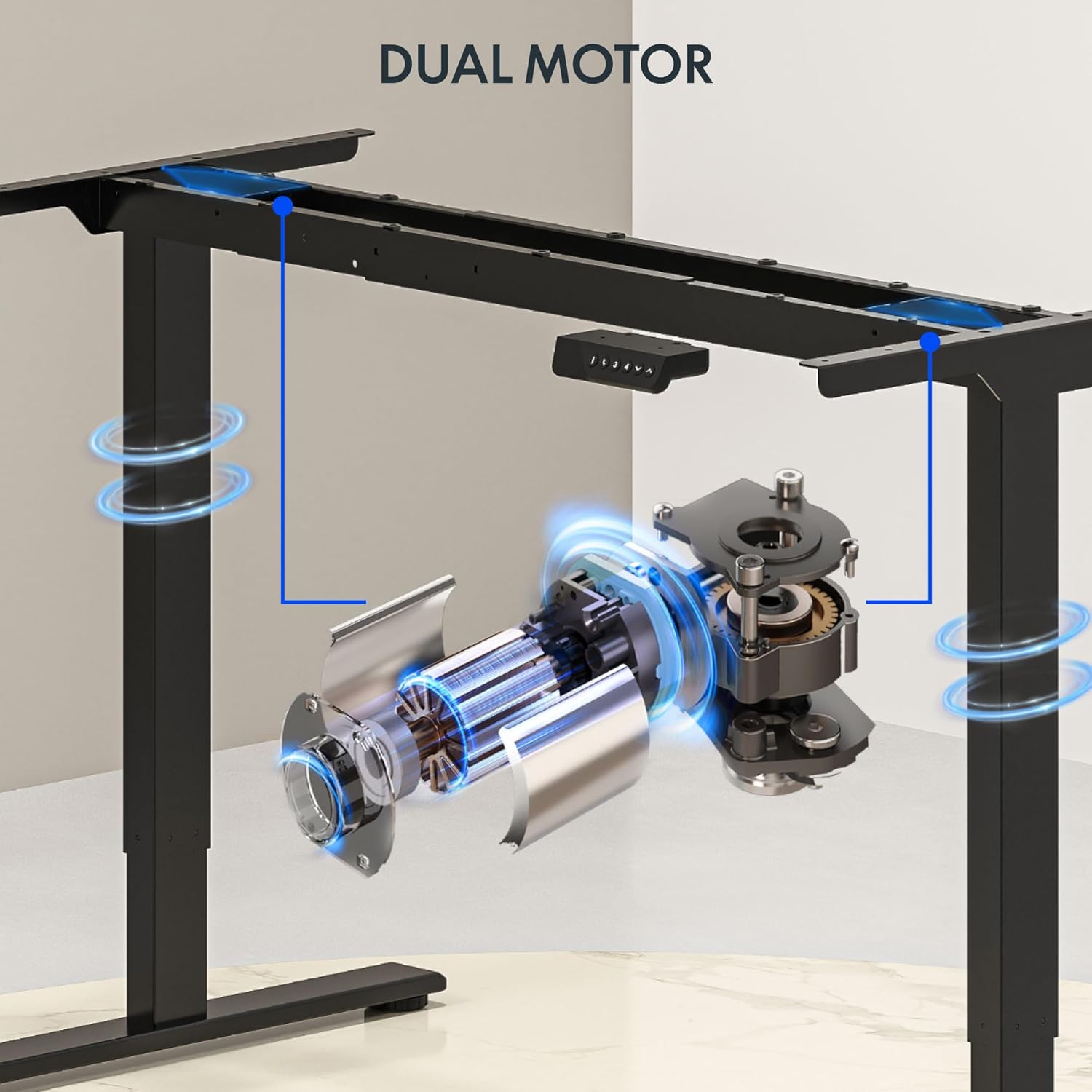
Attēls: Detalizēts view of the dual motor desk frame, illustrating the motor placement and structural components.
4.3 Attaching the Desktop
Carefully place the desktop upside down on a soft surface. Align the assembled frame with the pre-drilled holes on the desktop. Secure the desktop to the frame using the provided screws. Once secured, carefully flip the desk upright with assistance.
4.4 Connecting the Control Panel and Power
Connect the control panel cable to the control box, and then connect the power adapter to the control box. Plug the power cable into a standard electrical outlet. The desk is now ready for initial operation.

Image: Close-up of the desk's control panel, showing the LED display and buttons for height adjustment and memory presets.
Video: Demonstrates the dual-motor strength and smooth operation of the FLEXISPOT standing desk, highlighting its robust design and functionality.
5. Lietošanas instrukcijas
5.1 Augstuma regulēšana
- Nospiediet pogu Augšup (∧) poga, lai paceltu galdu.
- Nospiediet pogu Lejā (∨) poga, lai nolaistu galdu.
- Release the button at your desired height. The LED display will show the current height.
5.2 Atmiņas iestatījumu izmantošana
The control panel features four memory presets (1, 2, 3, 4) to save and recall your preferred sitting and standing heights.
- Pielāgojiet galda augstumu vēlamajā augstumā, izmantojot pogas Augšup/Lejup.
- Nospiediet pogu "M" button (or similar memory set button, indicated by 'i' on some models) once. The display will flash.
- Immediately press one of the number buttons (1, 2, 3, or 4) to save the current height to that preset.
- To recall a saved height, simply press the corresponding number button (1, 2, 3, or 4). The desk will automatically move to the saved position.

Image: Close-up of the memory controller, highlighting the numbered preset buttons and the up/down controls for precise height adjustments.
5.3 Sadursmju novēršanas sistēma
The desk is equipped with an anti-collision system. If the desk encounters an obstacle during height adjustment, it will automatically stop and reverse slightly to prevent damage. This feature enhances safety during operation.
6. Apkope
- Tīrīšana: Noslaukiet galda virsmu un rāmi ar mīkstu, damp Izvairieties no abrazīviem tīrīšanas līdzekļiem vai spēcīgām ķīmiskām vielām, kas varētu sabojāt apdari.
- Pārbaude: Regularly check all screws and connections to ensure they are tight. Re-tighten if necessary.
- Kabeļu vadība: Ensure all cables are neatly organized and not pinched or tangled, especially during height adjustments.
- Strāvas vads: Pārbaudiet strāvas vadu, vai nav bojājumu pazīmju. Ja tas ir bojāts, pārtrauciet lietošanu un sazinieties ar klientu atbalsta dienestu.
7. Traucējummeklēšana
| Problēma | Iespējamais cēlonis | Risinājums |
|---|---|---|
| Galds nekustas. | Power cable disconnected; motor cable loose; overload. | Check power connection; ensure all cables are securely plugged in; reduce weight on desk. |
| Galds kustas nevienmērīgi vai rada neparastu troksni. | Nevienmērīga slodze; vaļīgi savienojumi; aizsprostojums. | Distribute weight evenly; check and tighten all screws; remove any obstructions. |
| Augstuma iepriekšiestatījumi nedarbojas. | Presets not properly set. | Re-program the memory presets following section 5.2. |
| Sadursmes novēršanas sistēma bieži nostrādā. | Obstacles in the path of movement; sensitivity setting too high. | Clear the area around the desk; consult the full manual for adjusting anti-collision sensitivity if available. |
If you encounter issues not listed here or if the solutions do not resolve the problem, please contact FLEXISPOT customer support.
8. Specifikācijas
| Funkcija | Detaļas |
|---|---|
| Zīmols | FLEXISPOT |
| Modelis | 63x28 Inch Dual Motor Electric Standing Desk |
| Darbvirsmas izmēri | 63 collu platums x 28 collu dziļums |
| Augstuma diapazons | 28.3" līdz 47.6" |
| Maksimālā svara ietilpība | 198 mārciņas |
| Motora tips | Divkāršs motors |
| Vadības panelis | Memory Controller with 4 Presets |
| Darbvirsmas materiāls | Engineered Wood (Black Top) |
| Rāmja materiāls | Alloy Steel (Black Frame) |
| Īpašas funkcijas | Dual Motor, 198 lbs Heavy-Duty Capacity, Memory Controller, 63"x28" Large Desktop |

Image: Diagram illustrating the dimensions of the FLEXISPOT 63x28 Inch Electric Standing Desk, including height range, width, and depth.
9. Garantija un atbalsts
9.1. Ierobežotā garantija
This FLEXISPOT product comes with a limited warranty against defects in materials and workmanship. The specific terms and duration of the warranty may vary. Please refer to the warranty card included in your package or visit the official FLEXISPOT webvietne, lai iegūtu detalizētu informāciju par garantiju.
The warranty typically covers the desk frame, motors, and control panel under normal use conditions. Damage resulting from misuse, accidents, unauthorized modifications, or improper assembly is not covered.
9.2 Klientu atbalsts
For technical assistance, warranty claims, or any questions regarding your FLEXISPOT standing desk, please contact our customer support team:
- Webvietne: www.flexispot.com
- E-pasts: support@flexispot.com
- Tālrunis: (Refer to your product packaging or webreģionālo kontaktinformācijas numuru vietne)
Please have your model number (B0F29ZD4DN) and purchase date ready when contacting support.


