1. Ievads
Paldies par pirkumuasing the iFFALCON 40S55T 40-inch Full HD Google TV. This manual provides essential information for the safe and efficient use of your television. Please read it thoroughly before operating the device and retain it for future reference.
The iFFALCON 40S55T is a tunerless smart TV designed for streaming content, offering a Full HD display, Google TV operating system, Chromecast built-in, and Dolby Audio for an immersive entertainment experience.
2. Drošības informācija
Lietojot šo televizoru, vienmēr ievērojiet pamata drošības pasākumus, lai samazinātu ugunsgrēka, elektriskās strāvas trieciena un traumu risku.
- Nepakļaujiet televizoru lietus vai mitruma iedarbībai.
- Neatveriet televizora korpusuasing; visu apkopi uzticiet kvalificētam personālam.
- Nodrošiniet pareizu ventilāciju ap televizoru.
- Sargājiet televizoru no tiešiem saules stariem, siltuma avotiem un spēcīgiem magnētiskajiem laukiem.
- Izmantojiet tikai ražotāja piegādāto strāvas vadu un piederumus.
- Atvienojiet televizoru no strāvas zibens laikā vai tad, ja to ilgstoši nelietojat.
3. Iepakojuma saturs
Pārliecinieties, vai kastē ir visi priekšmeti:
- iFFALCON 40S55T 40-inch Full HD Google TV
- Tālvadības pults
- TV statīvs (2 gab.)
- TV statīva skrūves
- Strāvas kabelis
- Garantijas karte
- Lietošanas instrukcija (šis dokuments)
4. Iestatīšana
4.1 TV statīva piestiprināšana
- Uzmanīgi novietojiet televizoru ar ekrānu uz leju uz mīkstas, līdzenas virsmas, lai novērstu ekrāna bojājumus.
- Novietojiet katru statīva daļu ar atbilstošajām spraugām televizora apakšpusē.
- Nostipriniet statīvus, izmantojot komplektā iekļautās skrūves. Pārliecinieties, vai tās ir cieši pievilktas.
4.2 Strāvas pieslēgšana
Pievienojiet strāvas vadu televizora barošanas ieejai un pēc tam iespraudiet to sienas kontaktligzdā. Televizors pārslēgsies gaidstāves režīmā.
4.3 Initial Setup (Google TV & Network)
Upon first power-on, the TV will guide you through the initial setup process for Google TV. This includes:
- Valodas izvēle.
- Savienojuma izveide ar Wi-Fi tīklu.
- Signing in with your Google account to access personalized content and apps.
- Noteikumu un nosacījumu pieņemšana.
4.4 Savienojamība
The iFFALCON 40S55T offers various connection options for external devices.

Attēls: Pāriview of the TV's connectivity options, including HDMI, USB, Bluetooth, and Wi-Fi.
- HDMI porti: Pievienojiet ārējās ierīces, piemēram, spēļu konsoles, Blu-ray atskaņotājus vai televizora pierīces.
- USB ports: USB atmiņas ierīču pievienošanai multivides atskaņošanai files.
- Wi-Fi: For wireless internet connection to access streaming services and online features.
- Bluetooth: For connecting wireless headphones, speakers, or other Bluetooth-enabled accessories.
4.5 Tunerless Operation
This TV is designed as a tunerless model, meaning it does not have a built-in tuner for terrestrial (over-the-air) broadcasts. To watch terrestrial, BS, or CS broadcasts, an external tuner is required and must be purchased separately.

Image: The iFFALCON 40S55T TV showcasing its smart features, highlighting its tunerless design and ability to enjoy internet video content without an antenna connection.
5. Televizora vadība
5.1 Tālvadības pults Overview
The remote control provides access to all TV functions, including power, volume, channel navigation, and smart TV features. It also supports voice search via 'Hey Google'.

Image: The TV remote control, featuring quick access buttons for popular streaming services and a dedicated microphone button for voice commands.
- Barošanas poga: Ieslēdz vai izslēdz televizoru.
- Navigācijas pogas: Lai pārvietotos pa izvēlnēm, izmantojiet virziena paliktņus un pogu Labi.
- Skaļuma/kanālu pogas: Adjust volume and change channels (if an external tuner is connected).
- Lietotnes īsinājumtaustiņi: Direct access to popular streaming services like Netflix, YouTube, etc.
- Mikrofona poga: Press and hold to activate 'Hey Google' voice search.
5.2 Google TV funkcijas
Your iFFALCON TV runs on Google TV, providing a personalized and integrated entertainment experience.
- Satura apkopošana: Google TV organizes movies, shows, and live TV from all your apps and subscriptions into one place.
- Personalizēti ieteikumi: Pamatojoties uz jūsu viewing history and preferences, Google AI suggests content you might enjoy.
- Balss meklēšana: Use the 'Hey Google' feature on your remote to quickly find content, get information, or control smart home devices.
- Iebūvēta Chromecast ierīce: Easily cast content from your smartphone, tablet, or computer directly to your TV screen.

Image: A smartphone screen mirroring content to the iFFALCON TV, demonstrating the Chromecast built-in feature for enjoying mobile content on a larger display.
5.3 Attēla iestatījumi
The TV incorporates advanced image processing technologies to deliver a superior viewpieredzi.
- AI PQ Processor: TCL's proprietary AiPQ Processor intelligently adjusts image quality at the pixel level, enhancing clarity, color, and contrast for a vivid and realistic picture.
- Full HD (FHD): Experience sharp and detailed images with Full High Definition resolution, offering 200% more detail than standard HD screens.

Image: A visual comparison illustrating the enhanced detail and clarity provided by Full HD resolution compared to standard HD.
- HDR10/HLG Support: Enjoy a wider range of colors and contrast with HDR10 and HLG compatibility, revealing stunning detail in both bright and dark scenes.

Attēls: TV ekrāna šovsasing the vibrant and detailed picture quality achieved with HDR10/HLG technology.
- Mikro aptumšošana: This technology analyzes the image in hundreds of separate zones to adjust brightness and darkness independently, enhancing contrast and picture quality.

Image: A visual representation of Micro Dimming technology, illustrating how it enhances contrast and picture depth by adjusting brightness in specific areas of the screen.
5.4 Sound Settings (Dolby Audio)
The TV features Dolby Audio for clear, rich, and immersive sound.
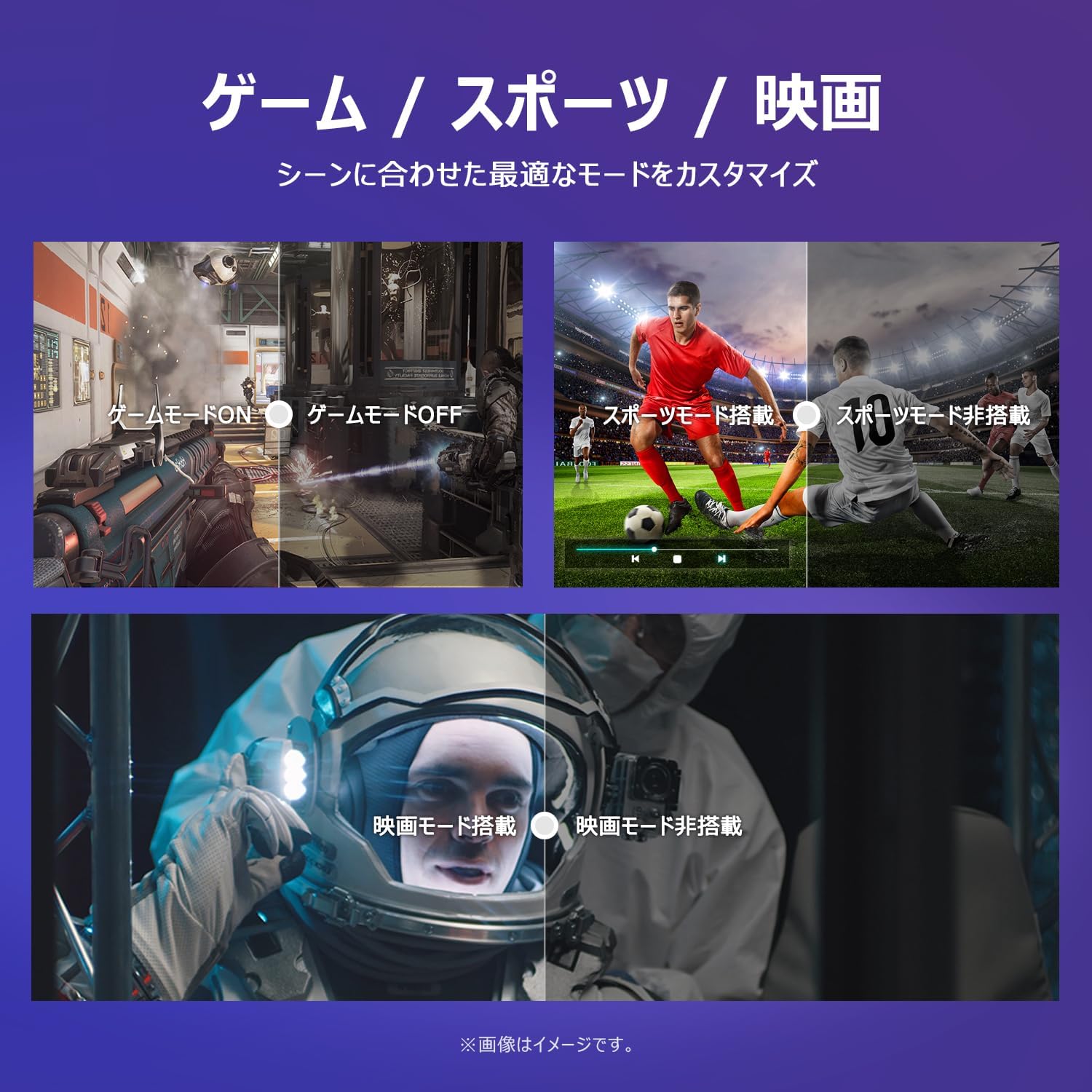
Image: The TV screen with a visual representation of sound, highlighting the immersive audio experience provided by Dolby Audio.
Access the sound settings menu to adjust modes like Standard, Music, Movie, or Custom to suit your preferences.
5.5 Spēles režīms
Activate Game Mode for an optimized gaming experience with reduced input lag.
Image: Visual comparisons demonstrating the optimized settings for Game Mode, Sports Mode, and Movie Mode, adapting the TV's performance to different content types.
The TV also offers dedicated Sports Mode and Movie Mode to enhance viewing for specific content types.
5.6 Sistēmas iestatījumi
The quick settings menu allows you to customize frequently used system settings and rearrange their order for intuitive and convenient access.

Attēls: A view of the TV's quick system settings interface, illustrating how users can easily access and customize various functions like brightness, picture mode, and network settings.
6. Apkope
Pareiza kopšana un apkope pagarinās jūsu televizora kalpošanas laiku.
- Ekrāna tīrīšana: Viegli noslaukiet ekrānu ar mīkstu, nepūkojošu drānu. Noturīgu traipu gadījumā izmantojiet ekrāna tīrīšanas līdzekli, kas īpaši paredzēts televizoriem, uzklājot to uz drānas, nevis tieši uz ekrāna.
- C tīrīšanaasing: Televizora tīrīšanai izmantojiet mīkstu, sausu drānu.asing. Nelietojiet abrazīvus tīrīšanas līdzekļus vai šķīdinātājus.
- Ventilācija: Lai novērstu pārkaršanu, pārliecinieties, vai televizora aizmugurē esošās ventilācijas atveres nav bloķētas.
- Strāvas vads: Regulāri pārbaudiet, vai strāvas vads nav bojāts. Ja tas ir bojāts, sazinieties ar klientu atbalsta dienestu, lai to nomainītu.
7. Traucējummeklēšana
Ja rodas problēmas ar televizoru, skatiet tālāk norādītās bieži sastopamās problēmas un risinājumus. Ja problēma joprojām pastāv, sazinieties ar klientu atbalsta dienestu.
| Problēma | Iespējamais cēlonis | Risinājums |
|---|---|---|
| Nav jaudas | Strāvas kabelis nav pievienots; strāvas kontaktligzda nedarbojas | Ensure power cable is securely plugged in; Test outlet with another device |
| Nav attēla, bet ir skaņa | Nepareizs ievades avots; ārējās ierīces problēma | Nospiediet tālvadības pults pogu “Ievade”, lai izvēlētos pareizo avotu; pārbaudiet ārējo ierīču savienojumus. |
| Nav skaņas, bet attēls ir | Skaļums ir izslēgts vai pārāk zems; ārējās audiosistēmas problēma | Unmute or increase volume; Check audio cable connections to external sound system |
| Tālvadības pults nedarbojas | Baterijas izlādējušās; šķērslis starp tālvadības pulti un televizoru | Replace batteries; Remove any obstructions; Ensure remote is pointed at the TV's IR sensor |
| Nevar izveidot savienojumu ar Wi-Fi | Nepareiza parole; Maršrutētāja problēma; Televizors ir pārāk tālu no maršrutētāja | Verify Wi-Fi password; Restart router; Move TV closer to router or use a Wi-Fi extender |
8. Specifikācijas
Detailed technical specifications for the iFFALCON 40S55T TV:

Image: Dimensional drawing of the iFFALCON 40S55T TV, indicating its physical measurements.
| Funkcija | Specifikācija |
|---|---|
| Ekrāna izmērs | 40 collas |
| Displeja veids | VA Liquid Crystal |
| Izšķirtspēja | Full HD (1920 x 1080) |
| Atsvaidzināšanas biežums | 60 Hz |
| Malu attiecība | 16:9 |
| Kontrasta attiecība | 1000:1 |
| Operētājsistēma | Google TV |
| Audio izvade | 20 Watts (2.1 channels) |
| HDMI porti | 2 |
| USB porti | 1 |
| Bezvadu savienojamība | Wi-Fi, Bluetooth |
| Izstrādājuma izmēri (PxAxD) | 89.2 x 55.8 x 18.4 cm (ar statīvu) |
| Produkta svars | 4.63 kg |
| Saderīgs ar sienas stiprinājumu | Jā |
| Iekļauti aksesuāri | Stand, Remote Control, Warranty Card, Power Cable |
9. Garantija un atbalsts
Your iFFALCON 40S55T TV comes with a manufacturer's warranty. Please refer to the included warranty card for specific terms, conditions, and duration of coverage.
For technical support, troubleshooting assistance beyond this manual, or warranty claims, please contact iFFALCON customer service. Contact information can typically be found on the warranty card or the official iFFALCON webvietne.
Please have your model number (40S55T) and purchase date ready when contacting support.


