1. Ievads
The ALIGATOR AZA930B is a mobile phone designed with ease of use in mind, particularly for seniors. It features a large keypad, a clear 2.8-inch color display, and essential safety functions such as an SOS button and SOS locator. This manual provides detailed instructions on how to set up, operate, maintain, and troubleshoot your device to ensure optimal performance and safety.
2. Drošības informācija
Please read this section carefully before using your phone to ensure safe and proper operation.
- Akumulatora drošība: Use only ALIGATOR approved batteries and chargers. Do not short-circuit, puncture, or expose the battery to extreme temperatures. Dispose of batteries properly.
- Uzlāde: The phone does not include a charger. Use a compatible USB-C charger (recommended model ALIGATOR CHA0047) with a power output of 2.5-3W. Avoid charging in damp nosacījumiem.
- Dzirdes aizsardzība: Lai novērstu dzirdes bojājumus, izvairieties no ilgstošas klausīšanās lielā skaļumā.
- Braukšanas drošība: Always prioritize driving safety. Use hands-free accessories and obey all local laws and regulations regarding mobile phone use while driving.
- Medicīniskās ierīces: Maintain a safe distance between the phone and medical devices such as pacemakers. Consult your physician and the medical device manufacturer for specific guidelines.
- Ūdens izturība: Šis tālrunis nav ūdensizturīgs. Izvairieties no saskares ar šķidrumiem.
3. Iepakojuma saturs
Pārliecinieties, vai produkta iepakojumā ir visi nepieciešamie priekšmeti:
- ALIGATOR AZA930B Mobile Phone
- Uzlādes doks
- Lietotāja rokasgrāmata (šis dokuments)
- Note: Charger is not included and must be purchased separately.
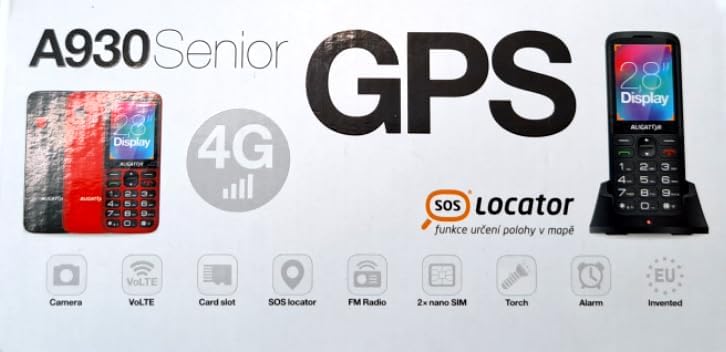
Figure 3.1: Product packaging illustrating the phone, charging dock, and various features such as 4G connectivity, GPS, SOS Locator, camera, VoLTE, card slot, FM radio, torch, and alarm. The box also indicates the 2.8-inch display.
4. Iestatīšana
4.1. SIM karšu ievietošana
The ALIGATOR AZA930B supports Dual SIM (2 x Nano SIM) functionality. To insert SIM cards:
- Izslēdziet tālruni.
- Noņemiet aizmugurējo vāciņu un akumulatoru.
- Locate the SIM card slots. Insert your Nano SIM cards into the designated slots, ensuring the gold contacts face down and the cut corner aligns correctly.
- Nomainiet akumulatoru un aizmugurējo vāciņu.
4.2. Micro SD kartes ievietošana
The phone supports a Micro SD memory card up to 256 GB for additional storage.
- Follow steps 1 and 2 from "4.1. Inserting SIM Cards".
- Locate the Micro SD card slot. Insert the Micro SD card with the gold contacts facing down until it clicks into place.
- Nomainiet akumulatoru un aizmugurējo vāciņu.
4.3. Sākotnējā uzlāde
Before first use, fully charge the phone's 1700 mAh Li-ion battery.
- Connect the USB-C cable (not included) to the phone's USB-C port or place the phone in the charging dock.
- Connect the other end of the cable to a compatible charger (e.g., ALIGATOR CHA0047, 2.5-3W) or a powered USB port.
- The charging indicator will illuminate. A full charge may take several hours.

Figure 4.1: The ALIGATOR AZA930B phone placed in its dedicated charging dock. The phone's screen shows the current time and network signal indicators.

Figure 4.2: Detail from the product box, explicitly showing an icon indicating that a charger is not included and specifying a recommended charger power of 2.5-3W.
5. Lietošanas instrukcijas
5.1. Ieslēgšana/izslēgšana
- Lai ieslēgtu: Nospiediet un turiet ieslēgšanas/izslēgšanas/zvana beigu pogu (sarkanā poga), līdz ekrāns iedegas.
- Lai izslēgtu: Press and hold the Power/End Call button until the power off options appear, then select "Power off".
5.2. Zvanīšanas pamatfunkcijas
- Zvanīšana: Enter the phone number using the large keypad and press the Call button (green button).
- Atbildēšana uz zvanu: When the phone rings, press the Call button (green button).
- Zvana beigšana: Press the Power/End Call button (red button).
- Brīvroku režīms: During a call, activate hands-free mode via the on-screen option or a dedicated button if available.
5.3. SOS Button and SOS Locator
The SOS button is a critical safety feature, allowing quick contact in emergencies.
- SOS poga: Located on the back of the phone (often red). Press and hold this button to activate the emergency sequence.
- SOS Presets: You can set up to 5 preset emergency contacts. When the SOS button is pressed, the phone will automatically call these numbers in sequence and send an emergency SMS.
- SOS Locator: This function sends the phone's location via SMS to the emergency contacts after the SOS button is pressed. The recipient can then view the location on a map via a web link provided in the SMS. This feature utilizes both GSM and GPS for location accuracy.

5.1. attēls. Aizmugure view of the ALIGATOR AZA930B, showing the prominent red SOS button and the speaker grille for clear audio.

5.2. attēls: Leņķiska aizmugure view of the ALIGATOR AZA930B, demonstrating the activated flashlight feature.
5.4. "Zachranka" Rescue Application
The "Zachranka" application is a mobile emergency call application pre-installed on the device.
- It provides quick contact with emergency medical services or mountain rescue.
- The application is valid in Austria, Hungary, the Czech Republic, and in the territories of the Slovak mountains.
- For more information, refer to the "Zachranka" app's official resources.

5.3. attēls: Priekšpuse un aizmugure views of the ALIGATOR AZA930B, accompanied by the "Zachranka" rescue application logo, indicating its integration with the device.
5.5. Citas funkcijas
- Tālruņu katalogs: Saglabājiet līdz 500 kontaktiem.
- Ziņapmaiņa: Send and receive SMS messages (memory for 100 SMS). Supports sending photos via MMS.
- Multivide:
- FM radio: Listen to FM radio stations.
- Multivides atskaņotājs: Atskaņot audio un video files stored on the phone or Micro SD card.
- Balss ierakstītājs: Record voice memos.
- Lukturis: Activate the built-in flashlight for illumination.
- Rīki: Includes Alarm, Calculator, and SIM toolkit support.
- Bluetooth: Connect to Bluetooth headsets or other devices.
- Vibrācijas trauksme: Set the phone to vibrate for incoming calls or notifications.
- Melodijas: Choose from 10+1 pre-installed melodies.
- Automātiska laika regulēšana: The phone can automatically adjust its time.

5.4. attēls. Priekšpuse view of the ALIGATOR AZA930B, highlighting its user-friendly large keypad and vibrant color display.
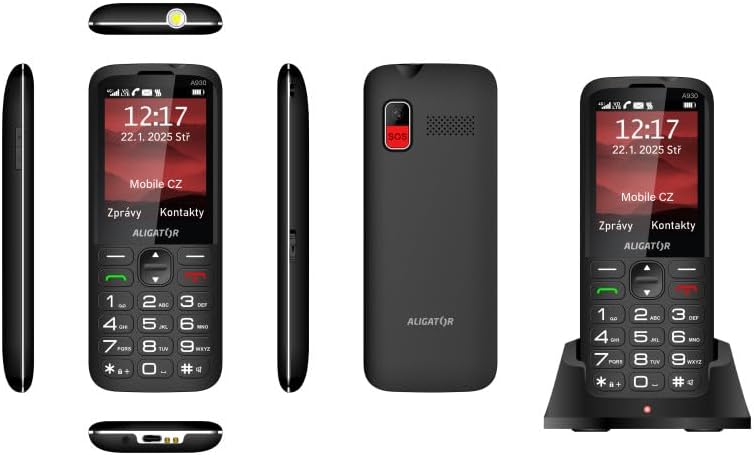
Figure 5.5: Comprehensive views of the ALIGATOR AZA930B, illustrating its design from the top, sides, front, back, and when seated in its charging dock.
6. Apkope
- Tīrīšana: Tālruņa virsmas tīrīšanai izmantojiet mīkstu, sausu drānu. Izvairieties no spēcīgu ķīmisku vielu vai abrazīvu materiālu lietošanas.
- Akumulatora kopšana: To prolong battery life, avoid fully discharging the battery frequently. Store the phone in a cool, dry place if not used for extended periods.
- Uzglabāšana: Keep the phone away from extreme temperatures, direct sunlight, and dusty environments.
7. Traucējummeklēšana
| Problēma | Iespējamais cēlonis | Risinājums |
|---|---|---|
| Tālrunis neieslēdzas. | Akumulators ir izlādējies vai nav pareizi ievietots. | Uzlādējiet akumulatoru. Pārliecinieties, vai akumulators ir pareizi ievietots. |
| Nav tīkla signāla. | SIM card not inserted correctly or out of network coverage. | Reinsert SIM card. Move to an area with better network coverage. |
| Nevar veikt vai saņemt zvanus. | No credit, SIM card issue, or network problem. | Check your account balance. Verify SIM card insertion. Contact your network provider. |
| SOS poga nedarbojas. | SOS numuri nav iestatīti vai ir nepareizi. | Ensure SOS numbers are correctly configured in settings. Check network signal. |
| Akumulators ātri izlādējas. | High usage, background apps, or aging battery. | Reduce screen brightness. Close unnecessary applications. Consider replacing the battery if it's old. |
8. Specifikācijas
| Funkcija | Detaļas |
|---|---|
| Modeļa numurs | AZA930B |
| Displejs | 2.8 collu TFT krāsu displejs |
| SIM karšu sloti | Dual SIM (2 x Nano SIM) |
| Atmiņas karšu atbalsts | Micro SD līdz 256 GB |
| Akumulators | 1700 mAh Li-ion |
| Sarunu laiks | Līdz 480 minūtēm |
| Gaidīšanas laiks | Līdz 10 dienām |
| Kamera | 1.9 MP |
| Savienojamība | 4G/LTE/VoLTE, Bluetooth |
| Uzlādes ports | USB-C |
| Austiņu ligzda | 3.5 mm |
| Izmēri | 14.3 x 5.8 x 1.36 cm |
| Svars | 95 g |
| Operētājsistēma | Symbian 9.1 |
| Krāsa | Melns |
Piezīme: specifikācijas var tikt mainītas bez iepriekšēja brīdinājuma.
9. Garantija un atbalsts
ALIGATOR products are designed and manufactured to the highest quality standards. For detailed warranty information, including terms, conditions, and duration, please refer to the warranty card included with your product or visit the official ALIGATOR webvietne.
For technical support, service, or inquiries regarding your ALIGATOR AZA930B mobile phone, please contact ALIGATOR customer service or visit their official support channels. Keep your purchase receipt and product serial number (IMEI) handy when seeking support.
- IMEI 1: 357140835088496
- IMEI 2: 357140835088504
- Barcode/UPC: 8596426108267


