1. Drošības informācija
Please read all safety instructions carefully before using your iFFALCON TV. Retain this manual for future reference.
- Elektriskā drošība: Do not expose the TV to rain or moisture. Ensure the power cord is securely plugged into a grounded outlet. Do not overload electrical outlets.
- Izvietojums: Place the TV on a stable, level surface or mount it securely to a wall. Ensure adequate ventilation around the TV to prevent overheating. Do not block ventilation openings.
- Tīrīšana: Pirms tīrīšanas atvienojiet televizoru no strāvas. Izmantojiet mīkstu, sausu drānu. Nelietojiet šķidrus tīrīšanas līdzekļus vai aerosolu tīrīšanas līdzekļus.
- Bērni: Supervise children to prevent them from climbing on the TV or stand. Small parts can be a choking hazard.
- Apkope: Nemēģiniet apkalpot televizoru paši. Visus apkopes darbus uzticiet kvalificētam servisa personālam.
2. Kas ir kastē
Izpakojot, pārliecinieties, vai ir visas sastāvdaļas:
- iFFALCON 85-Inch U85 Series QD-Mini LED 4K UHD Google Smart TV
- Strāvas kabelis
- 2 x AAA baterijas tālvadības pultij
- 6 x statīvu skrūves
- Table stands (2 pieces)
- 5 x kabeļu skavas
- Īsā lietošanas pamācība
- Televizora tālvadības pults
3. Iestatīšana
3.1 Fiziskā iestatīšana
Before powering on, ensure the TV is securely placed or mounted.
- Statīva uzstādīšana: If using the table stands, carefully attach them to the designated slots at the bottom of the TV using the provided stand screws. Ensure they are tightened securely.
- Sienas montāža: If wall mounting, follow the instructions provided with your wall mount kit. Ensure the mount is compatible with VESA standards for the 85U85 model.
- Strāvas pieslēgums: Pievienojiet strāvas kabeli televizora barošanas ieejai un pēc tam sienas kontaktligzdai.
- Ārējās ierīces: Connect any external devices (e.g., cable box, gaming console, Blu-ray player) to the appropriate HDMI or other input ports on the TV.

Image: The iFFALCON 85-Inch U85 Series TV, showcasing tā plāno dizainu un spilgto displeju.
3.2 Sākotnējā ieslēgšana un Google TV iestatīšana
After connecting power, press the power button on the remote control or TV to turn it on.
- Tālvadības pults savienošana pārī: If the remote does not respond, insert the AAA batteries and follow on-screen instructions to pair it via Bluetooth.
- Valodas izvēle: Izvēlieties vēlamo valodu.
- Tīkla savienojums: Select your Wi-Fi network and enter the password. A stable internet connection is required for Google TV features.
- Pierakstīšanās Google kontā: Sign in with your Google account to access Google TV features, personalized recommendations, and app downloads.
- Google Assistant Setup: Follow prompts to set up Google Assistant for voice control.

Image: A user interacting with the iFFALCON TV using hands-free voice control, demonstrating the integrated Google TV interface.
4. Televizora lietošana
4.1 Tālvadības pults funkcijas
The provided remote control allows full navigation and control of your iFFALCON TV.
- Barošanas poga: Ieslēdz vai izslēdz televizoru.
- Navigācijas bloks: Use the directional buttons to move through menus and the OK button to select.
- Skaļums +/-: Regulē skaļuma līmeni.
- Kanāls +/-: Pārslēdz TV kanālus.
- Ievade: Izvēlas ievades avotu (HDMI 1, HDMI 2 utt.).
- Google palīga poga: Activates voice control. Press and speak your command.
- Mājas poga: Atgriežas Google TV sākuma ekrānā.
- Lietotnes īsinājumtaustiņi: Ātra piekļuve populāriem straumēšanas pakalpojumiem.
4.2 Viedās funkcijas un Google TV
Your iFFALCON U85 Series TV runs on Google TV, offering a personalized and integrated smart experience.
- Google TV Home Screen: Provides access to movies, shows, and apps from all your subscriptions, organized for easy discovery.
- Balss vadība: Use Google Assistant or Alexa (via compatible devices) to search for content, control smart home devices, and manage TV settings hands-free.
- Lietotņu bibliotēka: Lejupielādējiet un instalējiet plašu lietojumprogrammu klāstu no Google Play veikala.
- Iebūvēta Chromecast ierīce: Pārraidiet saturu no saderīga viedtālruņa, planšetdatora vai datora tieši uz televizoru.
4.3 Attēla un skaņas iestatījumi
Pielāgojiet savu viewklausīšanās pieredzi, izmantojot televizora iestatījumu izvēlni.
- Attēlu režīmi: Izvēlieties kādu no dažādiem iepriekš iestatītiem attēla režīmiem (piemēram, Standarta, Spilgts, Filma, Spēle) vai pielāgojiet iestatījumus, piemēram, spilgtumu, kontrastu, krāsu un asumu.
- Mini LED Precision: The TV features 352 local dimming zones and 1000 nits peak brightness for enhanced contrast and detail.
- Dolby Vision IQ: Automatically adjusts HDR brightness based on the room's ambient light for optimal viewing.
- Skaņas režīmi: Izvēlieties kādu no skaņas iestatījumiem (piemēram, Standarta, Mūzika, Filma, Runa) vai pielāgojiet ekvalaizera iestatījumus.
- Dolby Atmos & DTS Virtual X: Experience immersive spatial audio with the integrated 2.1-channel 50W sound system.

Image: Visual comparison illustrating the superior contrast and detail of Mini LED technology compared to conventional TVs.

Image: Depiction of the immersive audio experience with the TV's 2.1 speaker system and Dolby Atmos technology.
4.4 Spēļu funkcijas
The iFFALCON U85 Series TV is equipped with features designed for an enhanced gaming experience.
- 144 Hz spēles režīms Pro: Provides a high refresh rate for smooth, responsive gameplay.
- 288Hz DLG Acceleration: Further enhances motion clarity for competitive gaming.
- FreeSync Premium Pro: Reduces screen tearing and stuttering for fluid visuals.
- Automātiskais zema latentuma režīms (ALLM): Automātiski pārslēdzas uz zemas latentuma režīmu, kad tiek noteikta spēļu konsole.
- Spēļu josla: Access and adjust key gaming settings quickly during gameplay.
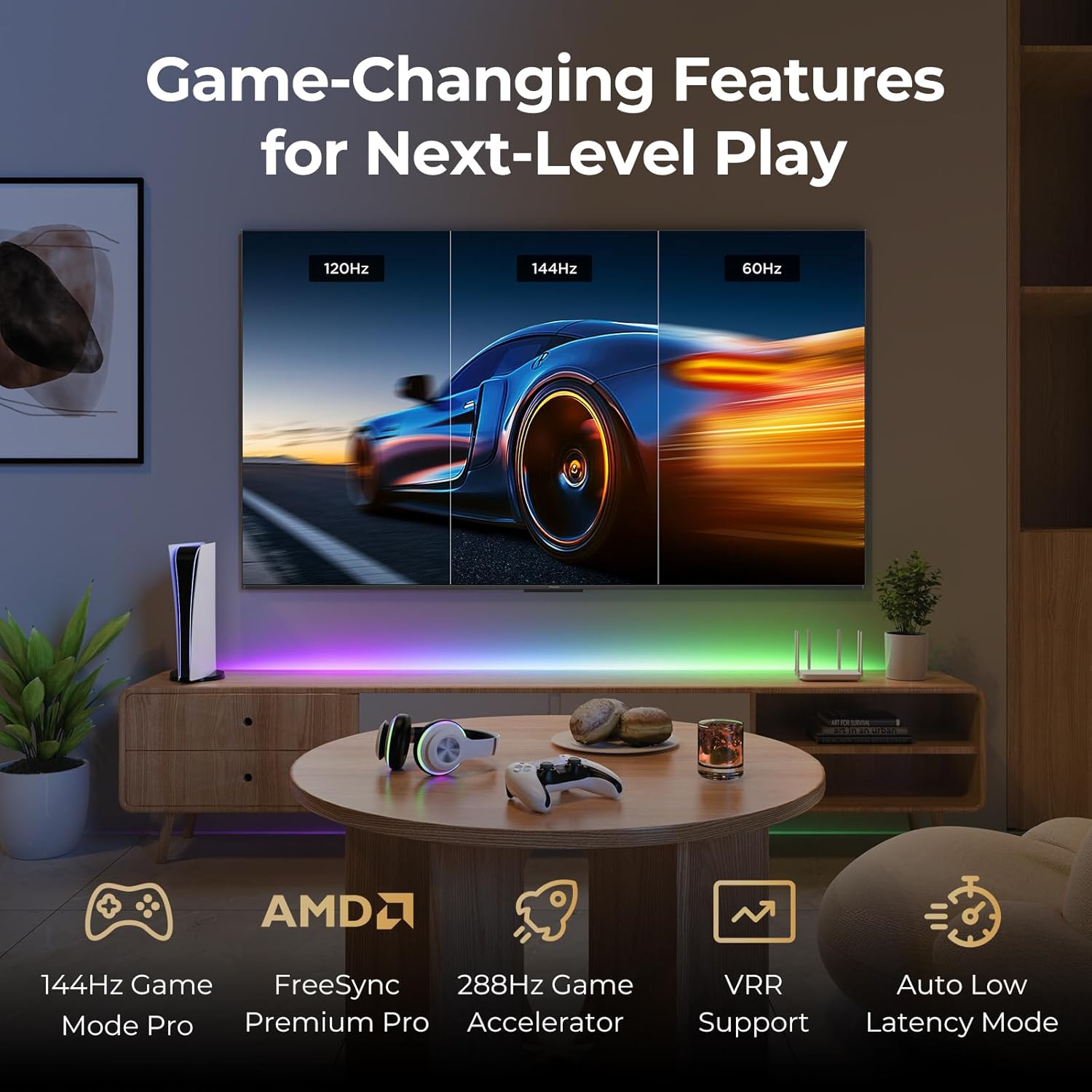
Image: A gaming setup featuring the iFFALCON TV, illustrating its high refresh rate and gaming-specific features for an optimized experience.
5. Apkope
5.1 Televizora tīrīšana
Regulāra tīrīšana palīdz saglabāt televizora izskatu un veiktspēju.
- Ekrāns: Viegli noslaukiet ekrānu ar mīkstu, nepūkošu drānu. Noturīgu traipu gadījumā viegli noslaukiet.ampNoslaukiet drānu ar ūdeni vai ekrānam paredzētu tīrīšanas līdzekli (nesmidziniet tieši uz ekrāna).
- Pamatteksts: Use a soft, dry cloth to wipe the TV's frame and back panel. Avoid abrasive materials or harsh chemicals.
- Porti: Ensure ports are free of dust. Use compressed air if necessary, holding the can upright.
5.2. Programmatūras atjauninājumi
Your TV may receive automatic software updates to improve performance and add new features. Ensure your TV is connected to the internet for these updates.
- You can check for updates manually in the TV's settings menu under System > About > System update.
6. Traucējummeklēšana
Ja rodas problēmas, pirms sazināšanās ar atbalsta dienestu izmēģiniet šos bieži sastopamos risinājumus.
- Nav jaudas: Ensure the power cable is securely plugged into both the TV and the wall outlet. Test the outlet with another device.
- Nav attēla/skaņas: Check the selected input source. Ensure all cables to external devices are connected correctly. Restart the TV and connected devices.
- Tālvadības pults nedarbojas: Replace the batteries. Ensure there are no obstructions between the remote and the TV. Re-pair the remote if it uses Bluetooth.
- Tīkla savienojuma problēmas: Restart your Wi-Fi router. Check TV network settings to ensure correct Wi-Fi password and connection.
- Attēla kvalitātes problēmas: Pielāgojiet attēla iestatījumus (spilgtumu, kontrastu, krāsu). Pārliecinieties, vai satura avots ir augstas kvalitātes.
- Rūpnīcas režīma iestatīšana: If problems persist, a factory reset can resolve many software-related issues. Navigate to Settings > System > About > Reset. Brīdinājums: Tas izdzēsīs visus personas datus un iestatījumus.
7. Specifikācijas
| Funkcija | Apraksts |
|---|---|
| Zīmols | iFFALCON |
| Modeļa numurs | 85U85 |
| Ekrāna izmērs | 85 collas |
| Displeja tehnoloģija | QD-Mini LED |
| Izšķirtspēja | 4K UHD (3840 x 2160) |
| Atsvaidzināšanas biežums | 144 Hz (Native), 288Hz DLG |
| Maksimālais spilgtums | Līdz 1000 nitiem |
| Kontrasta attiecība | Līdz 6500:1 |
| Vietējās aptumšošanas zonas | 352 |
| Procesors | AiPQ Pro procesors |
| Operētājsistēma | Google TV |
| Balss palīgs | Saderīgs ar Google Assistant un Alexa |
| Audio sistēma | 2.1-channel 50W, Dolby Atmos, DTS Virtual X |
| HDR atbalsts | HDR10+, Dolby Vision IQ |
| Spēļu funkcijas | 144Hz VRR, FreeSync Premium Pro, ALLM, Game Bar |
| Savienojamība | Bluetooth, WiFi |
| Produkta izmēri (D x P x A) | 15.2 x 74.4 x 45.5 collas |
| Preces svars | 76.7 mārciņas |
8. Garantija un atbalsts
Your iFFALCON U85 Series TV is covered by a manufacturer's warranty. Please refer to the warranty card included with your product for specific terms and conditions.
For technical support, service inquiries, or additional information, please visit the official iFFALCON support website or contact their customer service. Keep your purchase receipt and product serial number handy for warranty claims.
Vairāk informācijas un atbalsta resursu varat atrast, apmeklējot vietni iFFALCON Store on Amazon.


