1. Ievads
The Hama WM-450 Multi-Device Wireless Mouse is an optical mouse designed for versatile use across multiple devices. It features 7 buttons, a scroll wheel, and supports wireless connectivity via Bluetooth (two channels) and a 2.4 GHz radio frequency (one channel) using a USB-A receiver. This allows simultaneous connection to up to three devices, with quick switching between them. An integrated AI Assist button enhances productivity by activating an inter-program AI assistant. The mouse is designed for comfortable and silent operation.

1.1. attēls: beidziesview of the Hama WM-450 mouse highlighting its key features: Bluetooth connectivity, 10-meter wireless range, USB-A receiver, and battery power.
2. Iestatīšana
2.1 Akumulatora uzstādīšana
- Atrodiet akumulatora nodalījumu peles apakšpusē.
- Atveriet akumulatora nodalījuma vāku.
- Insert the two AAA batteries (included) according to the polarity markings (+/-) inside the compartment.
- Droši aizveriet akumulatora nodalījuma vāku.
2.2 Ieslēgšana/izslēgšana
Slide the ON/OFF switch, located on the underside of the mouse, to the 'ON' position to power on the mouse. Slide it to 'OFF' when not in use to conserve battery life.
2.3 Connecting via USB-A Receiver (2.4 GHz Radio)
- Remove the USB-A receiver from its storage slot on the underside of the mouse.
- Plug the USB-A receiver into an available USB-A port on your computer, laptop, or compatible device.
- The mouse should be automatically recognized and ready for use. This connection uses the 2.4 GHz radio channel.
2.4 Savienojuma izveide, izmantojot Bluetooth
The mouse supports two Bluetooth channels for connecting to different devices.
- Pārliecinieties, vai pele ir ieslēgta.
- Press the channel switch button (usually on the underside or top of the mouse) to select either Bluetooth Channel 1 or Bluetooth Channel 2. The corresponding indicator light will flash.
- On your device (PC, tablet, smartphone), go to Bluetooth settings and enable Bluetooth.
- Meklēt new devices. The mouse should appear as 'Hama WM-450' or similar.
- Select the mouse to pair. Follow any on-screen prompts.
- Once paired, the indicator light will stop flashing and remain solid for a few seconds, indicating a successful connection.

Image 2.1: The underside of the Hama WM-450 mouse, illustrating the battery compartment, the ON/OFF switch, and the integrated storage for the USB-A receiver.
3. Darbība
3.1 Pamatfunkcijas
- Kreisais klikšķis: Primārā atlase un aktivizēšana.
- Ar peles labo pogu noklikšķiniet: Piekļūst konteksta izvēlnēm.
- Ritināšanas ritenis: Ritiniet dokumentus un web pages. The high-quality aluminum scroll wheel provides precise control.
- Klusās klikšķināšanas pogas: The left and right click buttons are designed for silent operation, reducing noise in quiet environments.
3.2 Vairāku ierīču komutācija
To switch between connected devices (USB-A, Bluetooth 1, Bluetooth 2), press the dedicated channel switch button on the mouse. The mouse will instantly connect to the selected device.
3.3 Side Navigation Buttons
The mouse features two practical side buttons. These buttons typically function as 'Back' and 'Forward' for easier navigation in web pārlūkprogrammas, file explorers, and applications like Outlook.

3.1. attēls: Tuvplāns view of the two side navigation buttons on the Hama WM-450 mouse, used for 'Back' and 'Forward' functions.
3.4 DPI regulēšana
The mouse includes a DPI switch button, usually located near the scroll wheel. Press this button to cycle through different sensitivity settings: 800, 1200, and 1600 DPI (Dots Per Inch). Choose the DPI setting that best suits your preference and task.
3.5 AI Assist Button
The dedicated AI Assist button activates an inter-program AI assistant, designed to enhance productivity. Refer to your device's software documentation for specific functionalities enabled by this feature.
4. Apkope
4.1. Tīrīšana
To clean the mouse, use a soft, dry, lint-free cloth. For stubborn dirt, slightly dampen the cloth with water or a mild cleaning solution. Avoid using harsh chemicals, abrasive cleaners, or excessive moisture, as these can damage the mouse.
4.2. Akumulatora nomaiņa
When the mouse performance degrades or the indicator light signals low battery, replace the two AAA batteries. Always use fresh batteries of the same type.
4.3 USB Receiver Storage
When transporting the mouse or not using the 2.4 GHz radio connection, store the USB-A receiver in its dedicated slot on the underside of the mouse to prevent loss.
5. Traucējummeklēšana
- Pele nereaģē:
- Pārliecinieties, vai pele ir ieslēgta.
- Pārbaudiet akumulatora līmeni un, ja nepieciešams, nomainiet to.
- For USB-A connection, ensure the receiver is securely plugged into a working USB port. Try a different USB port.
- Lai izveidotu Bluetooth savienojumu, pārliecinieties, vai ierīcē ir iespējots Bluetooth un pele ir savienota pārī. Mēģiniet atkārtoti savienot pārī peli.
- Ensure the correct channel (USB-A, BT1, BT2) is selected on the mouse.
- Periodiska saziņa:
- Move the mouse closer to the receiver/device. The effective range is up to 10 meters, but obstacles can reduce this.
- Izvairieties lietot peli citu bezvadu ierīču tuvumā, kas varētu radīt traucējumus.
- Kursora kustība ir nevienmērīga vai lēna:
- Notīriet optisko sensoru peles apakšpusē.
- Pārliecinieties, ka peli lietojat uz piemērotas virsmas. Ļoti atstarojošas vai caurspīdīgas virsmas var ietekmēt veiktspēju.
- Adjust the DPI setting to a higher value if the cursor is too slow.
- Side buttons or AI Assist button not working:
- Ensure your operating system or application supports these functions.
- Check for any specific software or driver requirements for your device.
6. Specifikācijas
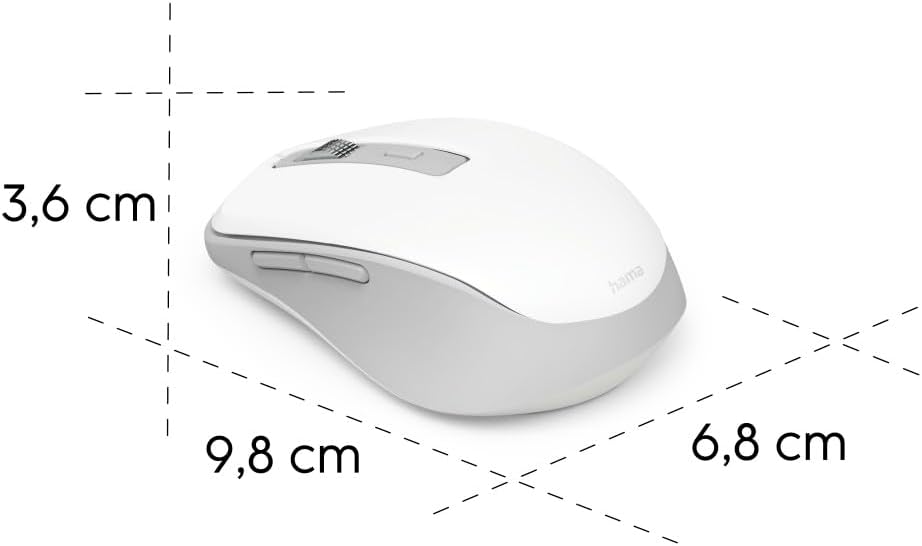
Image 6.1: Dimensional diagram of the Hama WM-450 mouse, indicating its length, width, and height.
| Zīmols | Hama |
| Modeļa nosaukums | WM-450 |
| Modeļa numurs | 00173080 |
| Savienojamības tehnoloģija | Bluetooth, 2.4 GHz Radio (USB-A) |
| Wireless Range | Līdz 10 metriem |
| Sensora tehnoloģija | Optiskais |
| DPI iestatījumi | 800, 1200, 1600 |
| Pogu skaits | 7 (ieskaitot klikšķi ar ritināšanas ritenīti) |
| Barošanas avots | 2 x AAA baterijas (iekļautas) |
| Izmēri (G x P x A) | 9.8 x 6.8 x 3.6 cm (aptuveni) |
| Svars | 140 grami |
| Saderīgas ierīces | PC, Tablet, Laptop, Smartphone, iPad |
| Īpašas funkcijas | Multi-device connectivity (3 devices), AI Assist button, Silent click buttons, Side navigation buttons, Retractable USB receiver, Polymer-coated mouse feet, High-quality aluminum scroll wheel. |
| Materiāla sastāvs | At least 20% recycled materials |
| Iepakojums | 100% bez plastmasas |
7. Garantija un atbalsts
Lai saņemtu informāciju par garantiju, tehnisko atbalstu vai servisa jautājumus, lūdzu, skatiet produktam pievienoto garantijas karti vai apmeklējiet oficiālo Hama vietni. webvietnē. Klientu atbalsta kontaktinformācija parasti ir pieejama ražotāja vietnē webvietne.


