1. Ievads
The FOXWELL FY406D is an advanced industrial endoscope designed for precise inspections in confined or hard-to-access areas. This device features dual lenses and a 2-way 220° articulating camera, providing multi-angle visibility with exceptional clarity. It is suitable for professionals in automotive, HVAC, plumbing, and general home inspection applications. This manual provides essential information for the safe and effective operation of your FY406D borescope.
2. Kas ir kastē
Carefully unpack your FOXWELL FY406D borescope and verify that all items listed below are present:
- 1x Articulating Borescope (Main Unit)
- 1x 2-in-1 Charging and Data Transfer Cable (USB-C)
- 1x Carrying Case Bag
- 1x User’s Manual (This Document)
- 2x Small Tips (Accessories for probe)
3. Produkts beidziesview un funkcijas
The FOXWELL FY406D is engineered for high-performance inspection. Familiarize yourself with its key components and capabilities.
3.1. Dual Lens System for Enhanced Visibility

The borescope features a dual-lens system, allowing users to switch between a front view, a side view, or a split-screen dual view for comprehensive inspection without changing probes.
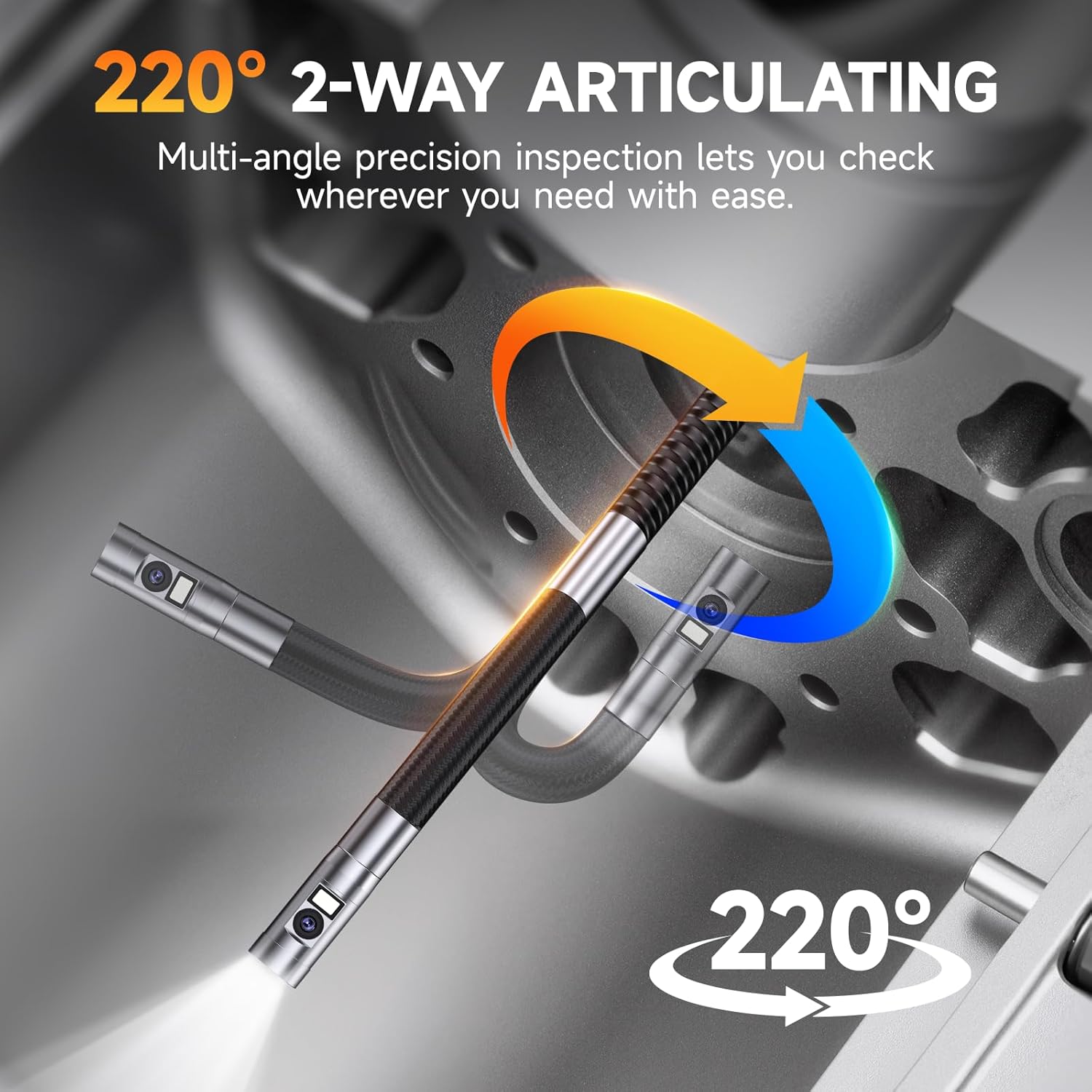
3.2. 2-Way 220° Articulation Control

The probe offers 2-way 220° articulation, enabling precise navigation around corners and obstacles in tight spaces. This feature is crucial for detailed inspections of engine components or wall cavities.
3.3. Ultra-Slim 6.5mm Probe
The 6.5mm (0.25 inch) diameter probe allows for easier entry into very tight spaces, such as spark plug holes or small pipe openings, compared to larger standard probes.
3.4. 4.3" IPS HD True Color Display

The device features a 4.3-inch IPS screen that provides clear, high-definition images with accurate color reproduction. It also displays real-time temperature readings.
3.5. Adjustable LED Illumination and IP67 Waterproof Probe

Equipped with 6 front LEDs (5000 lux) and 1 side LED (8000 lux), all with 3 adjustable brightness levels, the probe ensures optimal visibility in dark or damp environments. The IP67 waterproof rating protects the probe from water ingress, and overheat protection automatically shuts off the device if temperatures exceed 70°C.
3.6. Multi-Zoom Functionality

The borescope supports 2x and 4x digital zoom, allowing users to magnify details for closer examination of defects or features.
3.7. Ierakstīšana un glabāšana
The device includes 32GB of onboard memory, capable of storing over 50 videos or 10,000 photos. It supports video recording with audio and high-resolution image capture. Files can be transferred via the USB-C cable.
4. Iestatīšana
4.1. Ierīces uzlāde
- Connect the provided 2-in-1 USB-C cable to the charging port on the borescope.
- Pievienojiet USB-C kabeļa otru galu saderīgam USB strāvas adapterim (nav iekļauts komplektā) vai datora USB portam.
- The charging indicator on the device will illuminate. A full charge typically takes approximately 4 hours, providing up to 4 hours of continuous operation.
4.2. Attaching Small Tips (Optional)
The borescope comes with two small tips (e.g., hook, magnet). These can be screwed onto the end of the probe for retrieving lost items or manipulating objects in tight spaces. Ensure the device is powered off before attaching or detaching tips.
5. Lietošanas instrukcijas
5.1. Ieslēgšana/izslēgšana
- To power on: Press and hold the power button until the screen illuminates.
- To power off: Press and hold the power button until the screen shuts down.
5.2. Navigācija interfeisā
The device features intuitive buttons for navigation and control:
- Poga Labi: Confirms selections or takes photos/starts video recording.
- Izvēlnes poga: Accesses settings and playback modes.
- Augšup/lejupvērstās bultiņas: Navigate menus, adjust zoom, or control articulation.
- Artikulācijas kursorsvira: Controls the bending of the probe tip.
5.3. LED spilgtuma regulēšana
Press the dedicated LED button to cycle through the three brightness levels (Low, Medium, High) or to turn the lights off. This helps optimize visibility and reduce glare in various inspection environments.
5.4. Switching Camera Views
Nospiediet kameru view button to toggle between front camera view, sānu kamera viewvai dalītā ekrāna režīmā view displaying both simultaneously.
5.5. Fotoattēlu un video uzņemšana
- Lai uzņemtu fotoattēlu: Tiešraidē view, press the OK button once.
- Lai ierakstītu video: Tiešraidē view, press and hold the OK button to start recording. Press and hold again to stop.
- Uzņemtie multivides faili tiek saglabāti iekšējā 32 GB atmiņā.
5.6. Zoom and Image Rotation
- Use the designated zoom buttons (or arrow keys in some modes) to apply 2x or 4x digital zoom.
- The device supports 360° image rotation, accessible via the menu, to adjust the orientation of the live feed or captured images.
5.7. File Pārsūtīšana
Connect the borescope to a computer using the provided USB-C cable. The device will appear as a removable storage device, allowing you to access and transfer photos and videos.
6. Apkope
6.1. Cleaning the Probe and Lenses
- After each use, especially in dirty or oily environments, gently wipe the probe and camera lenses with a soft, damp audums.
- For stubborn grime, use a small amount of isopropyl alcohol on a cotton swab. Ensure no liquid enters the main unit.
- Neizmantojiet abrazīvus tīrīšanas līdzekļus vai šķīdinātājus.
6.2. Akumulatora kopšana
- Regulāri uzlādējiet akumulatoru, pat ja ierīce netiek bieži lietota, lai uzturētu akumulatora darbspēju.
- Izvairieties no akumulatora pilnīgas izlādes ilgstošā laika periodā.
- Glabājiet ierīci vēsā, sausā vietā, prom no tiešiem saules stariem.
6.3. Uzglabāšana
When not in use, store the borescope and its accessories in the provided carrying case to protect it from dust, impacts, and environmental damage.
7. Traucējummeklēšana
If you encounter issues with your FOXWELL FY406D, refer to the following common problems and solutions:
| Problēma | Iespējamais cēlonis | Risinājums |
|---|---|---|
| Ierīce neieslēdzas | Zems akumulatora līmenis; Bojāta ieslēgšanas/izslēgšanas poga | Pilnībā uzlādējiet ierīci. Ja problēma joprojām pastāv, sazinieties ar atbalsta dienestu. |
| Slikta attēla kvalitāte / tumšs attēls | Dirty lens; Insufficient lighting | Clean the camera lens. Increase LED brightness. |
| Probe articulation not working | Mechanical obstruction; Internal issue | Ensure no physical obstruction. Do not force articulation. Contact support if damaged. |
| Nevar pārsūtīt files uz datoru | Incorrect cable; Driver issue; Corrupted memory | Use the provided USB-C cable. Try a different USB port or computer. |
| Ierīce pārkarst | Ilgstoša lietošana augstā temperatūrā | The device has overheat protection and will shut down automatically. Allow it to cool before resuming use. |
8. Specifikācijas
| Funkcija | Detaļas |
|---|---|
| Modelis | 406. finanšu gada pārskats |
| Zondes diametrs | 6.5 mm (0.25 collas) |
| Artikulācija | 2-Way, 220° |
| Displeja ekrāns | 4.3 Inches IPS HD |
| Video uzņemšanas izšķirtspēja | 720p |
| Optiskā tālummaiņa | 4x (Digital) |
| LED apgaismojums | 6 Front LEDs (5000 lux), 1 Side LED (8000 lux), 3 adjustable levels |
| Ūdensizturības līmenis | IP67 (zonde) |
| Akumulatora tips | Litija jonu akumulators (2600 mAh) |
| Vidējais akumulatora darbības laiks | Līdz 4 stundām |
| Iekšējā atmiņa | 32GB |
| Aparatūras saskarne | USB tips C |
| Preces svars | 1.04 kg |
| Produkta izmēri | 21.89 x 12.78 x 5.03 cm |
| Audio ierakstīšana | Jā |
9. Drošības informācija
- This device is for industrial and home inspection use only. It is NAV intended for medical or human body use.
- Nemēģiniet ierīci izjaukt vai pārveidot. Tas anulēs garantiju un var izraisīt bojājumus vai traumas.
- Keep the device away from extreme temperatures, open flames, and corrosive substances.
- Ensure the probe is clean and free of debris before insertion into any cavity.
- Always handle the probe and articulation mechanism gently to prevent damage.
10. Garantija un atbalsts
FOXWELL products are designed for reliability and performance. For warranty information, technical support, or service inquiries, please refer to the warranty card included with your product or visit the official FOXWELL website. Please have your product model (FY406D) and purchase details ready when contacting support.


