1. Ievads
This manual provides detailed instructions for the installation, operation, and maintenance of your PHORUS 48-inch Tropical Palm Leaf Ceiling Fan. Please read this manual thoroughly before installation and retain it for future reference. This ceiling fan is designed for both indoor and outdoor covered areas, offering a unique tropical aesthetic with modern functionality.
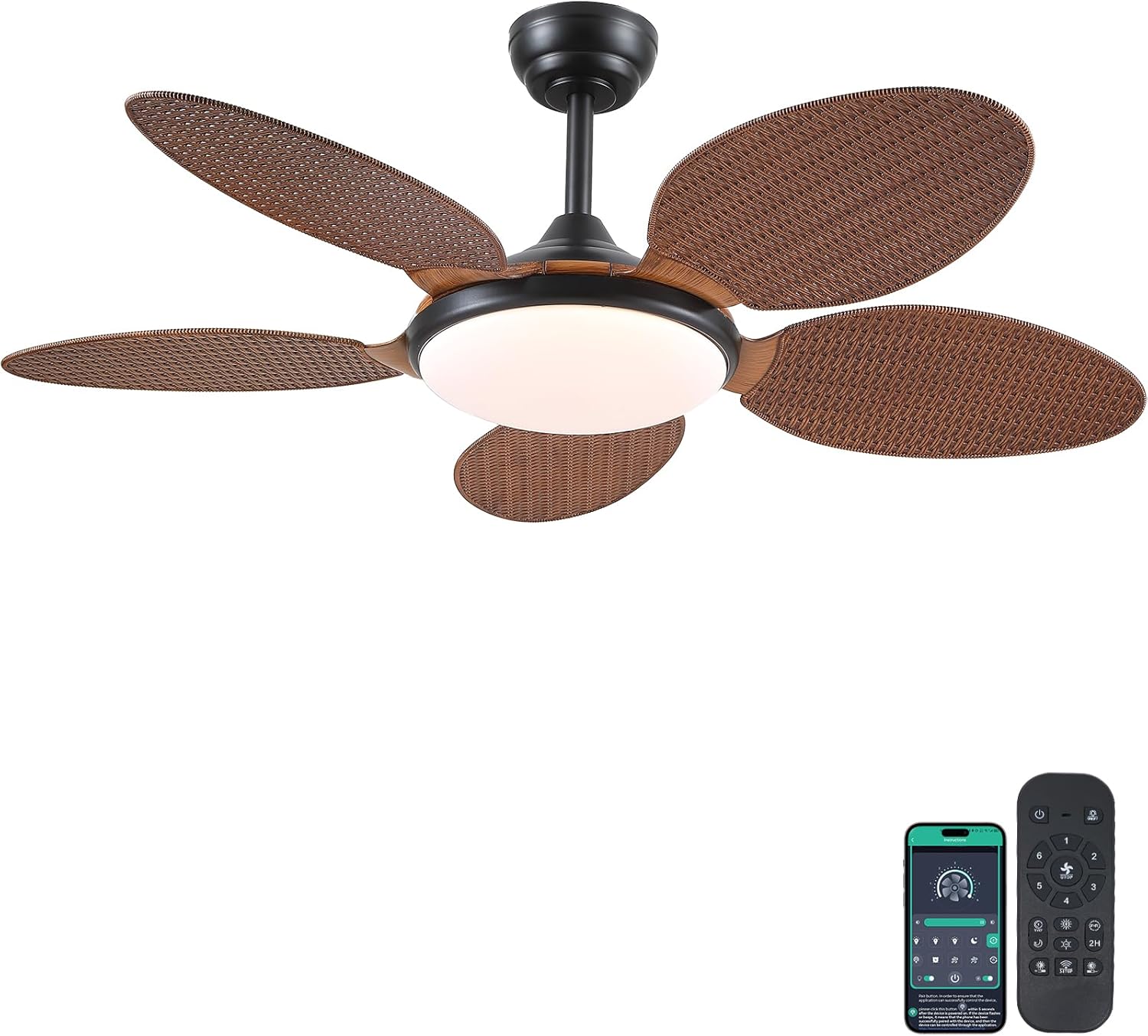
Image 1.1: PHORUS 48-inch Tropical Palm Leaf Ceiling Fan.
2. Drošības informācija
- Ensure the main power supply is disconnected before installation, maintenance, or cleaning.
- All electrical connections must comply with local codes and ordinances, as well as national electrical codes. If you are unfamiliar with electrical wiring, consult a qualified electrician.
- Montāžas konstrukcijai jāspēj izturēt ventilatora svaru (aptuveni 12.58 mārciņas) plus dinamisko slodzi darbības laikā.
- Uzstādīšanas vai tīrīšanas laikā nelieciet asmeņu turētājus.
- Pārliecinieties, ka starp ventilatora lāpstiņām un jebkādiem šķēršļiem ir pietiekams attālums.
- This fan is suitable for use in damp locations but should not be directly exposed to water.
3. Iepakojuma saturs
Pārliecinieties, vai iepakojumā ir iekļautas visas tālāk norādītās sastāvdaļas. Ja kādas detaļas trūkst vai ir bojātas, lūdzu, sazinieties ar klientu atbalsta dienestu.

3.1. attēls: beidziesview of included components and fan dimensions.
- Ventilatora korpusa montāža
- 5 Palm Leaf Blades
- Nojume
- Lejupvērstieņi (4 collu un 8 collu opcijas)
- Lamp Ēnojums
- Tālvadības pults
- Tālvadības uztvērējs
- Montāžas kronšteins
- Aparatūras komplekts (skrūves, stiepļu uzgriežņi utt.)
- Lietošanas pamācība
4. Iestatīšana un instalēšana
Follow these steps carefully for proper installation. For a visual guide, please refer to the installation video provided below.
4.1. Uzstādīšanas video pamācība
Video 4.1: Detailed installation guide for the PHORUS 48-inch Palm Leaf Ceiling Fan with lights.
4.2. Soli pa solim instalēšana
- Prepare the Fan Body: Attach the LED light board to the fan body assembly using the provided screws.
- Ventilatora lāpstiņu piestiprināšana: Secure each of the five palm leaf blades to the fan body. Ensure the correct side of the blade is facing upwards as indicated in the video.
- Salieciet lejupvērsto stieni: Insert the downrod through the canopy and secure it to the fan body. Feed the electrical wires through the downrod.
- Uzstādiet montāžas kronšteinu: Secure the mounting bracket to your ceiling junction box. Ensure it is firmly attached and can support the fan's weight.
- Elektroinstalācijas savienojumi: Connect the fan's electrical wires to your household wiring. Typically, this involves connecting the black live wire, white neutral wire, and yellow ground wire. Refer to the wiring diagram in the installation video for precise connections.
- Pakariet ventilatoru: Uzmanīgi paceliet ventilatora komplektu un uzkariet to uz stiprinājuma kronšteina.
- Instalējiet attālo uztvērēju: Place the remote receiver within the canopy, ensuring wires are not pinched. Connect the receiver to the fan and household wiring as per the diagram.
- Droša nojume: Pabīdiet nojumi līdz griestiem un piestipriniet to pie stiprinājuma kronšteina ar skrūvēm.
- Instalējiet Lamp Ēna: Pievienojiet lamp shade to the bottom of the fan body.
The fan is equipped with 4-inch and 8-inch downrods to accommodate various ceiling heights. It can also be used with sloped ceilings up to 15 degrees.
5. Lietošanas instrukcijas
Your PHORUS ceiling fan can be controlled via the included remote control or a smart application on your mobile device.
5.1. Tālvadības pults darbība

Image 5.1: Remote control layout with function descriptions.
The remote control allows you to adjust the following settings:
- Ieslēgšana/izslēgšana: Ieslēdziet vai izslēdziet ventilatoru un gaismu.
- Ventilatora ātrums: Izvēlieties vienu no 6 vēja ātrumiem (1–6).
- Gaisma ieslēgta/izslēgta: Control the integrated LED light independently.
- Krāsu temperatūra: Adjust between 3 light colors: 3000K (Warm Light), 4500K (Natural Light), and 6000K (White Light).
- Spilgtuma regulēšana: Dim or brighten the light from 10% to 100%.
- Reversā funkcija: Change the direction of the fan blades for summer (downdraft) or winter (updraft) modes. Press the F\R key and wait 5-8 seconds for the fan to stop completely and then automatically reverse.
- Taimeris: Iestatiet 2 stundas taimeri automātiskai izslēgšanai.
Remote Code Pairing:
If your remote control is not responding, you may need to pair it with the fan. Follow these steps:
- Turn off the main power supply to the fan for one minute.
- Turn on the main power supply and simultaneously long-press the code key on the remote control for 3-5 seconds.
- The fan light will blink 2-3 times to indicate successful code matching.
Video 5.2: Instructions for remote code pairing.
5.2. Viedās lietotnes vadība
The fan supports control via a smart application. Scan the QR code in Image 5.1 or visit https://www.jasonghost.com/fanlamppro/ to download the "Fan Lamp "Pro" lietotne.
Video 5.3: Guide for setting up and using the smart app control.
The app provides comprehensive control over fan speeds, light settings (color temperature and brightness), and the reverse function, similar to the remote control. All settings will be remembered after power cycling.

Image 5.4: Customizable light effects and dimming range.

Image 5.5: Fan airflow modes (summer/winter) and 6-speed settings.
6. Apkope
Regulāra apkope nodrošina jūsu griestu ventilatora optimālu darbību un ilgmūžību.
- Tīrīšana: Periodically clean the fan blades and light cover with a soft, damp audumu. Nelietojiet abrazīvus tīrīšanas līdzekļus vai šķīdinātājus, kas varētu sabojāt apdari.
- Pievelciet stiprinājumus: Check all screws and fasteners on the fan body and mounting bracket annually. Tighten any loose connections to prevent wobbling or noise.
- Putekļu noņemšana: Dust the fan motor housing and canopy regularly to prevent dust buildup, which can affect performance.
7. Traucējummeklēšana
Ja rodas problēmas ar ventilatoru, skatiet tālāk norādītās bieži sastopamās problēmas un risinājumus.
| Problēma | Iespējamais cēlonis | Risinājums |
|---|---|---|
| Ventilators neieslēdzas | No power supply; Loose wire connections; Remote not paired. | Check circuit breaker/wall switch; Verify all wire connections are secure; Perform remote code pairing (refer to Section 5.1). |
| Gaisma nedarbojas | Loose wire connection; LED driver issue. | Check light wiring connections; Contact customer support if LED driver is suspected. |
| Ventilatora svārstības | Vaļīgi asmeņi vai stiprinājuma detaļas; Nelīdzsvaroti asmeņi. | Ensure all blade screws and mounting bracket screws are tight; Use a balancing kit (not included) if necessary. |
| Tālvadības pults nereaģē | Zems akumulatora uzlādes līmenis; tālvadības pults nav savienota pārī. | Replace AAA batteries (2 required, included); Perform remote code pairing (refer to Section 5.1). |
| Pārmērīgs troksnis | Vaļīgas skrūves; Problēma ar motoru. | Check and tighten all screws; Ensure blades are securely attached. If noise persists, contact customer support. |
8. Specifikācijas
- Zīmols: FORUS
- Modelis: B0FC1SY1B2
- Krāsa: 48" Dark Brown
- Materiāls: Akrils, Plastmasa
- Stils: Tropu
- Numura veids: Bedroom, Dining Room, Garage, Kids Room, Kitchen
- Lietošana iekštelpās/ārā: Iekštelpās (piemērots lietošanaiamp atrašanās vietas)
- Barošanas avots: DC
- Īpašas funkcijas: Lietotnes vadība, LED gaisma, klusa darbība, tālvadības pults, taimeris
- Kontroles metode: Lietotne, tālvadības pults
- Gaismas avotu skaits: 1
- Iekļautie komponenti: Light Kit, Remote Control
- Preces svars: 12.58 mārciņas
- Preču skaits: 1
- Wattage: 60 vati
- Kontroliera tips: Lietotņu vadība, Tālvadība
- Vienību skaits: 1.0 Skaits
- Montāžas veids: Griestu stiprinājums
- Nepieciešama montāža: Jā
- Izmērs: Medium (48 inches)
- Produktam ieteicamie lietojumi: Gaisa cirkulācija
- Produkta izmēri: 48 x 48 x 15.15 collas
- Baterijas: Nepieciešamas 2 AAA baterijas (iekļautas komplektā)
9. Garantija un atbalsts
PHORUS provides a one-year quality warranty for this product. We also offer free replacement service for any damage and quality problems encountered during the warranty period. If you have any questions or require assistance, please contact PHORUS customer support for a satisfactory answer within 24 hours.