1. Produkts beidziesview
The ORICO 6-in-1 USB C Docking Station (Model: PW11-6PR) is a versatile multiport adapter designed to expand the connectivity of your USB-C enabled devices. It provides essential ports for display output, high-speed data transfer, network connectivity, and power delivery, enhancing productivity and convenience for users of Windows, Mac, and other compatible systems.

Figure 1: ORICO 6-in-1 USB C Hub Overview
2. Iepakojuma saturs
- ORICO 6-in-1 USB C Docking Station (Model: PW11-6PR)
- Lietotāja rokasgrāmata
3. Ierīces izkārtojums
The docking station features a compact design with clearly labeled ports for easy identification and connection.

Figure 2: Port Layout of the Docking Station
- USB-C ieejas kabelis: Connects to your host device (laptop, tablet, smartphone).
- 3 x USB-A 3.0 porti: USB perifērijas ierīču, piemēram, tastatūru, peļu, ārējo cieto disku vai USB zibatmiņu, pievienošanai. Atbalsta datu pārsūtīšanas ātrumu līdz 5 Gb/s.
- HDMI ports: For connecting to an external display (monitor, TV, projector). Supports resolutions up to 4K@30Hz.
- Ethernet (RJ45) ports: Provides stable wired network connectivity with speeds up to 1 Gbps.
- USB-C PD (barošanas) ports: For connecting a power adapter to charge your host device and power the docking station. Supports up to 100W power input.
4. Funkcijas
- 6-in-1 Multiport Hub: Expands a single USB-C port into 6 functional ports: 4K@30Hz HDMI, 3 USB-A 3.0, 1G Ethernet, and 100W PD.
- 4K@30Hz HDMI izeja: Supports high-resolution video output to external displays, backward compatible with 1080P@60Hz and 720P@60Hz.
- 5 Gbps Data Transfer: Three USB-A 3.0 ports enable rapid data transfer, allowing a 1GB video file to be transferred in seconds.
- 100 W jaudas piegāde: The PD port allows simultaneous charging of your laptop while using other connected USB accessories, eliminating the need to choose between charging and connectivity.
- 1G High-Speed Ethernet: Provides a stable and fast wired internet connection (10 Mbps–1 Gbps), ideal for streaming, video calls, and large file downloads. A Cat 5e cable is recommended for optimal performance.
- Plaša saderība: Compatible with Windows 11/10/8/7, Mac OS X, and Linux. Supports laptops, tablets, and smartphones with a compatible USB-C port.
- Kompakts un pārnēsājams dizains: Features a sleek, lightweight aluminum alloy build, making it easy to carry for business trips, mobile work, or meetings.
5. Iestatīšanas instrukcijas
- Savienojuma izveide ar resursdatora ierīci: Plug the integrated USB-C cable of the docking station into a compatible USB-C port on your laptop, tablet, or smartphone. Ensure your device's USB-C port supports DisplayPort Alternate Mode for video output.
- Strāvas pieslēgums (pēc izvēles, bet ieteicams): For stable operation and to charge your host device, connect your original USB-C power adapter to the USB-C PD port on the docking station.
- Pievienojiet perifērijas ierīces:
- HDMI displejs: Connect an HDMI cable from your monitor/TV to the HDMI port on the docking station.
- Ethernet tīkls: Connect an Ethernet cable (Cat 5e or higher recommended) from your router/modem to the RJ45 Ethernet port on the docking station.
- USB ierīces: Plug your USB-A peripherals (e.g., mouse, keyboard, USB drive) into the USB-A 3.0 ports.
- Draivera instalēšana: The docking station is plug-and-play for most operating systems and typically does not require additional drivers. If prompted, follow on-screen instructions.

Figure 3: Broad Compatibility of the Docking Station
6. Lietošanas instrukcijas
6.1. Video Output via HDMI
Connect an HDMI-enabled display to the docking station's HDMI port. Your host device should automatically detect the external display. You can configure display settings (e.g., mirror, extend) through your operating system's display settings.

Figure 4: 4K@30Hz HDMI Display Connection
6.2. Data Transfer via USB-A 3.0 Ports
Plug your USB devices into the three USB-A 3.0 ports. These ports support data transfer speeds up to 5 Gbps, allowing for quick synchronization and file pārskaitījumi.

5. attēls: Ātrdarbīga datu pārsūtīšana
6.3. Wired Network Connection via Ethernet
Connect an Ethernet cable to the RJ45 port for a stable and fast wired internet connection. This is particularly useful in environments with unreliable Wi-Fi or for tasks requiring high bandwidth.
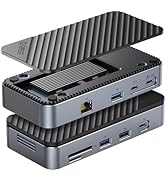
Figure 6: 1Gbps Ethernet Connection
6.4. Jaudas piegādes (PD) uzlāde
Connect your laptop's USB-C power adapter to the docking station's USB-C PD port. The docking station will pass through up to 85W of power to charge your laptop while simultaneously powering the hub and connected devices.

Figure 7: 100W Power Delivery
7. Saderība
The ORICO 6-in-1 USB C Docking Station is designed for broad compatibility. Please ensure your host device's USB-C port supports the necessary functions for optimal performance.
- Saimniekdatora ierīces saderība: Devices with a full-featured USB-C port (supporting data, power delivery, and DisplayPort Alternate Mode). This includes many modern laptops (e.g., MacBook Pro/Air, Dell XPS, Surface Pro, ThinkPad/Yoga), tablets (e.g., iPad Pro/Air), and some smartphones.
- Sistēmas saderība: Windows 11/10/8/7, macOS X, Linux, Android.
- Important Note on USB-C Ports: Not all USB-C ports are created equal. Please confirm your laptop's USB-C port supports DisplayPort Alternate Mode for video output.

Figure 8: Understanding USB-C Port Functionality
8. Traucējummeklēšana
- Nav video izvades:
- Pārliecinieties, vai jūsu resursdatora ierīces USB-C ports atbalsta DisplayPort alternatīvo režīmu.
- Check the HDMI cable connection between the docking station and the display.
- Verify the display input source is set correctly.
- Mēģiniet restartēt savu resursdatora ierīci.
- Neatpazītas USB ierīces:
- Ensure the docking station is properly connected to your host device.
- Mēģiniet tieši pievienot USB ierīci resursdatora ierīcei, lai pārliecinātos, ka tā darbojas neatkarīgi.
- If using high-power USB devices, ensure the docking station is connected to an external power source via its PD port.
- Nav Ethernet savienojuma:
- Pārbaudiet Ethernet kabeļa savienojumu gan ar dokstaciju, gan ar maršrutētāju/modemu.
- Pārbaudiet tīkla iestatījumus savā resursdatora ierīcē.
- Pārliecinieties, vai jūsu maršrutētājs/modems darbojas pareizi.
- Uzlādes problēmas:
- Ensure your USB-C power adapter is connected to the PD port and is capable of providing sufficient power (e.g., 100W).
- Pārbaudiet, vai jūsu resursdatora ierīce atbalsta USB-C barošanas avotu.
9. Specifikācijas
| Funkcija | Specifikācija |
|---|---|
| Produkta izmēri | 3.74 x 1.75 x 0.67 collas |
| Preces svars | 3.52 unces |
| Modeļa numurs | PW11-6PR |
| Zīmols | ORICO |
| Krāsa | Pelēks |
| Aparatūras saskarne | Ethernet, HDMI, USB 3.0 Type A, USB-C PD |
| Īpaša iezīme | Powered, Plug and Play |
| HDMI izeja | 4K@30Hz (backward compatible with 1080P@60Hz, 720P@60Hz) |
| USB-A 3.0 Data Transfer Speed | Līdz 5 Gbps |
| Ethernet ātrums | 10 Mbps / 100 Mbps / 1 Gbps |
| USB-C PD uzlāde | Up to 100W input (85W output to host) |
10. Apkope
- Turiet ierīci tīru un bez putekļiem. Tīrīšanai izmantojiet mīkstu, sausu drānu.
- Nepakļaujiet uzlādes staciju ekstremālām temperatūrām, mitrumam vai tiešiem saules stariem.
- Nemēģiniet pats izjaukt vai salabot ierīci. Lai saņemtu palīdzību, sazinieties ar klientu atbalsta dienestu.
- Disconnect the device when not in use for extended periods.
11. Drošības informācija
- Šī ierīce ir paredzēta lietošanai tikai iekštelpās.
- Nepakļaujiet ierīci ūdens vai citu šķidrumu iedarbībai.
- Izvairieties no ierīces nomešanas vai nepakļaušanas spēcīgam triecienam.
- Uzglabāt bērniem nepieejamā vietā.
- Izmantojiet tikai saderīgus strāvas adapterus un kabeļus.
12. Oficiālais produkta video
Video: ORICO 6-in-1 USB C Docking Station with 1G Ethernet. This video demonstrates the features and connectivity of the ORICO 6-in-1 USB C Docking Station, including its HDMI, Ethernet, USB-A, and PD charging capabilities.
13. Garantija un atbalsts
ORICO products come with a standard manufacturer's warranty. For detailed warranty information, technical support, or customer service inquiries, please refer to the official ORICO webvietnē vai sazinieties ar savu mazumtirgotāju. Lūdzu, saglabājiet pirkuma apliecinājumu garantijas prasību iesniegšanai.