1. Svarīgi drošības norādījumi
Pirms šīs ierīces lietošanas uzmanīgi izlasiet visus norādījumus. Saglabājiet šo rokasgrāmatu turpmākai uzziņai.
- Nodrošiniet sējtagUz nominālvērtības etiķetes norādītais spriegums atbilst jūsu elektrotīkla spriegumam.tage.
- Neiegremdējiet ventilatoru, kontaktdakšu vai vadu ūdenī vai citos šķidrumos.
- Atvienojiet ventilatoru no kontaktligzdas, kad to nelietojat, pirms tīrīšanas vai pirms pārvietošanas.
- Do not operate the fan with a damaged cord or plug. Contact authorized service personnel for repair.
- Turiet pirkstus un citus priekšmetus tālāk no ventilatora lāpstiņām un atverēm.
- Do not use the fan near windows, in bathrooms, or in wet environments.
- Šo ierīci nav paredzēts lietot personām (tostarp bērniem) ar ierobežotām fiziskām, maņu vai garīgām spējām vai pieredzes un zināšanu trūkumu, ja vien par viņu drošību atbildīgā persona nav sniegusi viņu uzraudzību vai norādījumus par ierīces lietošanu. .
- Bērni ir jāuzrauga, lai nodrošinātu, ka viņi nespēlējas ar ierīci.
2. Produkts beidziesview
The Mistral MFD4389DRW is a 43-inch DC Turbo Tower Fan designed for efficient air circulation. It features a DC brushless motor, 12 speed settings, and multiple operating modes. Control options include a full touch screen, remote control, and Wi-Fi with online voice control capabilities. The fan also offers a unique height conversion feature and 60-degree left-right oscillation.

2.1. attēls. Priekšpuse view of the Mistral MFD4389DRW DC Turbo Tower Fan, showcasing its sleek design and touch control panel.

2.2. attēls: sāni view of the Mistral MFD4389DRW DC Turbo Tower Fan, highlighting its slim profile.

2.3. attēls. Aizmugure view of the Mistral MFD4389DRW DC Turbo Tower Fan, showing the air intake grille.
3. Iepakojuma saturs
Pārliecinieties, vai iepakojumā ir visas sastāvdaļas:
- Mistral MFD4389DRW DC Turbo Tower Fan Unit
- Tālvadības pults
- Lietotāja rokasgrāmata (šis dokuments)
- Base components (if not pre-assembled)
- Height extension component (for convertible height models)
4. Montāža
The Mistral MFD4389DRW fan features simple assembly. Typically, this involves attaching the base to the main fan unit. For models with height conversion, an additional extension piece may need to be secured.
- Uzmanīgi izņemiet visas sastāvdaļas no iepakojuma.
- Place the main fan unit upside down on a soft, flat surface to avoid scratching.
- Align the base with the bottom of the fan unit. Ensure the power cord passes through the designated opening in the base.
- Secure the base to the fan unit using the provided screws (if applicable).
- For height conversion, insert the extension component between the base and the main unit, ensuring it clicks securely into place or is fastened as per instructions.
- Place the fan upright on a stable, level surface.
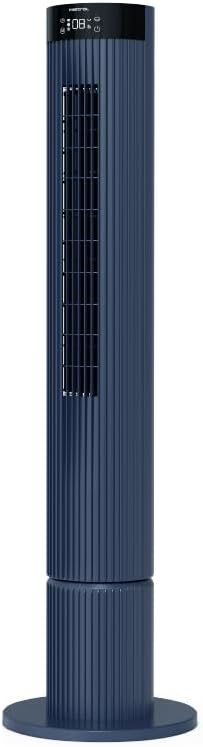
Figure 4.1: The fan demonstrating its convertible height feature, allowing adjustment between two different heights.
5. Iestatīšana un sākotnējā lietošana
After assembly, position the fan in your desired location. Ensure it is on a stable, flat surface and away from curtains or objects that could obstruct airflow.
- Plug the power cord into a suitable electrical outlet (220-240V~, 50-60Hz).
- The fan will enter standby mode. The touch screen display may illuminate briefly.
- To power on, touch the power icon on the control panel or press the power button on the remote control.
6. Lietošanas instrukcijas
The fan can be operated via the full touch screen control panel on the unit or the included remote control.
6.1 Vadības paneļa funkcijas
The touch screen control panel provides access to all fan functions:
- Barošanas poga: Ieslēdz vai izslēdz ventilatoru.
- Ātruma regulēšana: Cycles through 12 fan speeds.
- Režīma izvēle: Switches between Turbo, One-key Cycle, and Baby modes.
- Svārstības: Activates or deactivates 60-degree left-right oscillation.
- Taimeris: Sets the pre-set On/Off timer for up to 12 hours.
- Wi-Fi indikators: Rāda Wi-Fi savienojuma statusu.
6.2 tālvadības pults
The remote control duplicates all functions available on the touch screen panel for convenient operation from a distance.
- Pārliecinieties, vai tālvadības pultī ir darba baterijas.
- Point the remote control towards the fan's control panel for optimal signal reception.
6.3. Darbības režīmi
- Turbo režīms: Provides maximum airflow for rapid cooling.
- One-key Cycle Mode: Automatically cycles through different fan speeds to simulate natural breeze.
- Bērnu režīms: Operates at a gentle, quiet speed suitable for nurseries or light sleeping.
7. Wi-Fi and Online Voice Control
The Mistral MFD4389DRW fan can be connected to your home Wi-Fi network for smart control via a mobile application and online voice commands.
7.1 Wi-Fi savienojums
- Download the official Mistral smart home application from your device's app store.
- Reģistrējieties vai piesakieties savā kontā lietotnē.
- Pārliecinieties, vai mobilā ierīce ir savienota ar 2.4 GHz Wi-Fi tīklu.
- Follow the in-app instructions to add a new device. This typically involves putting the fan into pairing mode (refer to the app or fan display for specific instructions, often by holding a Wi-Fi button).
- Once connected, the Wi-Fi indicator on the fan's control panel will illuminate steadily.
7.2 Online Voice Control
After successful Wi-Fi connection, you can link your fan to compatible smart home voice assistants (e.g., Google Assistant, Amazon Alexa) through the Mistral app settings.
- Open the Mistral app and navigate to the 'Integrations' or 'Voice Control' section.
- Select your preferred voice assistant and follow the prompts to link your Mistral account.
- Kad savienojums ir izveidots, varat izmantot balss komandas, piemēram:
- "Turn on the fan."
- "Set fan speed to 5."
- "Turn off oscillation."
- "Change fan mode to Baby."
8. Apkope
Regulāra tīrīšana palīdz uzturēt ventilatora veiktspēju un pagarina tā kalpošanas laiku.
8.1. Tīrīšana
- Pirms tīrīšanas vienmēr atvienojiet ventilatoru no strāvas kontaktligzdas.
- Izmantojiet mīkstu, damp drānu, lai noslaucītu ventilatora ārējās virsmas. Nelietojiet abrazīvus tīrīšanas līdzekļus vai šķīdinātājus.
- Lai notīrītu putekļus no gaisa ieplūdes un izplūdes režģiem, izmantojiet putekļsūcēju ar birsti.
- Pirms ventilatora atkārtotas pieslēgšanas un iedarbināšanas pārliecinieties, vai tas ir pilnībā izžuvis.
8.2. Uzglabāšana
If storing the fan for an extended period, unplug it, clean it thoroughly, and store it in its original packaging or a dust-free environment.
9. Traucējummeklēšana
Ja rodas problēmas ar ventilatoru, skatiet tālāk norādītās bieži sastopamās problēmas un risinājumus.
| Problēma | Iespējamais cēlonis | Risinājums |
|---|---|---|
| Ventilators neieslēdzas. | Nav barošanas avota. | Pārbaudiet, vai strāvas vads ir droši pievienots darbojošai kontaktligzdai. |
| Vāja gaisa plūsma. | Air intake/outlet blocked; Fan speed too low. | Clean grilles to remove dust. Increase fan speed. |
| Ventilators rada neparastu troksni. | Obstruction; Loose parts. | Unplug and check for any foreign objects. Ensure base is securely attached. |
| Tālvadības pults nedarbojas. | Dead batteries; Obstruction. | Replace remote control batteries. Ensure no objects are blocking the signal path. |
| Wi-Fi savienojums neizdodas. | Incorrect Wi-Fi password; Router issues; Fan too far from router. | Verify Wi-Fi password. Ensure fan is within range of a 2.4GHz Wi-Fi network. Restart router and fan. |
Ja problēma joprojām pastāv pēc šo risinājumu izmēģināšanas, lūdzu, sazinieties ar klientu atbalsta dienestu.
10. Specifikācijas
| Funkcija | Specifikācija |
|---|---|
| Modelis | MFD4389DRW |
| Voltage | 220-240V~, 50-60Hz 1.3A |
| Wattage | 40W |
| Gaisa tilpums | 29.54 m³ / min |
| Maksimālā gaisa plūsma | 4.26 m/s |
| Noise Level (Lowest Speed) | 33.2 dB |
| Noise Level (Highest Speed) | 68.3 dB |
| Produkta izmēri (L*W*H) | 168 * 300 * 900 OR 1104 mm |
| Neto svars | 4.46 kg |
| Drošības zīme | 250467-11 |
| Īpašas funkcijas | Remote Controlled, Timer, Wi-Fi Enabled |
| Ātrumu skaits | 12 |
11. Garantija un atbalsts
This Mistral MFD4389DRW DC Turbo Tower Fan comes with a comprehensive warranty:
- Vispārējā garantija: 1 gads no pirkuma datuma.
- Motora garantija: An additional 3 Years for the motor only, totaling 4 years for the motor.
For warranty claims, technical support, or service inquiries, please contact your local Mistral authorized service center or refer to the contact information provided on the official Mistral webvietne.


