1. Ievads
Welcome to the DOOGEE Note 56 user manual. This guide provides essential information to help you set up, operate, and maintain your new smartphone. The DOOGEE Note 56 is an unlocked Android 16 smartphone featuring a powerful Octa-Core processor, a large 6150mAh battery, and a vibrant 6.56-inch 90Hz HD+ display. It is designed for efficient daily use, photography, and connectivity.
2. Kas ir kastē
Your DOOGEE Note 56 package includes the following items:
- 1 x DOOGEE Note 56 Cell Phone
- 1 x iepakojuma kaste
- 1 x Lietotāja rokasgrāmata
- 1 x Protective Film (Pre-applied)
- 1 x SIM kartes pieslēgvieta
- 1 x Type-C Port Cable
- 1x lādētājs
- 1x garantijas karte
- 1 x TPU Protective Case
3. Ierīce beigusiesview
Familiarize yourself with the physical components and design of your DOOGEE Note 56.
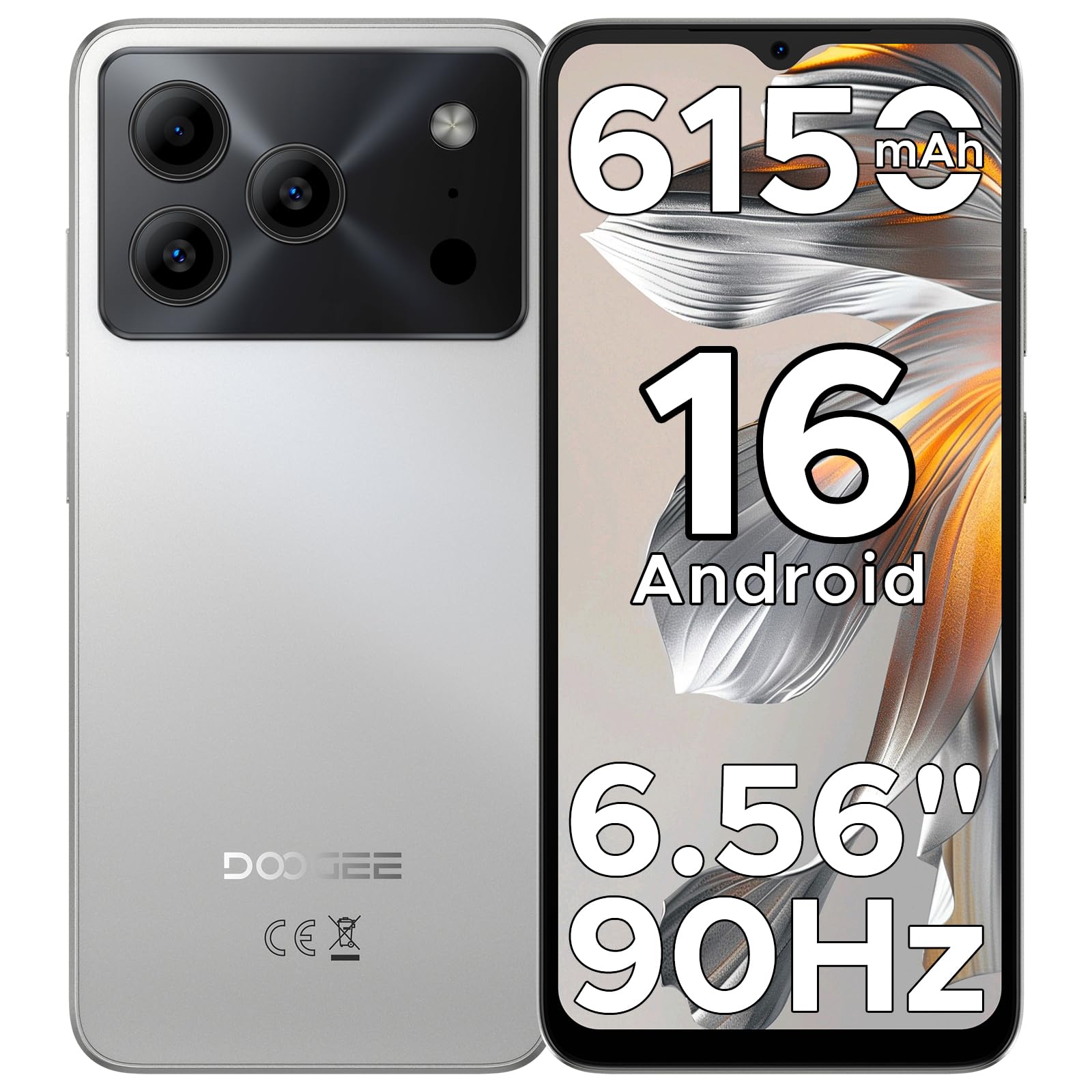
Image: The DOOGEE Note 56 smartphone, showcasing its slim design and key features such as the 8.45mm ultra-slim body, 6150mAh Silicon-Carbon Battery, Up-To-Date Android 16, 6.56" 90Hz Display, AI Scene Recognition, Instant Face Unlock, and 3.5mm Headphone Jack.

Attēls: Tuvplāns view of the DOOGEE Note 56 highlighting its ultra-slim 8.45mm profile and lightweight 195g design, emphasizing its pocket-friendly and refined appearance.
Fiziskās pogas un porti:
- Barošanas poga: Atrodas sānos, izmanto, lai ieslēgtu/izslēgtu ierīci vai aktivizētu/miega režīmu ekrānā.
- Skaļuma pogas: Atrodas sānos, izmanto multivides un zvanu skaļuma regulēšanai.
- C tipa USB ports: Atrodas apakšā, tiek izmantots uzlādei un datu pārsūtīšanai.
- 3.5 mm austiņu ligzda: Atrodas augšpusē, vadu austiņu pievienošanai.
- SIM/TF kartes slots: Located on the side, for inserting SIM cards and a TF (microSD) card.
4. Iestatīšana
4.1. SIM un TF karšu ievietošana
- Locate the SIM/TF card slot on the side of your phone.
- Insert the provided SIM eject tool into the small hole next to the slot to open the tray.
- Place your Nano-SIM card(s) and/or TF card into the tray according to the diagram on the tray.
- Uzmanīgi iebīdiet paplāti atpakaļ slotā, līdz tā ir vienā līmenī ar tālruņa korpusu.
4.2. Sākotnējā ieslēgšana un iestatīšana
- Nospiediet un turiet ieslēgšanas/izslēgšanas pogu, līdz parādās DOOGEE logotips.
- Izpildiet ekrānā redzamos norādījumus, lai izvēlētos valodu, izveidotu savienojumu ar Wi-Fi un iestatītu savu Google kontu.
- Configure security settings, including Face Unlock, for quick and secure access.
5. Lietošanas instrukcijas
5.1. Android 16 operētājsistēma
Your DOOGEE Note 56 runs on the latest Android 16 OS, offering an intuitive and secure user experience. Navigate through apps, customize your home screen, and access various features with ease.

Image: A visual representation of the Android 16 operating system interface on the DOOGEE Note 56, showing various app icons and system settings.
5.2. Sejas atbloķēšana
For convenient and secure unlocking, your device supports Face Unlock. To set it up:
- Dodieties uz Iestatījumi > Drošība > Atbloķēšana pēc sejas.
- Izpildiet ekrānā redzamos norādījumus, lai reģistrētu savu seju.
- Reģistrācijas laikā nodrošiniet labu apgaismojumu optimālai veiktspējai.

Image: A user demonstrating the Instant Face Unlock feature on the DOOGEE Note 56, highlighting its quick and secure access capabilities.
5.3. Gemini AI Integration
The DOOGEE Note 56 integrates Gemini AI features, enhancing your device's intelligence and responsiveness. This includes smart body sensing, dual system mode, super clipboard, memory expansion, screen optimization, and customizable screen colors.
Video: This video demonstrates how to utilize and upgrade Gemini AI features on a DOOGEE smartphone, showcasing its capabilities within the Android 16 operating system.
6. Kameras funkcijas
Capture memorable moments with the DOOGEE Note 56's advanced camera system.
6.1. Rear Camera (8MP)
The 8MP main camera delivers clear, natural photos. Features include:
- HDR: Uzlabo dinamisko diapazonu, lai nodrošinātu līdzsvarotu ekspozīciju sarežģītā apgaismojumā.
- Pro režīms: Offers manual control over camera settings.
- Nakts režīms: Uzlabo fotoattēlu kvalitāti vāja apgaismojuma apstākļos.
- AI Scene Recognition: Automatically detects 12 scenes and optimizes settings for stunning shots.
- Portreta režīms: Rada asuma dziļuma efektu profesionāla izskata portretiem.
- Smaida tveršana: Automatically takes a photo when a smile is detected.
- Panorāmas: Capture wide-angle scenic views.
- Burst Shots: Uzņemiet vairākus fotoattēlus ātrā secībā.
- Fun Filters: Apply creative filters to your photos.

Image: An illustration of the DOOGEE Note 56's camera capabilities, including AI Scene Recognition icons and various sample photos taken with the 8MP main camera and 5MP front camera.
6.2. Front Camera (5MP)
The 5MP front camera is perfect for selfies and video calls, featuring Beauty Mode and Portrait Effect for bright and natural results.
7. Savienojamība
Stay connected with a range of network and wireless options.
- 4G divas SIM kartes: Atbalsta divas SIM kartes elastīgai tīkla lietošanai.
- Wi-Fi: Izveidojiet savienojumu ar bezvadu tīkliem, lai piekļūtu internetam.
- Bluetooth 4.2: Lai izveidotu savienojumu ar bezvadu piederumiem.
- GPS: Navigācijas un atrašanās vietas pakalpojumiem.
- FM radio: Izbaudiet savas iecienītākās radiostacijas.
7.1. Supported Network Bands:
- GSM: B2/3/5/8
- WCDMA: B1/2/4/5/8
- TDD: B38 / 40/41
- FDD: B1/2/3/4/5/7/8/18/19/20/25/26/28A/28B/66
- Atbalsts: EDGE/GPRS
8. Akumulatora pārvaldība
The DOOGEE Note 56 is equipped with a large 6150mAh Silicon-Carbon battery for extended usage.

Attēls: Iekšējais view of the DOOGEE Note 56 highlighting its 6150mAh Silicon-Carbon Battery, emphasizing its longer lifespan, unmatched durability, 1000 charge cycles, 4 years durable battery, 20% smaller size, and 5W reverse charging capability.
Video: This video highlights the 6150mAh Silicon-Carbon Battery of the DOOGEE Note 56, showcasing its capacity and efficiency.
8.1. OTG Reverse Charging
The device supports OTG (On-The-Go) reverse charging, allowing you to use your Note 56 to charge other compatible devices.
8.2. Tips for Extending Battery Life:
- Adjust screen brightness to a lower level.
- Atspējojiet Wi-Fi, Bluetooth un GPS, kad tie netiek izmantoti.
- Aizveriet fona lietojumprogrammas.
- Iestatījumos iespējojiet akumulatora taupīšanas režīmu.

Image: This image illustrates various usage scenarios for the DOOGEE Note 56, demonstrating its extended battery life for web browsing (7 hours), music playing (49.5 hours), video watching (14 hours), and calling (28 hours).
9. Uzglabāšana un veiktspēja
The DOOGEE Note 56 is powered by a UNISOC SC9863A Octa-Core processor, ensuring smooth performance for applications and daily tasks.
- RAM: 24GB (virtual RAM expansion, 8GB physical RAM).
- Iekšējā atmiņa: 64 GB.
- Paplašināma krātuve: Supports up to 2TB via TF (microSD) card (TF card needs to be purchased separately).

Image: A visual representation of the DOOGEE Note 56's internal memory and storage, showing 64GB ROM and 24GB RAM (3GB+21GB virtual expansion), emphasizing smooth multitasking and ample telpa.
10. Displejs
Experience immersive visuals on the 6.56-inch HD+ 90Hz IPS waterdrop screen.
- Izmērs: 6.56 collas
- Izšķirtspēja: 720x1612 pikseļi
- Atsvaidzināšanas biežums: 90 Hz
- Malu attiecība: 20:9
- PPI: 269

Image: The DOOGEE Note 56 display showcasing its 6.56-inch HD+ screen with a 90Hz refresh rate, designed for smooth viewing and social media interaction.
11. Apkope un kopšana
To ensure the longevity and optimal performance of your DOOGEE Note 56, follow these care guidelines:
- Nepakļaujiet tālruni ekstremālām temperatūrām, tiešiem saules stariem vai pārmērīgam mitrumam.
- Izmantojiet tikai apstiprinātus lādētājus un kabeļus.
- Notīriet ekrānu un korpusu ar mīkstu, neplūksnojošu drānu.
- Utilize the provided TPU protective case and pre-applied protective film to guard against scratches and minor impacts.
12. Traucējummeklēšana
If you encounter issues with your DOOGEE Note 56, try the following basic troubleshooting steps:
- Ierīce neieslēdzas: Pārliecinieties, vai akumulators ir uzlādēts. Pievienojiet lādētāju un uzgaidiet dažas minūtes, pirms mēģināt atkārtoti ieslēgt ierīci.
- Ekrāns nereaģē: Restartējiet ierīci, nospiežot un turot ieslēgšanas/izslēgšanas pogu apmēram 10–15 sekundes.
- Tīkla problēmas: Check if your SIM card is properly inserted. Verify network settings and ensure you have an active plan with your carrier.
- Lietotnes avārijas: Notīriet problemātiskās lietotnes kešatmiņu vai atkārtoti instalējiet to. Pārliecinieties, vai ierīces programmatūra ir atjaunināta.
For more complex issues, refer to the official DOOGEE support webvietni vai sazinieties ar klientu apkalpošanas dienestu.
13. Specifikācijas
| Funkcija | Detaļas |
|---|---|
| Modeļa nosaukums | PIEZĪME56 |
| Operētājsistēma | Android 16 |
| Procesors | UNISOC SC9863A Octa-Core (1.6 GHz CPU Speed) |
| RAM | 24 GB (8 GB fiziskā + 16 GB virtuālā) |
| Iekšējā krātuve | 64 GB |
| Paplašināma krātuve | Līdz 2 TB, izmantojot TF karti |
| Displeja izmērs | 6.56 collas |
| Displeja izšķirtspēja | 720 x 1612 (HD+) |
| Atsvaidzināšanas biežums | 90 Hz |
| Aizmugurējā kamera | 8 MP |
| Priekšējā kamera | 5 MP |
| Akumulatora ietilpība | 6150 miljoniamp Stundas (litija polimēri) |
| Savienojamība | 4G Dual SIM, Wi-Fi, Bluetooth 4.2, GPS, FM Radio, USB Type-C |
| Audio ligzda | 3.5 mm |
| Izmēri | 6.45 x 2.98 x 0.33 collas |
| Preces svars | 6.9 unces (195 grami) |
| Īpašas funkcijas | Dual SIM, Expandable Memory, Supports USB OTG, Face Unlock |
14. Garantija un atbalsts
Your DOOGEE Note 56 comes with a warranty. Please refer to the included Warranty Card in your product package for detailed information on warranty terms, conditions, and duration.
For technical support, service, or further inquiries, please visit the official DOOGEE website or contact their customer service channels. Keep your purchase receipt and warranty card handy for any claims.


