Ievads
This manual provides detailed instructions for the setup, operation, and maintenance of your GUSTARD R30 Fully-Discrete R2R Network Streamer DAC. Please read this manual thoroughly before using the device to ensure optimal performance and longevity.
Iepakojuma saraksts
Atverot iepakojumu, lūdzu, pārliecinieties, vai ir iekļauti visi tālāk norādītie priekšmeti:
- GUSTARD R30 Mainframe
- Strāvas vads
- USB kabelis
- Tālvadības pults
- Garantijas karte

Priekšējais panelis beidziesview
The front panel of the GUSTARD R30 features essential controls and a display for real-time status and operations.
- Barošanas poga: Toggles between standby and active states. The R30 can remain in standby mode when the rear power switch is ON.
- Displeja apgabals: Shows the current input channel, encoding format, and sampling rate. Displays menu items when in the setup menu.
- Skaļuma displejs: Indicates the current volume level, ranging from -63.5dB to 0dB. 'FIXED' indicates bypass mode. Displays menu options during configuration.
- Poga '-': Normally decreases volume. Cycles through options in the menu.
- Zobrata poga: Short press switches inputs. Long press enters/exits the menu. Short press navigates items in the menu.
- Poga '+': Normally increases volume. Cycles through options in the menu.

Aizmugurējais panelis beidziesview
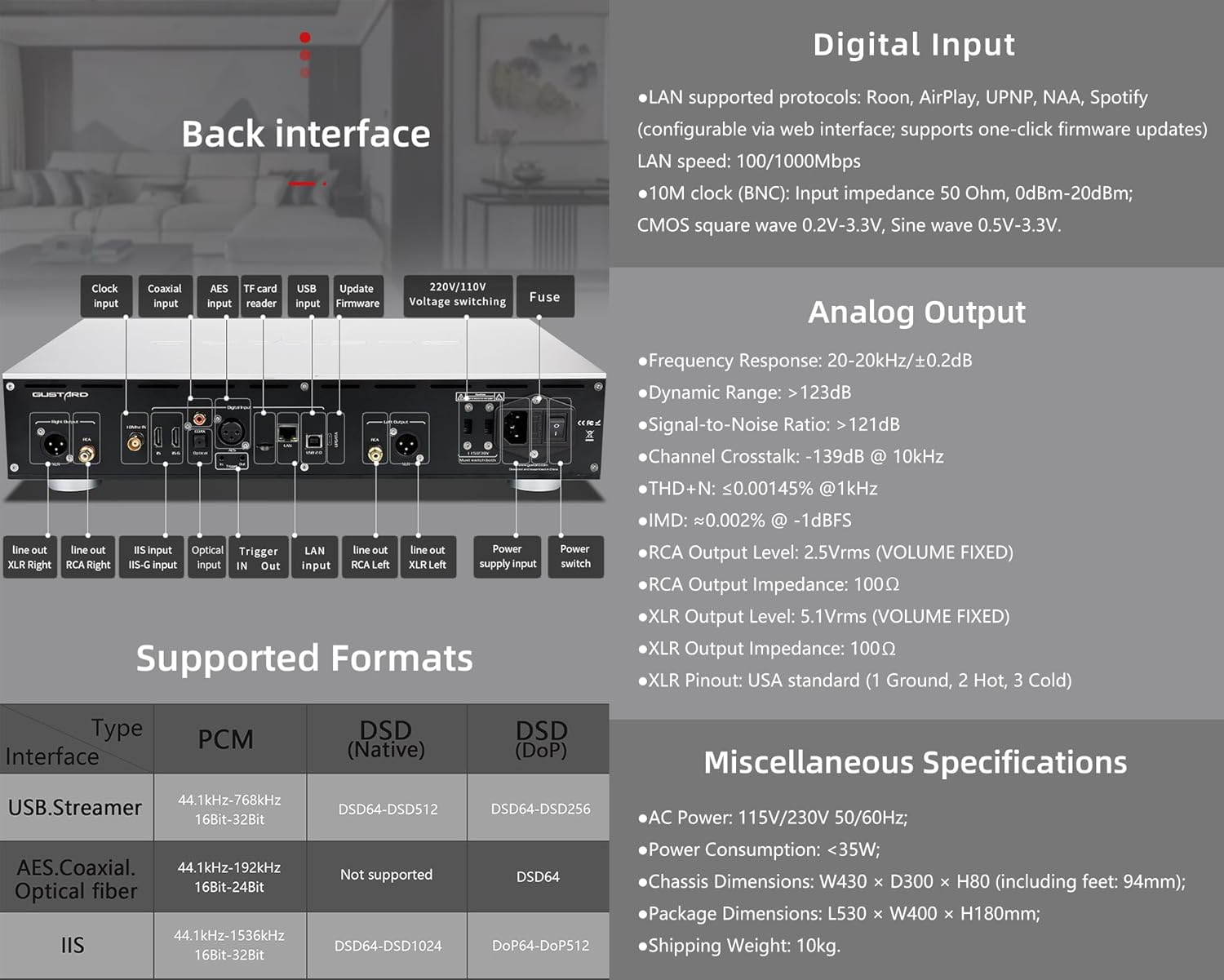
The rear panel provides various input and output connections for the GUSTARD R30.
- Pulksteņa ievade: For external 10MHz clock synchronization.
- Koaksiālā ieeja: Digitālā audio ieeja.
- AES ievade: Digitālā audio ieeja.
- USB ieeja: Savienošanai ar datoru vai citu USB audio avotu.
- LAN Input: For network streaming functionality.
- TF karšu lasītājs: Programmaparatūras atjauninājumiem.
- Atjaunināt programmaparatūru: USB ports programmaparatūras atjauninājumiem.
- 220V/110V VoltagPārslēgšana: Selector for power voltage.
- Drošinātājs: Strāvas drošinātājs.
- Line Out XLR Right/Left: Balanced analog audio outputs.
- Line Out RCA Right/Left: Unbalanced analog audio outputs.
- IIS Input (IIS-G): Digital audio input with Gustard pinout.
- Optiskā ieeja: Digitālā audio ieeja.
- Sprūda ieeja/izeja: For 12V trigger control.
- Barošanas avota ieeja: Maiņstrāvas pieslēgums.
- Strāvas slēdzis: Main power toggle.
Important: Ensure both voltagslēdži ir iestatīti uz vienādu skaļumutage, darbinot 220 V/110 V spriegumutage switch, otherwise, it may damage the internal transformer upon powering on.
Displeja un paneļa vadības elementi
The R30 utilizes a large OLED display for real-time status monitoring and functional operations. The diagram below illustrates the main interface display states.
1. OLED displejs
The display shows the input channel, external clock indication, encoding format, sampling rate, and volume.
2. Input Channel Selection
R30 ir 7 ievades kanāli. Galvenajā saskarnē katrs Gear pogas nospiešanas secības maiņa notiek, lai pārslēgtos starp pieejamajiem kanāliem šādā secībā: COAX → AES → OPT → USB → STREAMER → IIS(G) → IIS(M*).
***Note: IIS(G) is for fixed Gustard pinout configuration and cannot be adjusted. IIS(M*) supports adjustable pinout configuration.
3. Skaļuma regulēšana
- When the main interface is displayed, pressing the "+" or "-" buttons directly adjusts the analog volume attenuation function of the passive preampPavājināšanās svārstās no 0 dB līdz -63.5 dB (kopējā vājināšanās 63.5 dB).
- Pressing "+" at 0dB activates Fixed Output mode (bypassing attenuation circuit), displaying 'FIXED' indicator.
- When 'FIXED' is displayed, pressing "-" first exits bypass mode before controlling the attenuation level.

Iestatīšanas izvēlne
On the main screen, long press the Gear Button to enter the settings menu (hereinafter referred to as the menu button). In this state, the menu button can sequentially switch the menu items to be modified. "+" and "-" buttons are used to adjust the currently selected menu options. When the screen is in the settings menu, long press the menu button again to return to the main screen.
Izvēlnes struktūra:
- PCM FILTS
- DSD FILTS
- NOS REŽĪMS
- REF CLOCK
- IIS MODE
- FĀZE
- TRIGGER CH.
- TRIGGER VOL.
- DISPLAY

Izvēlnes funkcijas
Piekļūstiet izvēlnei, galvenajā saskarnē nospiežot izvēlnes pogu. Katra izvēlnes opcija ir aprakstīta tālāk.
1. PCM FILTER (PCM Digital Filter Adjustment)
R30 izmanto pašu izstrādātu augstas veiktspējas PCM pārsūtīšanas sistēmu.ampling digitālais filtra modulis ar trim filtru veidiem:
- VIVID (Default): Similar to the FAST roll-off type of traditional digital filter, but with better ringing characteristics, very small pre-ringing, and fast convergence post-ringing. It aims for a broad soundstage and sound restoration. Recommended for most music styles.
- GENTLE: Similar to the SLOW roll-off type of traditional digital filter, offering a soft listening experience.
- KOMPOSĪTS: A hybrid digital filter, balancing characteristics between Vivid and Gentle for a good listening experience.
2. DSD FILTER (DSD Digital Filter Adjustment)
DSD filtram ir 4 iebūvētas joslas platuma opcijas: 47K (Default), 50K, 60K, 70K.
3. NOS REŽĪMS (bez overiem)ampling Filter Mode)
When enabled, the PCM signal bypasses the oversampling filter entirely, decoded straight through the R-2R decoder module. This preserves micro-details and timing integrity. When enabled, there may be a slight clicking sound when the playback data format switches between PCM and DSD.
- DISABLE (Default)
- IESPĒJOT
4. REF CLOCK (Reference Clock Selection)
The GUSTARD-K2, low-noise clock synthesizer, achieves ultra-low jitter performance. The R30 offers two clock options:
- INTERNAL (Default): Uses the built-in OCXO internal reference.
- EXT. 10MHz: Selects an external 10MHz reference source. It is recommended to connect to GUSTARD C16 or C18 reference 10M master clocks.
If the external clock is lost, powered off, or its frequency deviation is greater than +/-150ppm, "EXT ERR" will be displayed and flash.
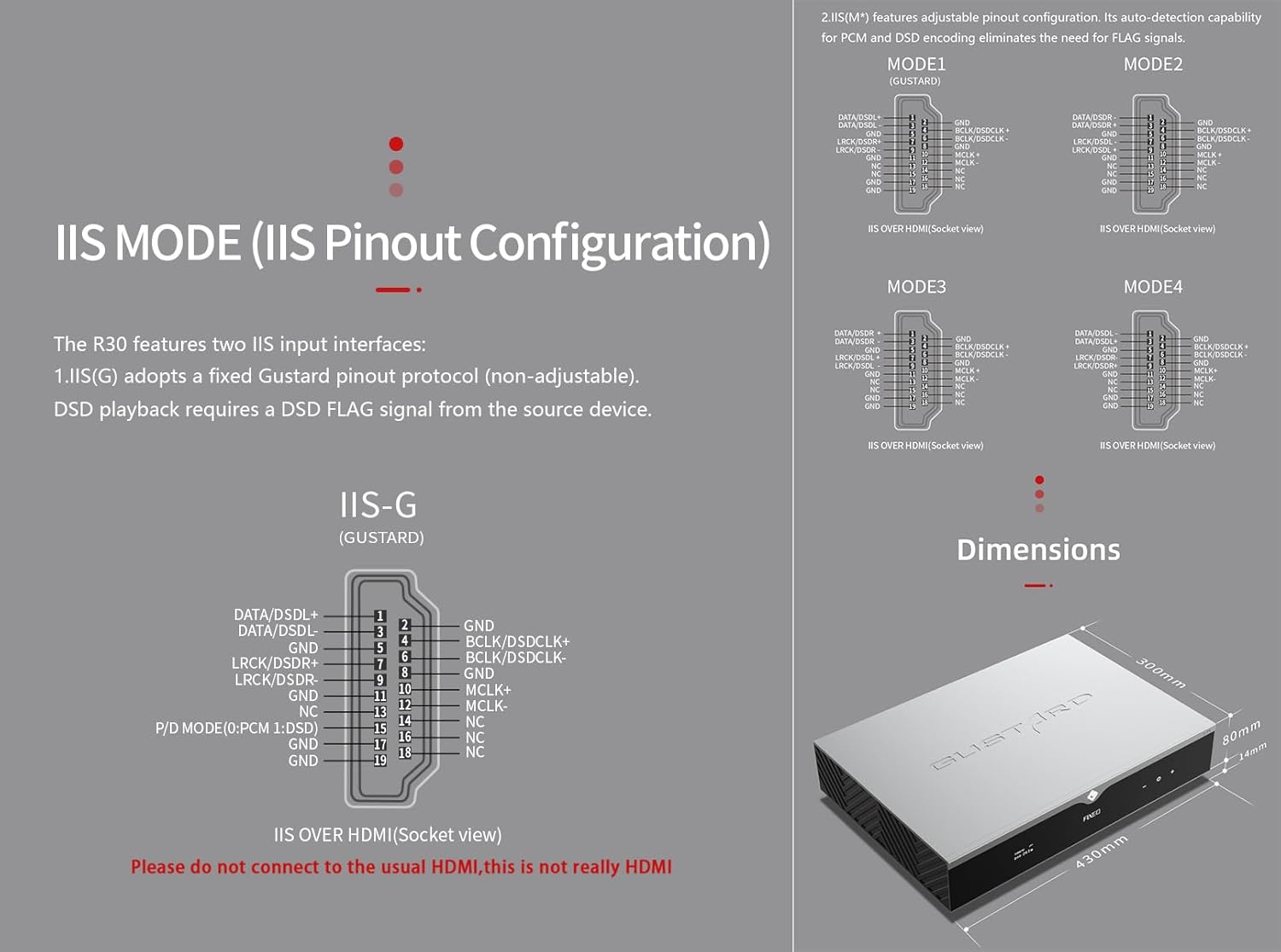
5. IIS MODE (IIS Pinout Mode Selection)
R30 ir aprīkots ar divām IIS ievades saskarnēm:
- IIS(G): Fixed Gustard pinout protocol (non-adjustable). DSD playback requires a DSD FLAG signal from the source device.
- IIS(M*): Features adjustable pinout configuration. Its auto-detection capability for PCM and DSD encoding eliminates the need for FLAG signals.
IIS(M*) adjustable Pinout mode IIS input has four Pinouts: MODE1 (Default), MODE2, MODE3, MODE4. MODE1 is compatible with the GUSTARD mode. If you are connecting to a GUSTARD front end such as U12, U16, U18, S16, S26, etc., you can match them with MODE1, which is the former works in the Gustard output mode.
Please do not connect to the usual HDMI, this is not really HDMI.
6. PHASE (Phase Setting)
Šī funkcija piedāvā divas iespējas:
- NON-inverted (Default): When non-inverted, the RCA output of R30 is normal phase, and the XLR balanced output is American standard polarity output (1 ground, 2 hot, 3 cold).
- Apgriezts: When inverted, only the RCA output is reverse phase, and the XLR balanced output is Japanese/European standard polarity output (1 ground, 2 cold, 3 hot).
7. TRIGGER CH. (Linkage Trigger Start Channel Selection)
The R30 can be triggered by an external 12V linkage signal and automatically turn on from standby mode. When the 12V trigger signal ceases or drops to 0V, automatic standby activation occurs. When the R30 is working, it is switched to the input channel of this setting by the 12V trigger linkage signal.
- LAST (Default): The input channel that was in use before entering standby last time.
- Other options include COAX, AES, OPT, USB, STREAMER, IIS(G), IIS. Selecting any channel activates it upon receiving a 12V trigger signal.
8. TRIGGER VOL. (Link Trigger Boot Volume Selection)
R30 var ieslēgt no gaidīšanas režīma, izmantojot ārēju 12 V sprūda signālu, un automātiski iestatīt izvēlēto skaļuma līmeni. Alternatīvi, darbības laikā 12 V sprūda signāls pārslēdz izeju uz iepriekš iestatīto skaļumu. Šī opcija konfigurē izejas skaļumu pēc sprūda aktivizēšanas.
- LAST (Default): The volume used before entering standby.
- FIXED: Fixed full-scale output bypassing attenuation.
- -20dB: Output at a volume attenuated to -20dB.
- -30dB: Output at a volume attenuated to -30dB.
- -40dB: Output at a volume attenuated to -40dB.
9. DISPLAY (Screen Brightness Settings)
Long-term high-brightness use of OLED screens can cause screen burn-in or ghosting. Therefore, the R30 is designed to always select automatic screen off, or manually select automatic screen off, which can also reduce interference.
- AUTO (Default): Automatically reduce brightness.
- AUTOMĀTISKĀ IZSLĒGŠANA: Automatically turn off the screen.
Infrasarkanā tālvadības pults
DAC produktu lietošanas laikā nospiediet un ilgāk par 3 sekundēm turiet nospiestu DAC pogu, lai pārietu DAC vadības režīmā. AMP/STREAM režīmi kontrolē citus Gustard produktus.
- Gaidīšanas režīms: Press once to activate R30 from standby. Press once during operation to enter standby.
- Izvēlne: Press to access R30's setup menu.
- Spilventiņš ar 4 virziena taustiņiem: Up/Down navigates menu items. Left/Right adjusts selected options. Center press activates/deactivates mute.
- Atpakaļ: Returns to main interface.
- Vol.: Decreases output volume on main interface.
- Vol+: Increases output volume on main interface.
Piezīmes:
- Operational range varies with angle.
- Obstructions between remote and sensor may cause malfunction.
- Remove batteries if unused for more than 1 month.
- Thoroughly clean battery compartment if leakage occurs.
- May accidentally trigger other IR-controlled devices.

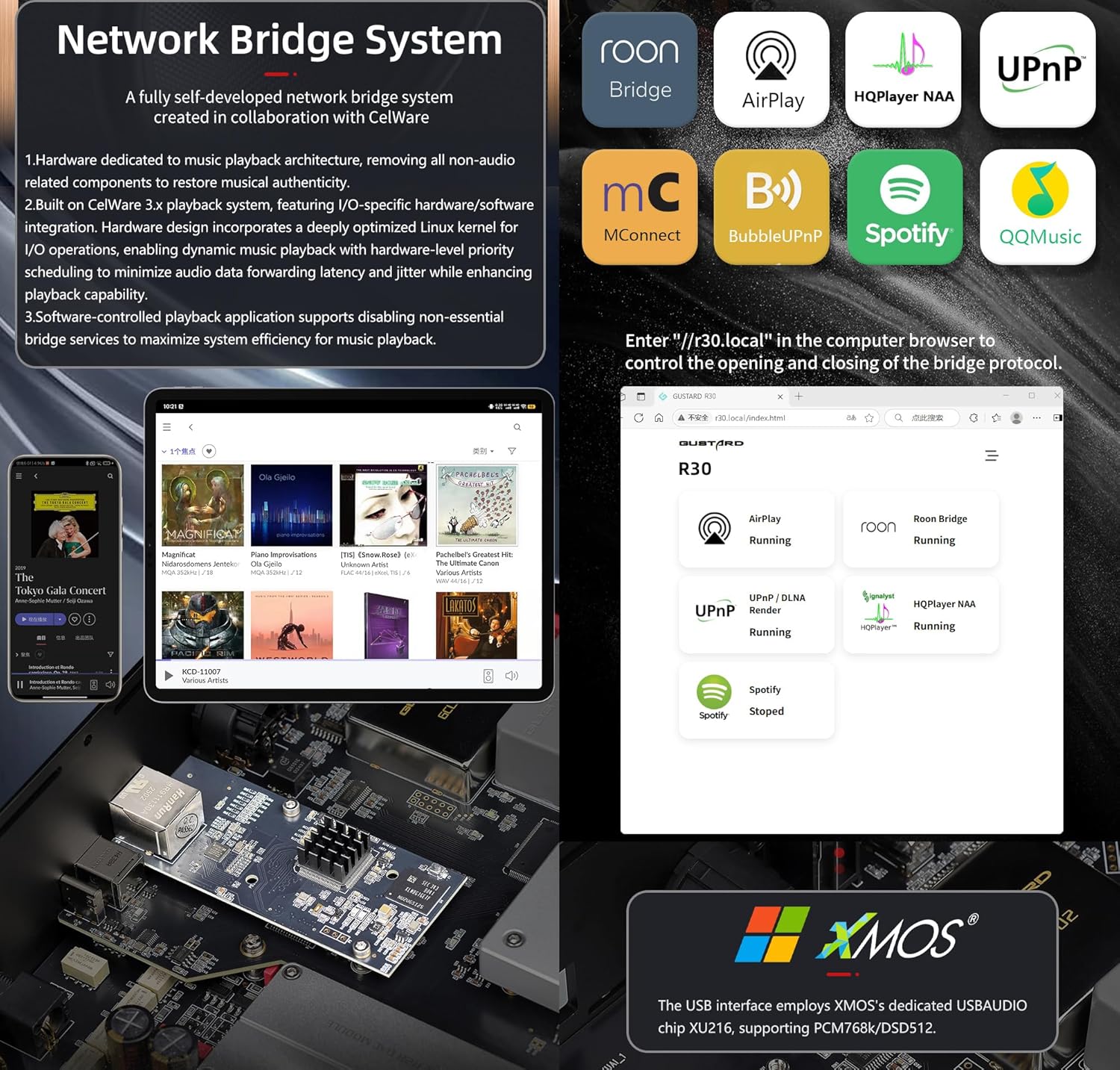
Tīkla tilta straumētāja īsā pamācība
After connecting R30's RJ45 port to your local network:
- Select the STREAMER channel and await system boot (approximately 1 minute, until "DSD 24.5MHz" appears).
- Access R30's configuration page via: http://R30.local (as shown below). Disable unused streaming protocols on the web saskarne, lai maksimāli palielinātu sistēmas efektivitāti. Šeit tiek veikti arī programmaparatūras atjauninājumi.
(Darbība mobilajā/planšetdatorā ir gaidāma līdz īpašas lietotnes izlaišanai)
You can turn off streaming protocols that are not frequently used through the web page to maximize system music playback performance. At the same time, the online upgrade of the Streamer is also operated on the web lapā.
(Pēc speciālās straumēšanas lietotnes palaišanas iepriekš minētās darbības var veikt lietotnē)
Official Product Video: GUSTARD R30 - User Manual
Produkta specifikācijas
Digital Input Support Formats:
| Tips | PCM | DSD (vietējā) | DSD (DoP) |
|---|---|---|---|
| USB.Streamer | 44.1kHz-768kHz 16Bit-32Bit | DSD64-DSD512 | DSD64-DSD256 |
| AES.Coaxial.Optical fiber | 44.1kHz-192kHz 16Bit-24Bit | Nav atbalstīts | DSD64 |
| IIS | 44.1kHz-1536kHz 16Bit-32Bit | DSD64-DSD1024 | DoP64-DoP512 |
Analogā izeja:
- Frekvences reakcija: 20–20 kHz/±0.2 dB
- Dinamiskais diapazons: >123dB
- Signāla / trokšņa attiecība:> 121 dB
- Kanāla šķērsruna: -139dB pie 10kHz
- THD+N: ≤ 0.00145% pie 1 kHz
- IMD: ≈0.002% pie -1 dBFS
- RCA izejas līmenis: 2.5 Vrms (fiksēts skaļums)
- RCA izejas pretestība: 100Ω
- XLR izejas līmenis: 5.1 Vrms (fiksēts skaļums)
- XLR izejas pretestība: 100Ω
- XLR pieslēgvieta: ASV standarts (1 zemējums, 2 karstie, 3 aukstie)
Citas specifikācijas:
- AC Power: 115V/230V 50/60Hz
- Enerģijas patēriņš: <35W
- Chassis Dimensions: W430 × D300 × H80 (including feet: 92mm)
- Package Dimensions: L530 × W400 × H180mm
- Shipping Weight: 10kg (with package)
- 10MHz BNC Input: Input impedance 50 Ohm, 0dBm-20dBm; CMOS square wave 0.2V-3.3V, Sine wave 0.5V-3.3V.
- Trigger: IN- 12V Typ. OUT- 12V Typ.
Garantijas noteikumi
Thank you for choosing GUSTARD HIFI products. To safeguard your rights and interests, please read the following warranty terms carefully. You can promptly obtain comprehensive after-sales service provided by GUSTARD.
Preču garantija
You will enjoy a 2-year free warranty and lifetime maintenance after the date of purchasing GUSTARD's HIFI product.
* Ražotājs sedz tikai kravas no Ķīnas kontinentālās daļas. Daļu no ārzemēm iekasētās kravas un nodokļiem lietotājs atrisinās, vienojoties ar izplatītāju.
Bezmaksas garantijas serviss
GUSTARD R30 from the purchasing datums bezmaksas garantijas periodā, lietotājs lieto produktu normālā veidā, un produkts sabojājas detaļu kvalitātes vai ražošanas problēmu dēļ.
Papildus garantijas servisam
Belonging to one of the following circumstances, products are no longer provided warranty service:
- Produktiem no iegādes datuma ir beidzies iepriekš noteiktais garantijas laiks.
- Modelis, svītrkodi un pirkuma datums neatbilst faktiskajam produktam un garantijas kartei.
- Without GUSTARD technician permission, unauthorized modifications to the circuit, components or self-repaired product.
- Bojājumi, ko izraisa neatvairāmi dabas spēki.
- Pārsniedzot atļauto izmantošanu, kaitējot videi.
- Bojājumi nepareizas lietošanas vai nepareizas uzglabāšanas dēļ. Tostarp, bet ne tikai: sējtage ir pārāk augsts, lai sadedzinātu ķēdes vai sastāvdaļas; sasitumi, kā rezultātā tiek bojāts korpuss vai iekšpuse; bojājumi ūdens, eļļas, šķidruma un pārmērīgu putekļu dēļ; produkta oksidēšanās vai korozija utt.
- Pēc garantijas perioda beigām, piemēram, atsevišķu komponentu bojājumi, izskats cilvēka izraisītu bojājumu dēļ, programmaparatūras modifikācijas noved pie tā, ka nesankcionēti lietotāji nevar strādāt. GUSTARD apņemas iekasēt saprātīgas uzturēšanas maksas (izņemot lielas platības komponentus vai shēmas plati, kas sadedzināta līdz remontam). Lietotājam jāsedz kravas un uzturēšanas izmaksas, materiālu izmaksas.
Kontaktinformācija
Ražotājs: Shenzhen Goshide Technology Co., LTD
Adrese: Room 302, Building 1, No. 28, Huimin 1st Road, Guanlan Sub-district, Longhua District, Shenzhen City, Guangdong Province
Tālr.: +86-18682080102
Webvietne: http://www.gustard.com
E-pasts: service@gustard.com


