1. Produkts beidziesview
The Keychron M6 Silent Wireless Gaming Mouse is designed for optimal comfort and performance across various tasks, from gaming to productivity. It features a lightweight, ergonomic design, versatile connectivity options, and a high-precision optical sensor. This manual provides detailed instructions for setup, operation, and maintenance.

Image: Keychron M6 Silent Wireless Gaming Mouse, showcasing its ergonomic shape and main buttons.
2. Galvenās iezīmes
- Ultra-Ergonomic & Lightweight Design: The M6 mouse combines a compact, ergonomic shape with a lightweight 86g body for extended comfort. It includes over ten customizable buttons and an infinite metal scroll wheel.
- Stable Wireless with Ultra-Low Latency: Experience reliable 2.4GHz wireless performance with a 1000Hz polling rate. The M6 also supports Bluetooth 5.3 for multi-device use and flexible switching.
- High-Precision PixArt 3395 Sensor: Equipped with the advanced PixArt 3395 optical sensor, the M6 provides up to 26,000 DPI, 650 IPS tracking speed, and pinpoint accuracy.
- Infinite Scroll & Premium Metal Wheel: Features dual scrolling modes: smooth, infinite scroll for fast navigation and tactile mode for precision. The solid metal wheel offers a quiet, premium feel.
- Fully Programmable via Keychron Engine Software: Customize every button with Keychron Engine software on macOS and Windows. Create shortcuts, set macros, adjust DPI, polling rate, and LOD.
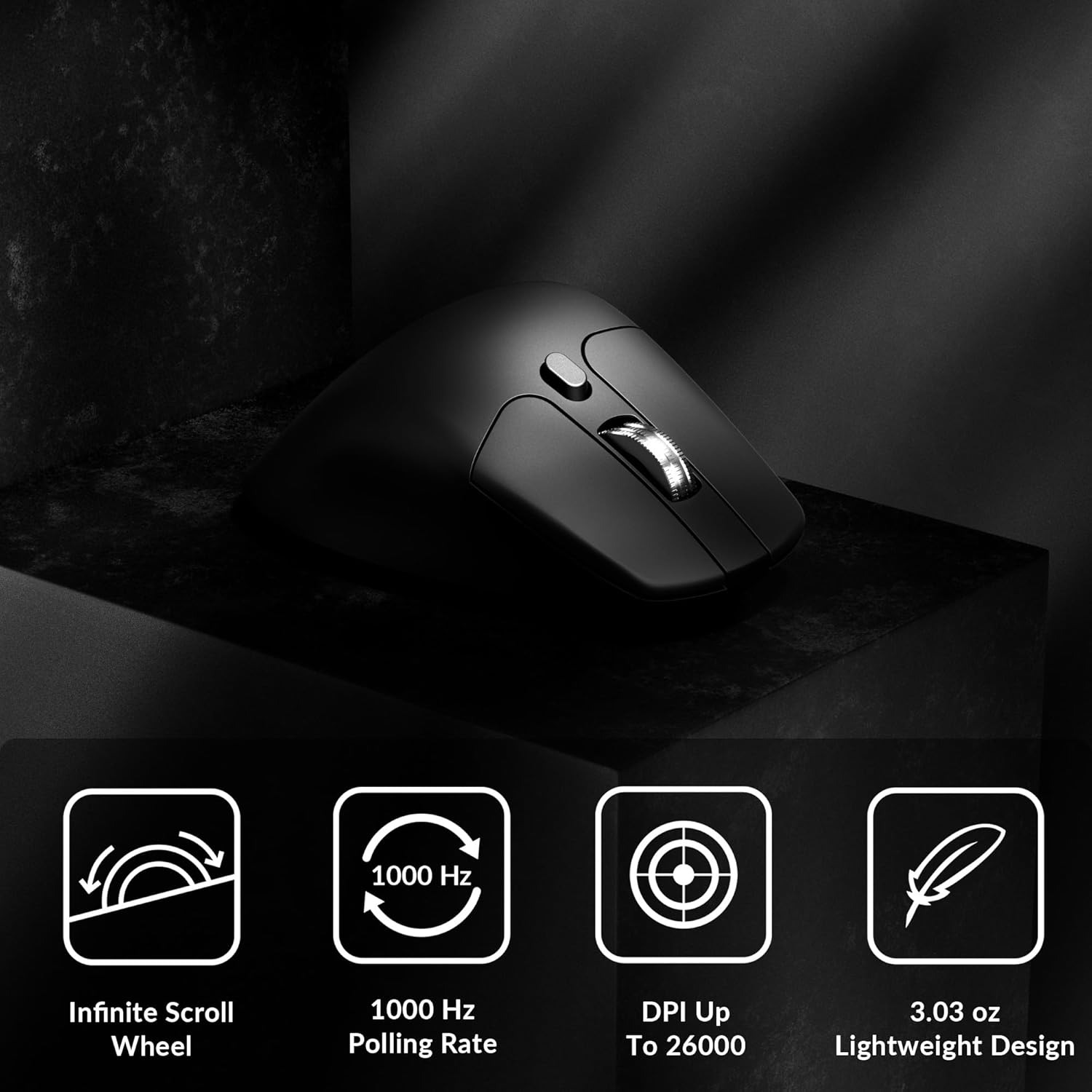
Image: Icons illustrating key features: Infinite Scroll Wheel, 1000 Hz Polling Rate, DPI Up To 26000, and Lightweight Design.
3. Iestatīšana
3.1. Iepakojuma saturs
Pārliecinieties, vai iepakojumā ir visi priekšmeti:
- 1x Keychron M6 Mouse
- 1 C tipa–C tipa kabelis
- 1 A tipa–C tipa adapteris
- 1x pagarinājuma adapteris uztvērējam
- 1x Type-C 2.4 GHz Receiver
- 1x A tipa 2.4 GHz uztvērējs
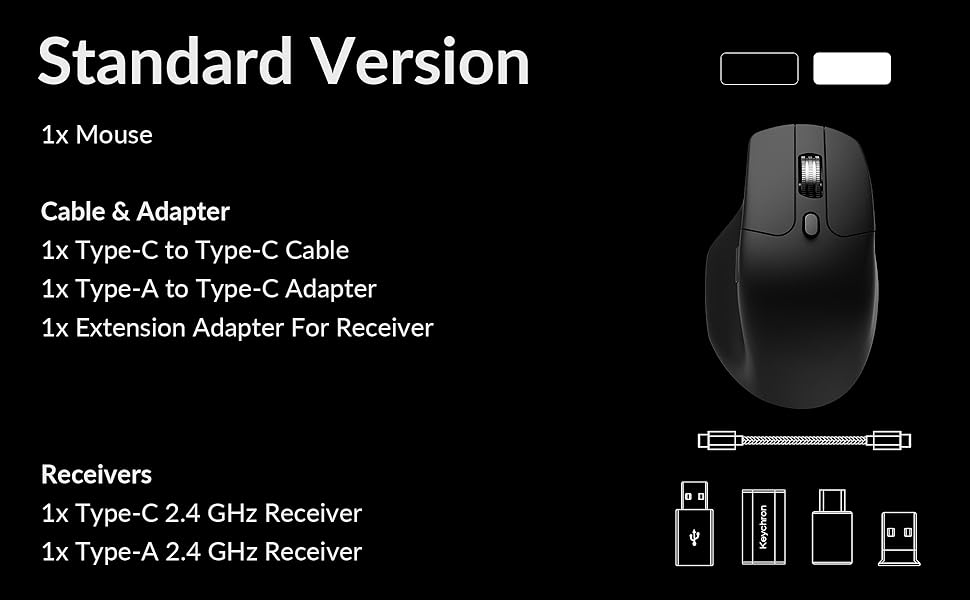
Image: Diagram showing the contents of the Keychron M6 mouse package.
3.2. Sākotnējā uzlāde
Before first use, it is recommended to fully charge the mouse. Connect the mouse to your computer using the provided Type-C cable. The LED indicator will show charging status.
3.3 Peles pievienošana
The Keychron M6 supports three connection modes: 2.4GHz wireless, Bluetooth 5.3, and wired.
- 2.4 GHz bezvadu savienojums: Insert the 2.4GHz receiver (Type-A or Type-C) into your computer's USB port. Switch the mode switch on the bottom of the mouse to 'G' (Gaming) mode. The mouse should connect automatically.
- Bluetooth 5.3: Switch the mode switch on the bottom of the mouse to 'B' (Bluetooth) mode. On your computer, search for Bluetooth devices and select 'Keychron M6' to pair.
- Vadu: Connect the mouse directly to your computer using the provided Type-C cable. The mouse will function in wired mode and charge simultaneously.

Image: Keychron M6 mouse connected to a laptop via 2.4GHz receiver, with Bluetooth 5.3 icon.
4. Lietošanas instrukcijas
4.1 Pamatfunkcijas
- Kreisais/labais klikšķis: Standarta peles pogu funkcijas.
- Ritināšanas ritenis: Izmanto vertikālai ritināšanai.
- Sānu pogas: Default to Forward/Backward navigation. Customizable via software.
- Īkšķa ritenis: Located on the side, used for horizontal scrolling.
4.2 DPI regulēšana
The DPI (Dots Per Inch) button on the bottom of the mouse allows you to cycle through preset sensitivity levels. Each level is indicated by a specific LED color. You can customize these DPI levels using the Keychron Engine software.
4.3 Aptaujas ātruma pielāgošana
The polling rate button on the bottom of the mouse allows you to switch between different polling rates (125Hz, 500Hz, 1000Hz). A higher polling rate provides more responsive tracking, ideal for gaming. The LED indicator will change color to reflect the current polling rate.

Image: Close-up of the polling rate switch and indicator light on the mouse's underside.
4.4 Infinite Scroll Mode
The M6 features a button near the main scroll wheel to toggle between infinite scroll mode and tactile (notched) scroll mode. Infinite scroll allows for rapid navigation through long documents or web lapas.

Image: Diagram showing the infinite scroll button and the horizontal scrolling function of the thumb wheel.
5. Customization with Keychron Engine Software
The Keychron Engine software allows for comprehensive customization of your M6 mouse. It is compatible with macOS and Windows and can be accessed online, eliminating the need for a download.
- Pogas piešķiršana: Remap any of the mouse buttons to perform different functions, including keyboard shortcuts, multimedia keys, or macros.
- Makro izveide: Record and assign complex sequences of commands to a single button.
- DPI/Polling Rate/LOD Adjustment: Fine-tune sensor settings to match your preferences.
Apmeklējiet oficiālo Keychron website to access the Keychron Engine software.

Image: Screenshot of the Keychron Engine software interface, showing button customization options for the M6 mouse.
6. Savienojamības režīmi
The M6 mouse offers flexible connectivity to suit various setups:
- 2.4 GHz bezvadu savienojums: Provides a stable, low-latency connection with a 1000Hz polling rate, ideal for gaming and demanding tasks. Uses a dedicated USB receiver.
- Bluetooth 5.3: Offers seamless connection to multiple devices, allowing for quick switching between systems. Suitable for general use and productivity.
- Vadu (USB-C): Connects directly via the USB-C cable, providing a reliable connection and simultaneously charging the mouse.
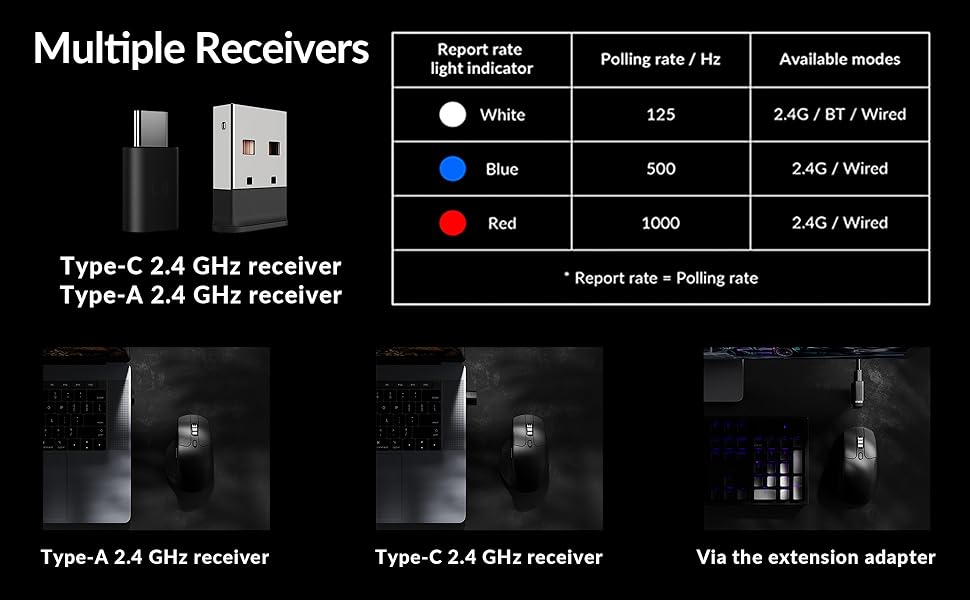
Image: Illustration of the Type-C and Type-A 2.4 GHz receivers, along with a table detailing polling rates and available modes.
7. Specifikācijas
| Modeļa numurs | M6S |
| Sensors | PixArt 3395 optiskais sensors |
| DPI | Līdz 26,000 |
| IPS izsekošanas ātrums | 650 |
| Aptauju skaits | 1000Hz (2.4GHz/Wired), 125Hz (Bluetooth) |
| Savienojamība | 2.4 GHz bezvadu, Bluetooth 5.3, USB-C vadu savienojums |
| Svars | 86 g (3.03 unces) |
| Akumulators | 800 mAh (Up to 80 hours) |
| Slēdži | Huano 20M Silent Micro Switch |
| Saderība | Windows, macOS, Linux |
| Izmēri | 4.82 x 2.97 x 1.97 collas (122.5 x 75.4 x 50 mm) |
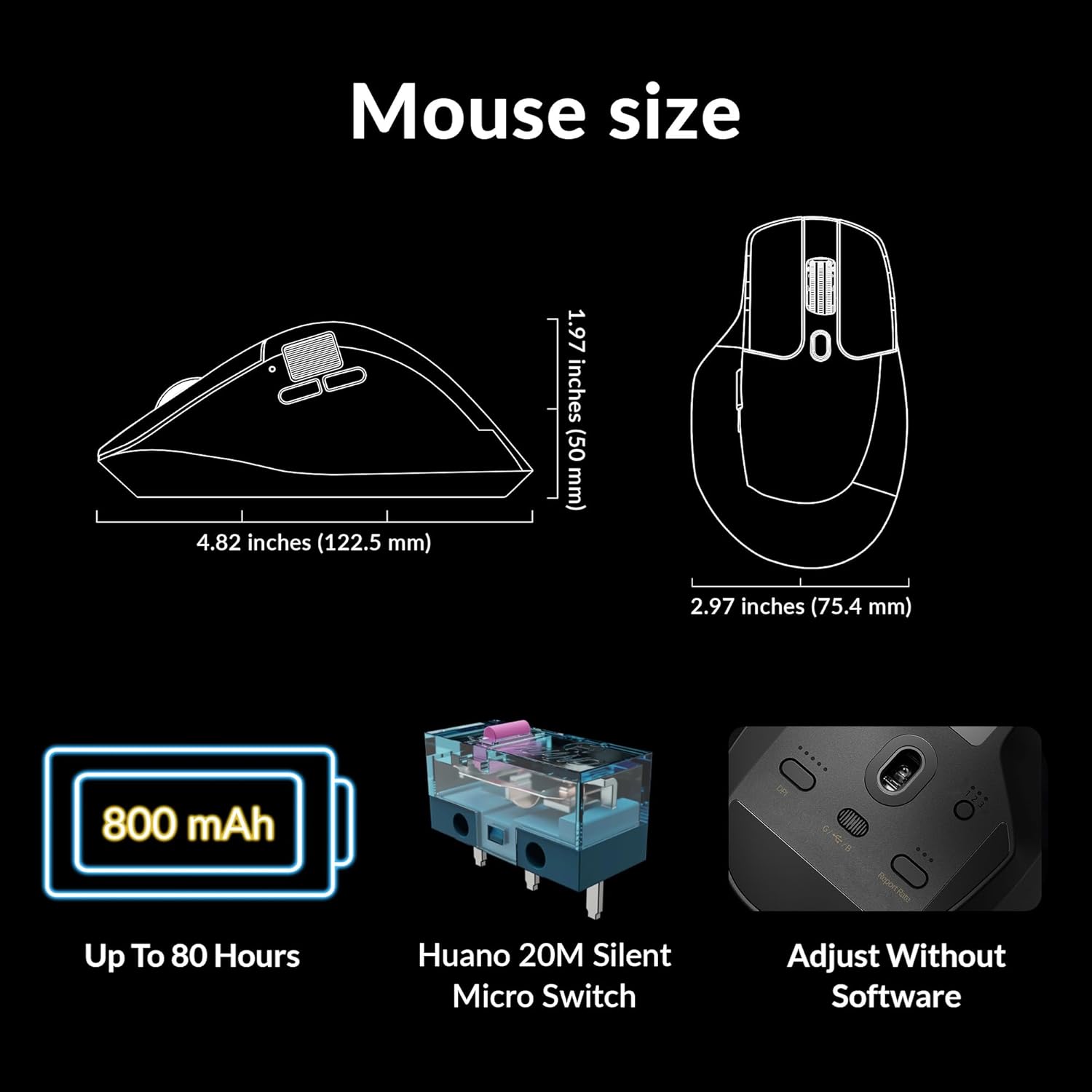
Image: Diagram showing the dimensions of the Keychron M6 mouse, its 800 mAh battery, and Huano 20M Silent Micro Switches.
8. Apkope
To ensure the longevity and optimal performance of your Keychron M6 mouse, follow these maintenance guidelines:
- Tīrīšana: Peles virsmas noslaukšanai izmantojiet mīkstu, sausu drānu. Noturīgu netīrumu gadījumā nedaudz paberzējiet.ampNoslaukiet drānu ar ūdeni vai maigu tīrīšanas līdzekli. Izvairieties no spēcīgām ķīmiskām vielām.
- Sensoru kopšana: Lai nodrošinātu precīzu izsekošanu, turiet peles apakšpusē esošo optisko sensoru tīru un bez putekļiem vai gružiem.
- Akumulatora kopšana: Izvairieties no biežas akumulatora pilnīgas izlādes. Ilgstošai uzglabāšanai uzlādējiet peli līdz aptuveni 50% un uzglabājiet to vēsā, sausā vietā.
- Uzglabāšana: When not in use, store the mouse in a safe place to prevent physical damage.
9. Traucējummeklēšana
If you encounter issues with your Keychron M6 mouse, refer to the following common solutions:
- Pele nereaģē:
- Pārliecinieties, vai pele ir uzlādēta.
- Check the connection mode switch (2.4GHz, Bluetooth, Wired) is set correctly.
- For 2.4GHz, ensure the receiver is properly inserted and try a different USB port.
- For Bluetooth, re-pair the device in your computer's Bluetooth settings.
- Lai izslēgtu bezvadu savienojuma problēmas, mēģiniet izveidot savienojumu, izmantojot USB-C kabeli.
- Nekonsekventa izsekošana:
- Notīriet optisko sensoru peles apakšā.
- Pārliecinieties, ka peli lietojat uz piemērotas virsmas (piemēram, peles paliktņa).
- Pielāgojiet DPI iestatījumus sev ērtā līmenī.
- Pogas nedarbojas:
- Check Keychron Engine software for custom button assignments that might be interfering.
- Pārliecinieties, vai peles programmaparatūra ir atjaunināta.
- Scroll Wheel Issues:
- Toggle the infinite scroll button to ensure it's in the desired mode.
- Notīriet visus gružus ap ritināšanas ritenīti.
10. Oficiālais produkta video
Video: Oficiāls paziņojumsview of the Keychron M6 Silent Wireless Optical Gaming Mouse, highlighting its features and design.
11. Garantija un atbalsts
Keychron products come with a limited warranty. For detailed warranty information, technical support, and frequently asked questions, please visit the official Keychron webvietnē vai sazinieties ar klientu apkalpošanas dienestu. Saglabājiet pirkuma apliecinājumu garantijas prasību iesniegšanai.