1. Beigāsview
The Element 32-inch 720p HD Xumo Smart TV offers reliable performance and smart functionality in a compact design. Ideal for smaller spaces such as kitchens, dorm rooms, guest rooms, or offices, this television combines a clear HD display with a versatile smart platform and modern connectivity options.
Key features include a 720p resolution display, a 120Hz effective refresh rate for smooth motion, and the integrated Xumo OS for access to numerous streaming applications and free live channels. Connectivity is robust with multiple HDMI ports, USB, LAN, Bluetooth, and Apple AirPlay support. The TV also comes with a voice remote for convenient navigation.
2. Kas ir kastē
Upon unboxing your Element 32-inch Xumo Smart TV, please ensure all the following components are present:
- 32-inch Element Xumo TV
- Voice Remote + 2 AAA batteries
- TV Stand & Screws
- Īsā lietošanas pamācība

Image: The contents of the TV box, showing the 32-inch television, its remote control, two stand feet, and a bag of screws for assembly. Dimensions of the TV are also displayed.
3. Iestatīšana
3.1 TV statīva piestiprināšana
- Uzmanīgi novietojiet televizoru ar ekrānu uz leju uz mīkstas, tīras virsmas, lai novērstu skrāpējumus.
- Novietojiet katru statīva kāju ar atbilstošajiem skrūvju caurumiem televizora apakšā.
- Secure each stand foot using the provided screws. Ensure they are tightened firmly but do not overtighten.
- Uzmanīgi paceliet televizoru un novietojiet to uz stabilas, līdzenas virsmas.
Alternatively, the TV supports VESA mounting for wall installation (wall mount hardware sold separately).
3.2 Strāvas pieslēgums
Connect the power cord to the TV's power input and then plug it into a standard electrical outlet. A pilot light on the TV will indicate that it is receiving power.
3.3 Initial Setup (Xumo OS)
Pēc pirmās ieslēgšanas televizors jūs vadīs cauri sākotnējās iestatīšanas procesam. Tas ietver:
- Valodas izvēle: Izvēlieties vēlamo valodu.
- Tīkla savienojums: Connect the TV to your home Wi-Fi network or via an Ethernet cable.
- Xumo OS Account Setup: Follow on-screen prompts to set up or log in to your Xumo OS account. This is necessary to access smart features and apps.
- Kanālu skenēšana: Ja pievienojat antenu, televizors skenēs pieejamos kanālus.

Image: The Element 32-inch Xumo Smart TV is shown on a wooden TV stand, displaying its smart interface with various streaming app icons.
4. Savienojumi
The Element Xumo Smart TV provides a variety of ports for connecting external devices:
- HDMI porti (3): Connect high-definition devices such as Blu-ray players, gaming consoles, or cable/satellite boxes. One HDMI port supports eARC (enhanced Audio Return Channel) for simplified audio connections to compatible soundbars or AV receivers.
- USB ports (1): Pievienojiet USB atmiņas ierīces view fotoattēlus, atskaņot mūziku vai skatīties video.
- LAN (Ethernet) ports: Vadu interneta pieslēgumam.
- Audio Out (Optical) / Headphone Jack: Ārējo audiosistēmu vai austiņu pievienošanai.
- Composite Input / Analog Tuner: For connecting older devices or an antenna.
5. Televizora lietošana
5.1 tālvadības pults
The included voice remote allows for intuitive control of your TV. It features dedicated buttons for popular streaming services and a microphone for voice commands.
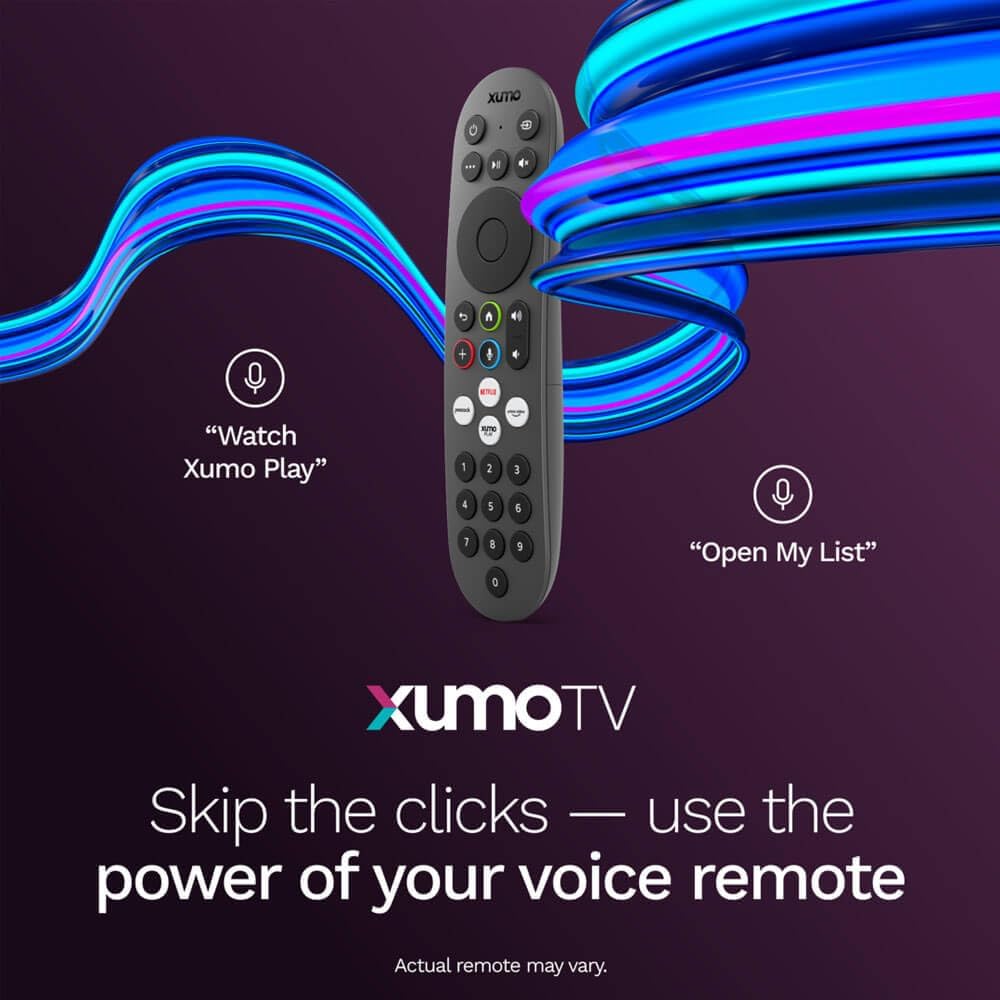
Image: A close-up of the Element Xumo Smart TV voice remote, highlighting its various buttons including a microphone for voice commands and quick access buttons for streaming services.
5.2 Smart Features & Streaming (Xumo OS)
The Xumo OS provides access to over 250 preloaded apps and more than 750 free live channels. You can:
- Meklēt saturu: Use the unified search function to find content across all your installed apps.
- My List: Curate your personal watchlist for easy access to your favorite shows and movies.
- Free On-Demand Libraries: Explore a wide selection of free on-demand content.
- Balss vadība: Use the voice remote to navigate, search, and control your TV hands-free.

Image: The Xumo TV interface showing a selection of popular streaming applications and content recommendations.
5.3 Attēla un skaņas iestatījumi
Your TV delivers a crisp 720p HD display with a 120Hz effective refresh rate, minimizing motion blur for clear visuals. Dolby Audio processing enhances the sound experience. You can adjust picture and sound settings via the TV's menu to suit your preferences.
- Attēlu režīmi: Select from various preset picture modes (e.g., Standard, Vivid, Movie, Sports) or customize settings like brightness, contrast, and color.
- Skaņas režīmi: Choose from different sound modes (e.g., Standard, Music, Movie, Speech) or adjust bass and treble levels.
5.4 Apple AirPlay & Home Support
Seamlessly stream content or mirror your screen from your iPhone, iPad, or Mac directly to your Element TV using Apple AirPlay. With Apple Home support, you can integrate your TV into your Apple smart home ecosystem for convenient control.
6. Apkope
To ensure the longevity and optimal performance of your Element Xumo Smart TV, follow these maintenance guidelines:
- Ekrāna tīrīšana: Viegli noslaukiet ekrānu ar mīkstu, sausu, nepūkošu drānu. Noturīgu traipu gadījumā viegli noslaukietampNoslaukiet drānu ar ūdeni vai ekrānam paredzētu tīrīšanas līdzekli (nekad nesmidziniet tieši uz ekrāna).
- Skapja tīrīšana: Televizora korpusa tīrīšanai izmantojiet mīkstu, sausu drānu. Izvairieties no abrazīvu tīrīšanas līdzekļu vai šķīdinātāju lietošanas.
- Ventilācija: Lai novērstu pārkaršanu, pārliecinieties, vai televizora aizmugurē esošās ventilācijas atveres nav bloķētas.
- Izslēgt, kad nelieto: Izslēdziet televizoru, kad to nelietojat, lai taupītu enerģiju un pagarinātu tā kalpošanas laiku.
7. Traucējummeklēšana
If you encounter any issues with your Element Xumo Smart TV, refer to the following common troubleshooting tips:
- Nav jaudas: Pārbaudiet, vai strāvas vads ir droši pievienots gan televizoram, gan elektrotīkla kontaktligzdai. Pārliecinieties, vai kontaktligzda darbojas.
- Nav attēla/skaņas: Verify that the correct input source is selected. Check all cable connections (HDMI, antenna, etc.) for secure fit.
- Tālvadības pults nedarbojas: Nomainiet tālvadības pultī AAA baterijas. Pārliecinieties, vai starp tālvadības pulti un televizora infrasarkano staru sensoru nav nekādu šķēršļu.
- Tīkla savienojuma problēmas: Restart your Wi-Fi router. Check the TV's network settings to ensure it's connected to the correct network and the password is entered correctly.
- Smart App Problems: Try restarting the app. If the issue persists, clear the app's cache or reinstall it. Ensure your TV's software is up to date.
For persistent issues, please contact Element customer support.
8. Specifikācijas
| Funkcija | Specifikācija |
|---|---|
| Modeļa numurs | E300AE32C |
| Ekrāna izmērs | 32 collas |
| Displeja izšķirtspēja | 720p (1366x768) |
| Atsvaidzināšanas biežums | 60 Hz (120Hz Effective) |
| Malu attiecība | 1.78:1 |
| Operētājsistēma | Xumo OS |
| Savienojamība | 3x HDMI (1x eARC), 1x USB, LAN (Ethernet), Optical Audio Out, Headphone Jack, Composite Input, Wi-Fi, Bluetooth |
| Īpašas funkcijas | Bezel-Less Design, Built-In Speaker, Voice Remote, Apple AirPlay & Home Support |
| TV with Stand Dimensions (W x H x D) | 28.8 cm x 19.2 cm x 7.0 cm |
| TV without Stand Dimensions (W x H x D) | 28.8 cm x 17.0 cm x 2.7 cm |
| Preces svars | 8.8 mārciņas |
9. Garantija un atbalsts
The Element 32-inch 720p HD Xumo Smart TV comes standard with a 2 gada ražotāja garantijaŠī garantija attiecas uz materiālu un izgatavošanas defektiem normālas lietošanas apstākļos. Lūdzu, saglabājiet pirkuma apliecinājumu garantijas prasību iesniegšanai.
For technical support, warranty inquiries, or further assistance, please refer to the contact information provided in your Quick Start Guide or visit the official Element Electronics webvietne.


