1. Ievads
Paldies par pirkumuasing the Monster S350 Bluetooth Speaker. This portable wireless speaker features a touch screen, Bluetooth 6.0 connectivity, and support for TF cards, offering a versatile audio experience. This manual provides detailed instructions for setup, operation, maintenance, and troubleshooting to ensure optimal performance and longevity of your device.
2. Drošības informācija
- Nepakļaujiet skaļruni ekstremālām temperatūrām, tiešiem saules stariem vai augstam mitrumam.
- Nenometiet skaļruni vai nepakļaujiet to spēcīgiem triecieniem.
- Sargājiet skaļruni no ūdens un citiem šķidrumiem.
- Nemēģiniet pats izjaukt, remontēt vai pārveidot skaļruni. Ja nepieciešams, sazinieties ar kvalificētu servisa personālu.
- Izmantojiet tikai komplektācijā iekļauto uzlādes kabeli vai tā ekvivalentu sertificētu kabeli.
- Atbrīvojieties no baterijām saskaņā ar vietējiem noteikumiem. Nededzināt.
3. Iepakojuma saturs
Lūdzu, pārbaudiet, vai iepakojumā nav šādu priekšmetu:
- Monster S350 Bluetooth skaļrunis
- USB uzlādes kabelis
- Lietotāja rokasgrāmata
4. Produkts beidziesview
Familiarize yourself with the components of your Monster S350 speaker.

4.1. attēls: Priekšpuse view of the Monster S350 Bluetooth Speaker, showcasing its retro design and touch screen.

4.2. attēls: Close-up of the speaker's top controls, illustrating the long press function for power and swipe gestures for volume adjustment.
Vadības ierīces un porti:
- Barošanas/skaļuma poga: Long press to turn on/off. Swipe up to increase volume, swipe down to decrease volume.
- Skārienekrāna displejs: For navigation, settings, and displaying information.
- TF kartes slots: Insert a TF (microSD) card for local music playback.
- USB-C uzlādes ports: Skaļruņa uzlādēšanai.
5. Iestatīšana
5.1 Skaļruņa uzlāde
- Pievienojiet USB uzlādes kabeli skaļruņa USB-C portam.
- Pievienojiet kabeļa otru galu USB strāvas adapterim (nav iekļauts komplektā) vai datora USB portam.
- Uzlādes indikators ekrānā parādīs uzlādes statusu. Pilnīga uzlāde parasti aizņem aptuveni 2–3 stundas.
5.2 Ieslēgšana/izslēgšana
- Lai ieslēgtu: Long press the Power/Volume knob until the screen lights up.
- Lai izslēgtu: Long press the Power/Volume knob until the screen turns off.
5.3 Bluetooth savienošana pārī
Pair your Monster S350 with a Bluetooth-enabled device.
- Ensure the speaker is powered on and within range of your Bluetooth device (e.g., smartphone, tablet).
- Savā Bluetooth ierīcē iespējojiet Bluetooth un meklējiet pieejamās ierīces.
- Atrasto ierīču sarakstā atlasiet "Monster S350".
- Kad skaļrunis ir izveidots pārī, tas norādīs uz veiksmīgu savienojumu, un jūs varēsiet sākt atskaņot audio.

5.1. attēls: The speaker displaying its Bluetooth connection status alongside a smartphone's Bluetooth settings.
5.4 TF kartes atskaņošana
Atskaņojiet mūziku tieši no TF (microSD) kartes.
- Pārliecinieties, vai skaļrunis ir izslēgts.
- Insert a TF card (up to 32GB, formatted to FAT32) into the TF card slot until it clicks into place.
- Power on the speaker. The speaker will automatically detect the TF card and switch to local music playback mode, or you can select it from the touch screen menu.

5.2. attēls: Demonstrating the insertion of a TF card into the speaker's dedicated slot for local music playback.
6. Lietošanas instrukcijas
6.1 Pamata audio atskaņošana
- Atskaņot/pauzēt: Tap the play/pause icon on the touch screen.
- Nākamais ieraksts: Swipe right on the touch screen or tap the next track icon.
- Iepriekšējais ieraksts: Swipe left on the touch screen or tap the previous track icon.
- Skaļuma kontrole: Swipe up on the Power/Volume knob to increase volume, swipe down to decrease volume. Alternatively, adjust volume via the connected Bluetooth device.
6.2. Skārienekrāna lietošana
The full-color touchscreen display allows for intuitive navigation and access to various features.
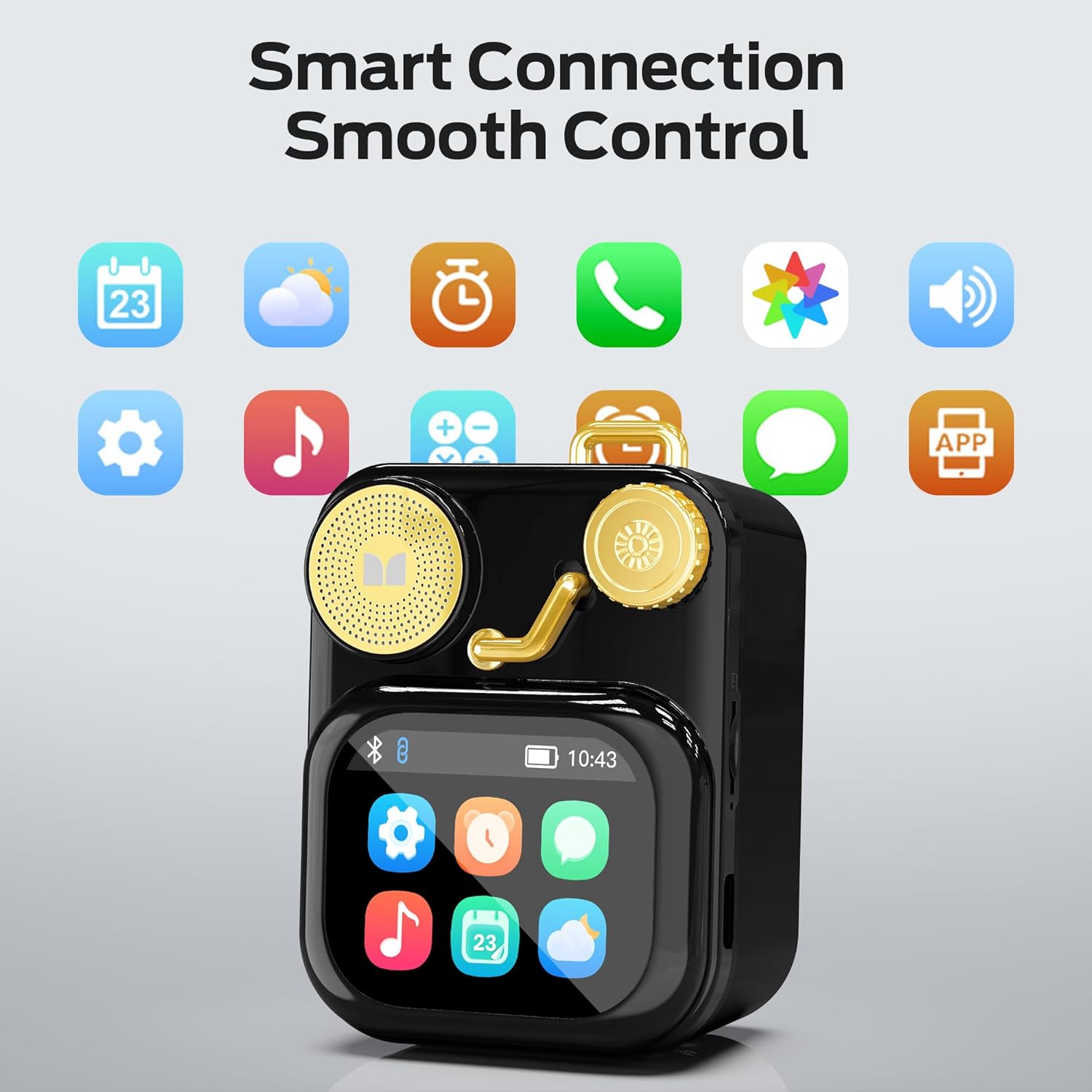
6.1. attēls: The speaker's touch screen displaying various application icons for smart features.
- Navigācija: Swipe left/right or up/down to browse through menus and options.
- Izlase: Pieskarieties ikonai vai opcijai, lai to atlasītu.
- Iestatījumi: Access system settings, Bluetooth options, display preferences, and more through the settings icon.
6.3 Viedās funkcijas
When connected to a compatible smartphone via Bluetooth and the companion app (if available), the speaker can display various smart features:

6.2. attēls: Examples of smart features displayed on the speaker's screen, including notifications, weather, lyrics, and Bluetooth call information.
- Mobilie paziņojumi: Receive alerts for messages and other app notifications.
- Dziesmas informācija: Display song titles and artist information during playback.
- Trauksmes: Set and manage alarms directly from the speaker.
- Laikapstākļu atjauninājumi: View real-time weather information.
- Baltais troksnis: Access soothing white noise sounds for relaxation.
7. Apkope
7.1. Tīrīšana
- Wipe the speaker's surface with a soft, dry, lint-free cloth.
- Nelietojiet abrazīvus tīrīšanas līdzekļus, spirtu vai ķīmiskos šķīdinātājus, jo tie var sabojāt apdari.
- Turiet portus tīrus no putekļiem un gružiem.
7.2. Uzglabāšana
- Uzglabājiet skaļruni vēsā, sausā vietā, pasargājot to no tiešiem saules stariem un ekstremālām temperatūrām.
- If storing for an extended period, charge the battery to approximately 50% every three months to preserve battery life.
8. Traucējummeklēšana
If you encounter issues with your Monster S350 speaker, refer to the following solutions:
| Problēma | Iespējamais cēlonis | Risinājums |
|---|---|---|
| Skaļrunis neieslēdzas. | Akumulators ir izlādējies. | Uzlādējiet skaļruni, izmantojot komplektācijā iekļauto USB kabeli. |
| No skaļruņa nav skaņas. | Skaļums ir pārāk zems vai izslēgts. Ierīce nav savienota pārī. | Increase speaker volume. Ensure Bluetooth device is paired and playing audio. |
| Nevar savienot pārī, izmantojot Bluetooth. | Speaker is not in pairing mode. Device is out of range. Interference. | Ensure speaker is on and Bluetooth is enabled. Move devices closer. Turn off other Bluetooth devices. |
| TF kartes mūzika netiek atskaņota. | Card not inserted correctly. Unsupported file format. Corrupted card. | Ievietojiet TF karti atpakaļ. Pārliecinieties, vai mūzika ir ieslēgta. files are in a supported format (e.g., MP3). Try a different TF card. |
| Viedās funkcijas nedarbojas. | Not connected to companion app. App issues. | Ensure the speaker is connected to the companion app on your smartphone. Check app permissions and updates. |
9. Specifikācijas
Technical details of the Monster S350 Bluetooth Speaker:
- Modeļa nosaukums: S350
- Zīmols: Briesmonis
- Materiāls: Metāls
- Krāsa: Melns
- Produkta izmēri: 12.5D x 10.5W x 5.4H Centimetres (approx. 4.9 x 4.1 x 2.1 inches)
- Preces svars: 160 grami (aptuveni 0.35 mārciņas)
- Savienojamības tehnoloģija: Bluetooth 6.0
- Skaļruņa maksimālā izejas jauda: 10 vati
- Audio izvades režīms: Stereo
- Montāžas veids: Galda virsma
- Akumulators: 1 litija jonu akumulators (iekļauts)
- TF karšu atbalsts: Yes (up to 32GB, FAT32 format recommended)

9.1. attēls: Diagram illustrating the internal woofer for deep bass and tweeter for crisp highs, contributing to the speaker's audio quality.
10. Garantija un atbalsts
For warranty information or technical support, please refer to the documentation included with your purchase or contact Monster customer service. Keep your proof of purchase for warranty claims.
Klientu apkalpošanas kontaktpersona: Please visit the official Monster website or refer to your product packaging for the most current support contact information.


