1. Ievads
This manual provides comprehensive instructions for the installation, operation, and maintenance of the CHBMSS GE4-P61A Digital Counter Module. Please read this manual thoroughly before using the device to ensure proper function and safety. Keep this manual for future reference.
2. Produkts beidziesview un funkcijas
The CHBMSS GE4-P61A is a reliable digital counter module designed for precise and dependable counting performance across various industrial applications. Its robust design and clear display make it an essential tool for monitoring signal inputs.
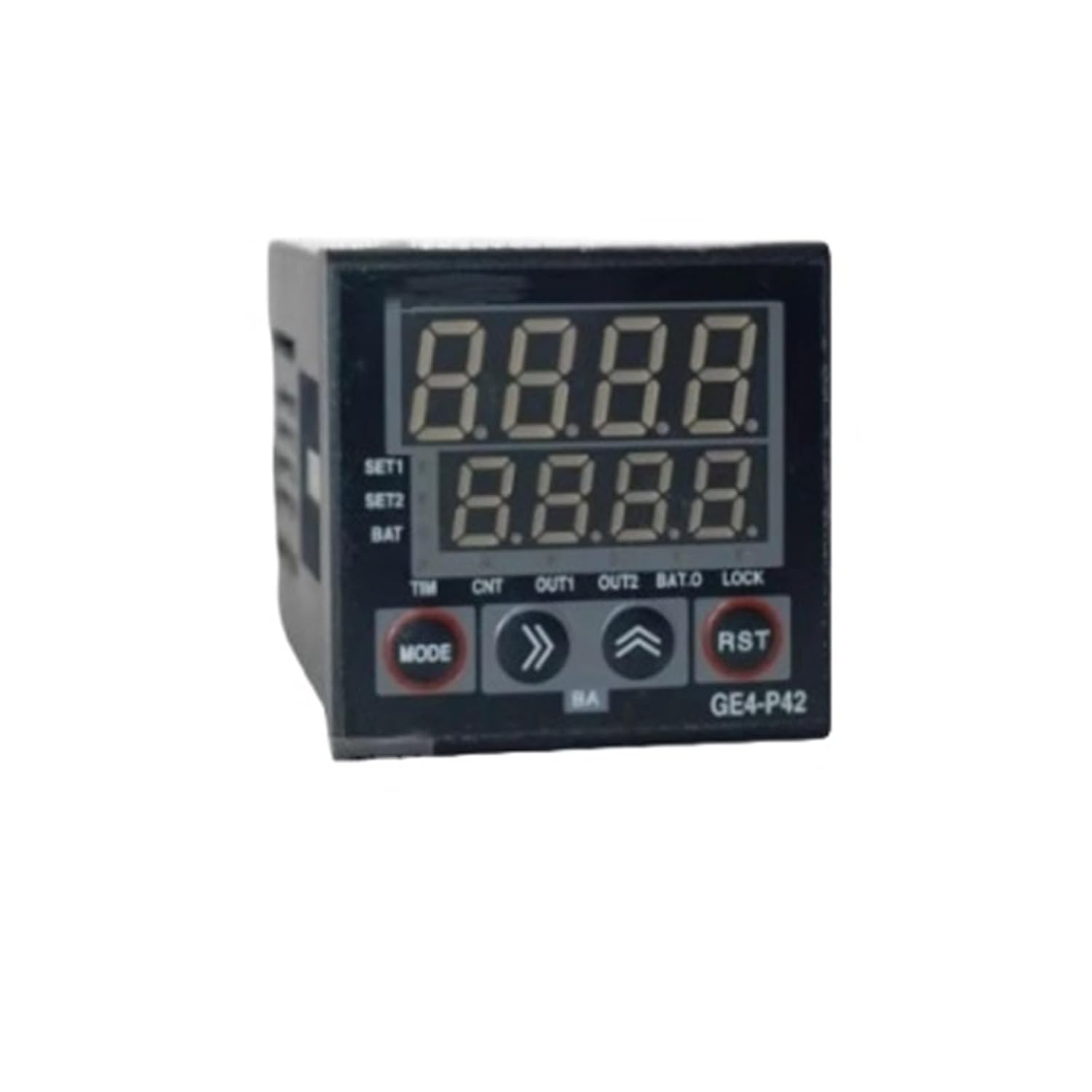
1. attēls: Front panel of the CHBMSS Digital Counter Module. It features a dual-line LCD display for numerical readings, and control buttons labeled 'MODE', '>>' (forward/select), '^' (up/increment), and 'RST' (reset). Indicators for SET1, SET2, BAT, TIM, CNT, OUT1, OUT2, BAT.O, and LOCK are visible. The model number 'GE4-P42' is printed on the bottom right, though this manual pertains to the GE4-P61A model.
Galvenās funkcijas:
- Digital Counter: Utilizes digital counting technology, eliminating mechanical wear for an extended service life.
- LCD displejs: Equipped with an electronic LCD display for clear, precise, and reliable readings.
- Precīzs un uzticams: Engineered to deliver accurate and dependable counting performance in various environments.
- Viegla uzstādīšana: Features strong anti-interference capabilities, ensuring straightforward and stable installation.
- Plašs pielietojums: Compatible with a broad range of signal inputs, including photoelectric switches, proximity switches, reed switches, microswitches, magnetic switches, solid-state components, and various relays and changeover contacts.
3. Drošības informācija
- Pirms uzstādīšanas vai apkopes pārliecinieties, vai visa strāva ir atvienota, lai novērstu elektriskās strāvas triecienu.
- Uzstādīšanu un elektroinstalāciju drīkst veikt tikai kvalificēts personāls.
- Do not expose the module to excessive moisture, dust, or extreme temperatures.
- Pārbaudiet pareizo tilptage un strāvas vērtības pirms pievienošanas strāvas avotam.
- Izvairieties no fiziska trieciena vai ierīces nomešanas.
4. Iestatīšana un instalēšana
The GE4-P61A module is designed for easy integration into existing systems. Follow these general guidelines for installation:
- Montāža: Securely mount the counter module in a suitable enclosure or panel, ensuring adequate ventilation.
- Strāvas pieslēgums: Connect the module to a stable power supply according to the wiring diagram provided with the product packaging. Ensure correct polarity.
- Input Signal Connection: Connect your signal sources (e.g., photoelectric switch, proximity switch) to the designated input terminals. Refer to the product's specific wiring diagram for terminal assignments.
- Output Connection (if applicable): If using the module's output functions, connect external devices (e.g., relays) to the output terminals as per the wiring diagram.
- Sākotnējā ieslēgšana: After all connections are verified, apply power to the module. The LCD display should illuminate.
Due to its strong anti-interference capability, the module is robust against electrical noise, simplifying installation in industrial environments.
5. Darbība
The GE4-P61A features an intuitive interface for setting parameters and monitoring counts.
Pamatfunkcijas:
- LCD displejs: The dual-line LCD shows current count values and parameter settings. The upper line typically displays the main count, while the lower line may show auxiliary information or set points.
- MODE poga: Press the 'MODE' button to cycle through different operating modes or parameter settings. Each press typically advances to the next mode or setting.
- '>>' (Forward/Select) Button: Used to move the cursor, select digits, or confirm a setting within a mode.
- '^' (Up/Increment) Button: Used to increase numerical values or scroll through options when setting parameters.
- RST (atiestatīšanas) poga: Press this button to reset the current count value to zero. Depending on the configuration, a long press might be required for a full reset.
Parametru iestatīšana:
To adjust settings such as count direction, input type, or output trigger points, enter the parameter setting mode by pressing the 'MODE' button. Use the '>>' and '^' buttons to navigate and modify values. Always refer to the detailed programming guide (if provided with the product) for specific parameter codes and their functions.
6. Apkope
The CHBMSS GE4-P61A Digital Counter Module requires minimal maintenance to ensure long-term performance.
- Tīrīšana: Periodically clean the exterior of the module with a soft, dry cloth. Do not use abrasive cleaners or solvents.
- Pārbaude: Regularly inspect wiring connections for looseness or damage. Ensure the module is free from dust and debris accumulation.
- Akumulators (ja piemērojams): If the module uses an internal battery for memory retention (indicated by 'BAT' or 'BAT.O' on the display), monitor its status. Replace the battery as per manufacturer recommendations if a low battery indicator appears.
7. Traucējummeklēšana
Biežāk sastopamās problēmas un to iespējamos risinājumus skatiet šajā tabulā:
| Problēma | Iespējamais cēlonis | Risinājums |
|---|---|---|
| Displejs ir tukšs | No power, incorrect wiring, or internal fault. | Check power supply and connections. Verify wiring against the diagram. If problem persists, contact support. |
| Counter not incrementing | Input signal issue, incorrect input settings, or sensor malfunction. | Verify input signal source. Check module's input settings (e.g., NPN/PNP, counting mode). Test the sensor independently. |
| Incorrect count value | Noise interference, incorrect scaling factor, or faulty sensor. | Ensure proper shielding for input cables. Check scaling factor settings. Verify sensor operation. |
| Pogas nereaģē | Module locked, or internal fault. | Check for 'LOCK' indicator on display. Refer to manual for unlocking procedure. If unresponsive, power cycle the device. |
If you encounter issues not listed here or if the suggested solutions do not resolve the problem, please contact CHBMSS customer support for assistance.
8. Specifikācijas
| Atribūts | Vērtība |
|---|---|
| Modeļa numurs | GE4-P61A |
| Ražotājs | CHBMSS |
| Iepakojuma izmēri | 0.39 x 0.39 x 0.39 collas |
| Preces svars | 9.17 unces |
| ASIN | B0FPX28TND |
9. Garantija un atbalsts
For warranty information and technical support, please refer to the documentation included with your purchase or contact CHBMSS customer service directly. Keep your purchase receipt as proof of purchase for warranty claims.


