1. Ievads
Thank you for choosing the MCHOSE ACE 68 Mechanical Gaming Keyboard. This 60% compact keyboard is engineered for high-performance gaming, featuring Hall Effect magnetic switches, Rapid Trigger technology, adjustable actuation, and an 8000Hz polling rate for ultra-low latency. This manual will guide you through the setup, operation, and maintenance of your new keyboard to ensure optimal performance.
2. Kas ir kastē
- MCHOSE ACE 68 Mechanical Gaming Keyboard
- USB kabelis (C tips)
- Taustiņu vāciņu un slēdžu novilcējs
- 2 x rezerves slēdži
- Putekļu vāks
- Lietotāja rokasgrāmata (šis dokuments)
3. Iestatīšana
3.1 Aparatūras savienojums
- Connect the provided USB Type-C cable to the port on the MCHOSE ACE 68 keyboard.
- Plug the other end of the USB cable into an available USB port on your computer (PC, Laptop, Gaming Console, PS5, XBOX).
- Jūsu operētājsistēma automātiski atpazīs tastatūru.
3.2 Software Installation (M HUB Web vadītājs)
For advanced customization and optimal performance, it is recommended to use the MCHOSE M HUB web vadītājs.
- Atveriet savu web browser and navigate to the MCHOSE official webvietne: https://www.mchose.com.cn.
- Select your preferred language from the options provided on the webvietne.
- Click on the 'Enter M HUB WEBpoga '.
- On the M HUB page, click on the image corresponding to the 'Ace 68' keyboard to enter its configuration interface.

Image: Step 1 - Webpage input for MCHOSE HUB web vadītājs.

Image: Step 2 - Language selection and entering M HUB WEB.
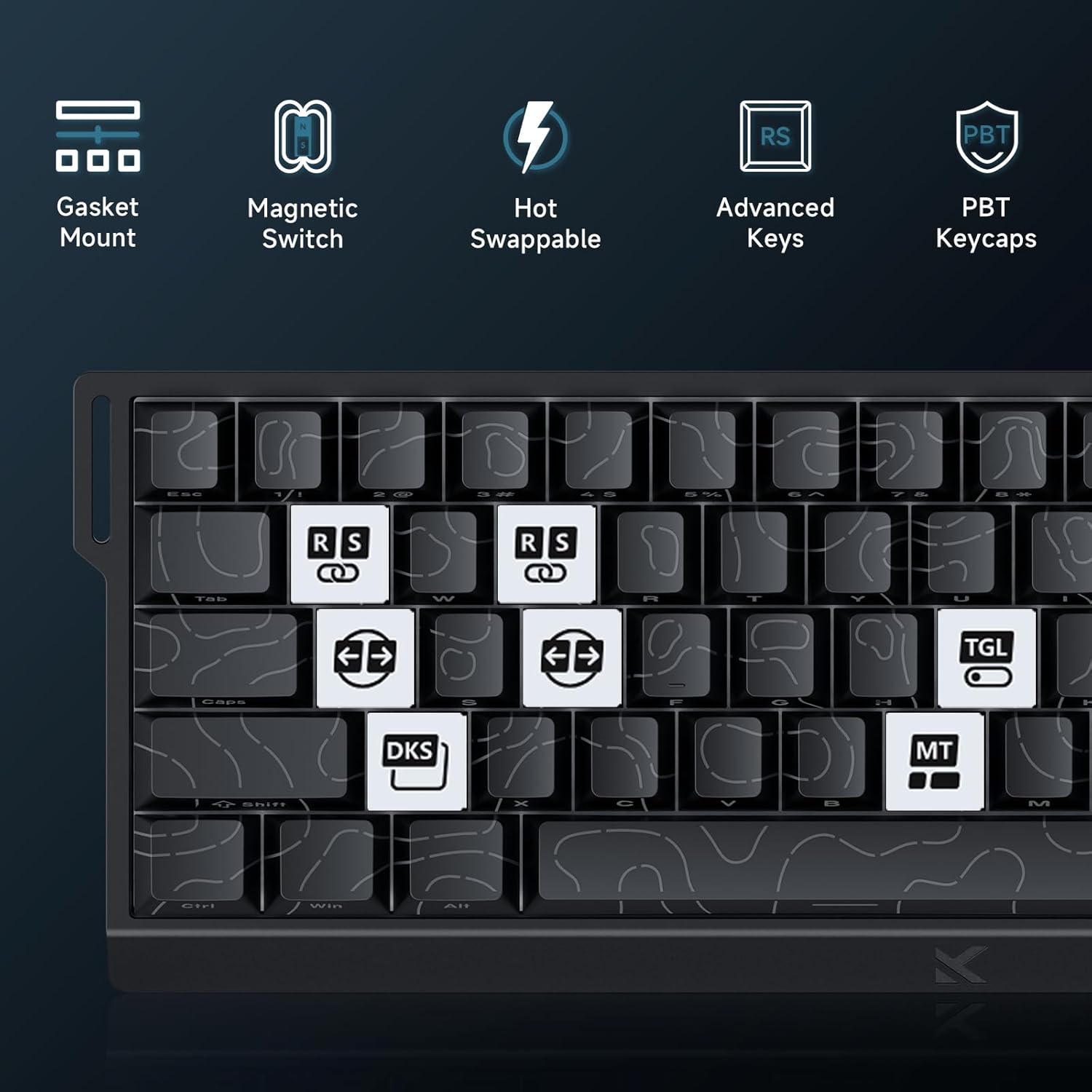
Image: Step 3 - Selecting the Ace 68 device within the M HUB web saskarne.
4. Lietošanas instrukcijas
4.1 Polling Rate and Latency
The MCHOSE ACE 68 features an 8000Hz polling rate and a 128K scan rate, resulting in an ultra-low 0.1ms latency. This ensures rapid and precise input registration.

Image: Visual representation of 8000Hz Polling Rate and 0.1ms Report Rate, highlighting fast actuation and response time.
4.2 Rapid Trigger and Adjustable Actuation
The keyboard's magnetic switches allow for dynamic actuation and deactivation points, eliminating traditional input latency.
- Ātra aktivizēšana: Keys activate when pressed and deactivate when released, without a fixed reset point. This allows for faster repeated inputs.
- Regulējama iedarbināšana: Customize the actuation point of each key from 0.1mm to 4.0mm using the M HUB software. This provides precise control over key sensitivity.

Image: Comparison of Rapid Trigger (dynamic reset) versus traditional fixed actuation/reset points.
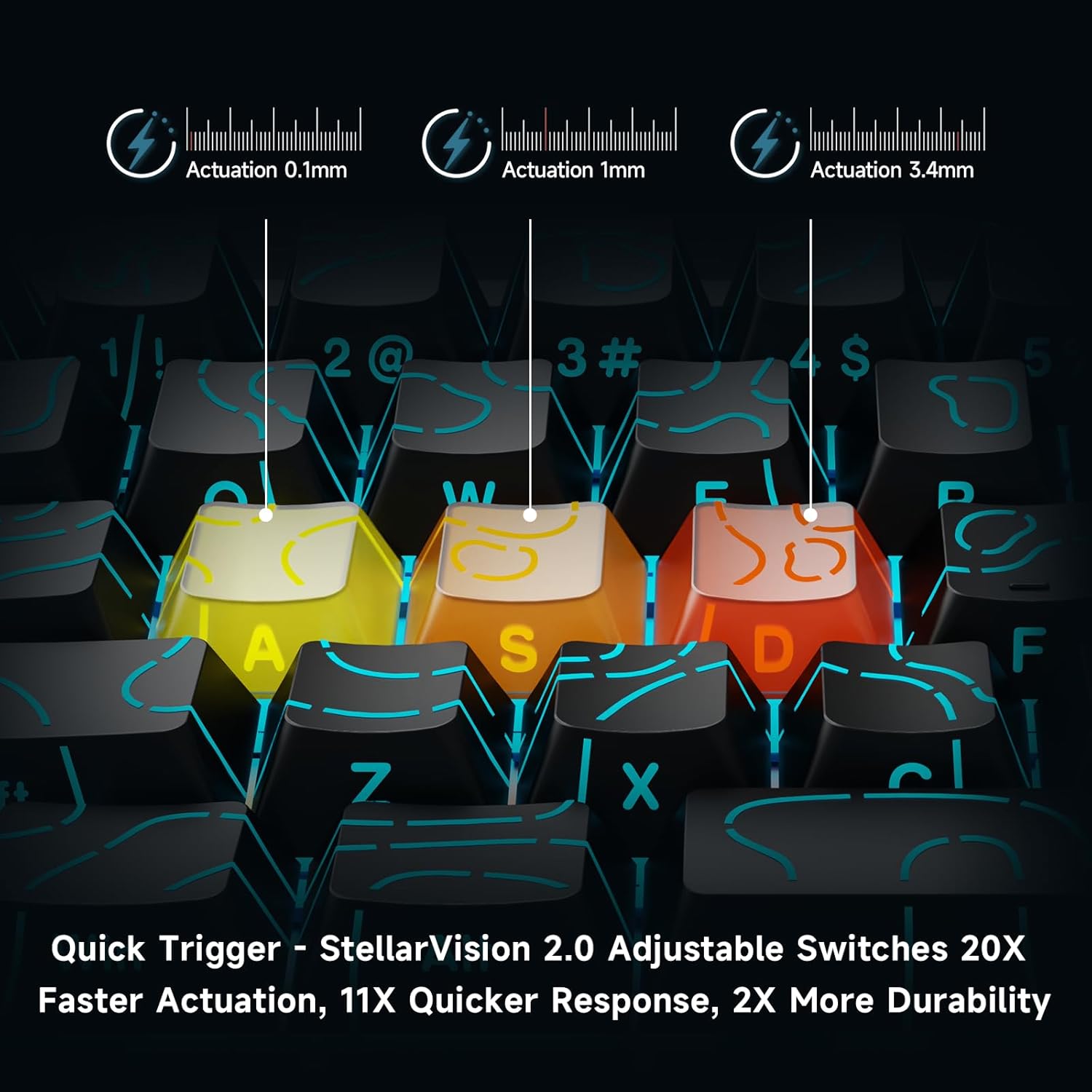
Image: Visual demonstration of adjustable actuation points (0.1mm, 1mm, 3.4mm) for StellarVision 2.0 switches.
4.3 Advanced Key Functionality (M HUB Software)
The M HUB software allows for advanced customization of key behavior:
- RS (Rappy Snappy): Monitors at least two selected keys and activates the key pressed the furthest. When both are at the same depth, it uses your selected SOCD resolution. This enhances movement in games.
- SOCD (Simultaneous Opposing Cardinal Directions): When opposing direction keys (e.g., Left + Right) are pressed together, you can set it to neutralize, prioritize the last-pressed, or hold the first-pressed direction.
- DKS (Dynamic Key Press): Map up to four separate actions along a single key's travel at actuation, bottom-out, first release, and full release for complex macros or multi-stage komandas.
- MT (Mod-Tap): Assign a key to send one keycode on a quick tap and a different (usually modifier) code when held, blending typing and modifier layers seamlessly.
- TGL (pārslēgt): Turn any key into an on/off switch-press once to latch the output; press again to cancel. A hold still provides momentary behavior.

Attēls: Pāriview of key features including Advanced Keys (RS, DKS, TGL, MT).

Image: Diagram explaining the concept of 4-in-1 Action Keys, allowing multiple actions per key based on press depth.
4.4 RGB apgaismojuma pielāgošana
The MCHOSE ACE 68 features customizable RGB backlighting with 16.8 million colors and 22+ dynamic lighting effects.
- FN taustiņu kombinācijas: Use the Function (FN) key in combination with other keys to adjust lighting effects directly on the keyboard.
- M HUB Software: For full customization, including per-key lighting and advanced effects, use the M HUB web vadītājs.

Image: FN key combinations for adjusting RGB lighting effects, brightness, and speed.

Image: The MCHOSE ACE 68 keyboard displaying various preset RGB lighting effects.
5. Apkope
5.1. Tīrīšana
- Pirms tīrīšanas atvienojiet tastatūru no datora.
- Izmantojiet mīkstu, sausu drānu, lai noslaucītu taustiņu vāciņus un tastatūras korpusu.
- Dziļākai tīrīšanai izmantojiet saspiesta gaisa kannu, lai notīrītu putekļus un gružus no starp taustiņu vāciņiem.
- Izvairieties no spēcīgu ķīmisku vielu vai abrazīvu materiālu lietošanas, jo tie var sabojāt tastatūras apdari vai taustiņu uzrakstus.
5.2 Tastatūras vāciņa un slēdža nomaiņa
The MCHOSE ACE 68 features hot-swappable magnetic switches, allowing for easy replacement without soldering.
- Izmantojiet komplektā iekļauto taustiņu vāciņu izvilcēju, lai uzmanīgi noņemtu vēlamo taustiņu vāciņu.
- Use the provided switch puller to carefully extract the magnetic switch from its socket.
- Novietojiet jaunā slēdža tapas ar PCB caurumiem un stingri piespiediet, līdz tas noklikšķ vietā.
- Uzlieciet atslēgas vāciņu atpakaļ uz jaunā slēdža.

Image: Diagram showing the hot-swappable PCB, pre-lubed magnetic switch, plate-mounted stabilizers, hot-swap socket, and north-facing per-key LEDs.
6. Traucējummeklēšana
- Tastatūra nereaģē:
- Pārliecinieties, vai USB kabelis ir droši pievienots gan tastatūrai, gan datoram.
- Mēģiniet pievienot tastatūru citam datora USB portam.
- Pārbaudiet tastatūru citā datorā, lai izslēgtu ar sistēmu saistītas problēmas.
- Input Lag or Dropped Inputs:
- Ensure the M HUB web driver is installed and updated to the latest version.
- Check the polling rate setting in the M HUB software; ensure it is set correctly for your needs.
- If 'Berserk Mode' is enabled in the M HUB software, be aware that while it offers maximum accuracy, it may impact stability with mixed switch configurations. Try disabling it if issues persist.
- Ensure no other software or background processes are interfering with keyboard input.
- RGB apgaismojums nedarbojas/nepareizi:
- Check FN key combinations for lighting control (refer to section 4.4).
- Verify lighting settings within the M HUB software.
- Pārliecinieties, vai tastatūras programmaparatūra ir atjaunināta.
- Keys Not Actuating Correctly:
- Check the adjustable actuation settings for the specific key in the M HUB software.
- If a switch feels faulty, consider replacing it using the provided spare switches and switch puller (refer to section 5.2).
7. Specifikācijas
| Funkcija | Detaļas |
|---|---|
| Modeļa numurs | MCHOSE ACE 68 |
| Tastatūras izkārtojums | 60% kompakts (61 taustiņi) |
| Slēdža veids | TTC Dragon Lord Magnetic Switches (Hall Effect) |
| Iedarbināšanas diapazons | 0.1mm - 4.0mm (Adjustable) |
| Aptauju skaits | 8000 Hz |
| Pārskata likme | 0.1 ms |
| Taustiņu vāciņi | PBT Keycaps, Cherry Profile, Shine-through legends |
| Fona apgaismojums | RGB (16.8 Million Colors, 22+ Effects) |
| Savienojamība | Vadu (USB-C) |
| Saderīgas ierīces | PC, Laptop, Gaming Console, PS5, XBOX |
| Produkta izmēri | 12.6 collu garums x 4.56 collu platums x 1.54 collu augstums (32 cm x 11.7 cm x 3.9 cm) |
| Preces svars | 2.55 mārciņas (1.16 kg) |
| Īpašas funkcijas | Rapid Trigger, Adjustable Actuation, Hot-Swappable Switches, Programmable Keys, Gasket Mount |
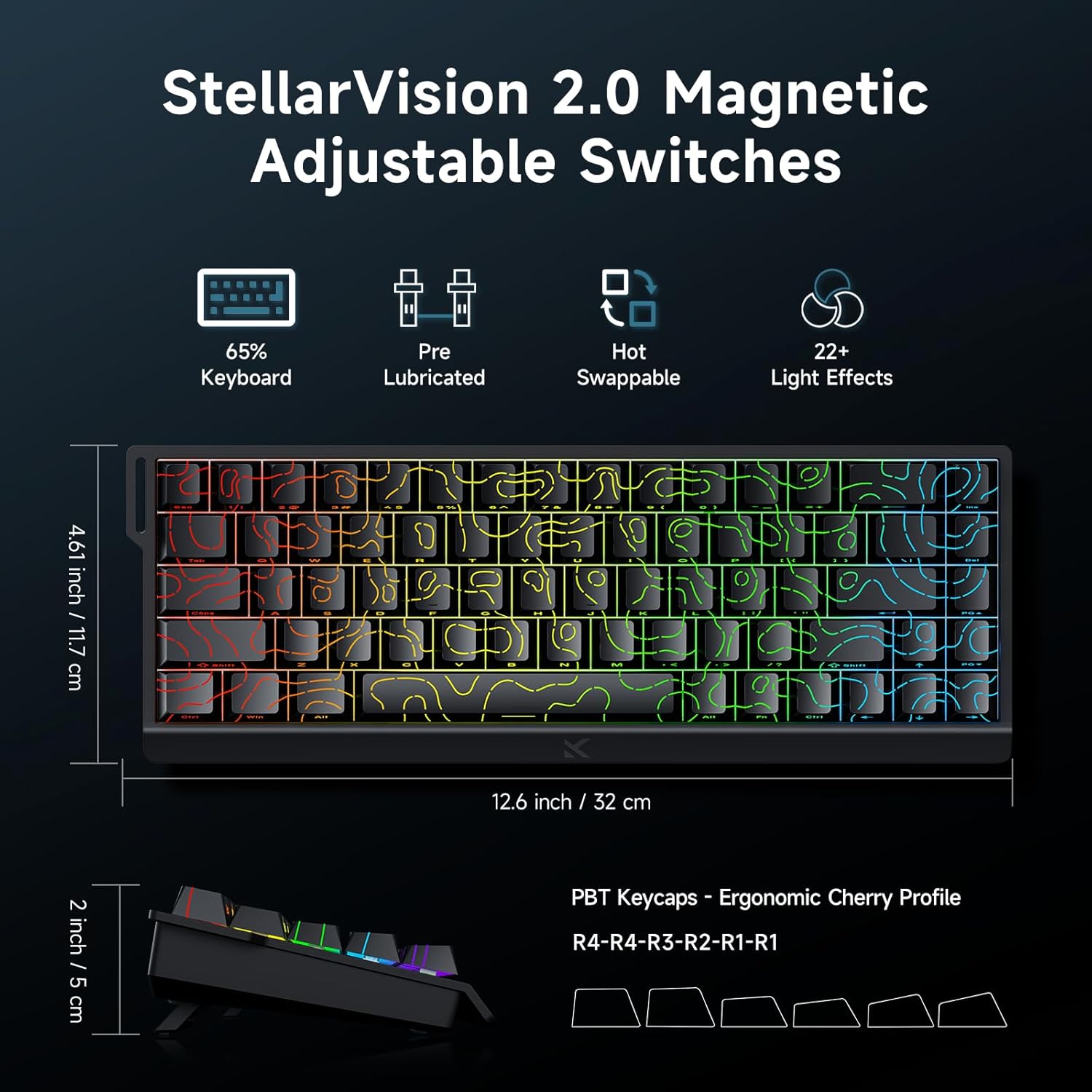
Image: MCHOSE ACE 68 keyboard with dimensions (12.6 inches / 32 cm length, 4.61 inches / 11.7 cm width, 2 inches / 5 cm height) and key features like StellarVision 2.0 Magnetic Adjustable Switches, pre-lubricated, hot-swappable, and 22+ light effects.

Image: Detailed specifications of the Uranus Magnetic Switch eSports, including switch type, actuation range (0.1-3.4mm), lifespan (100 Million Clicks), sensitivity (0.005mm), total travel (3.4mm), and trigger pressure (32 +/- 5 gf).
8. Garantija un atbalsts
MCHOSE products are designed for durability and performance. For warranty information, technical support, or further assistance, please visit the official MCHOSE webvietnē vai sazinieties tieši ar klientu apkalpošanas dienestu. Saglabājiet pirkuma čeku garantijas prasību gadījumā.
Oficiālā Webvietne: https://www.mchose.com.cn


