1. Ievads
The TOPPING M62 is a portable audio interface engineered for creators who demand high-quality sound for various applications, including live streaming, podcasting, music recording, and field recording. This device integrates advanced features such as dual microphone inputs with 48V phantom power, an ultra-linear preamp, and intelligent audio processing to deliver clear and professional audio performance. Its versatile connectivity options and long-lasting battery make it suitable for both indoor and outdoor use.
2. Galvenās iezīmes
- Dual Microphone Inputs with 48V Phantom Power: Connect and power two condenser or dynamic microphones simultaneously, ideal for interviews, podcasts, and vocal/instrument recording.
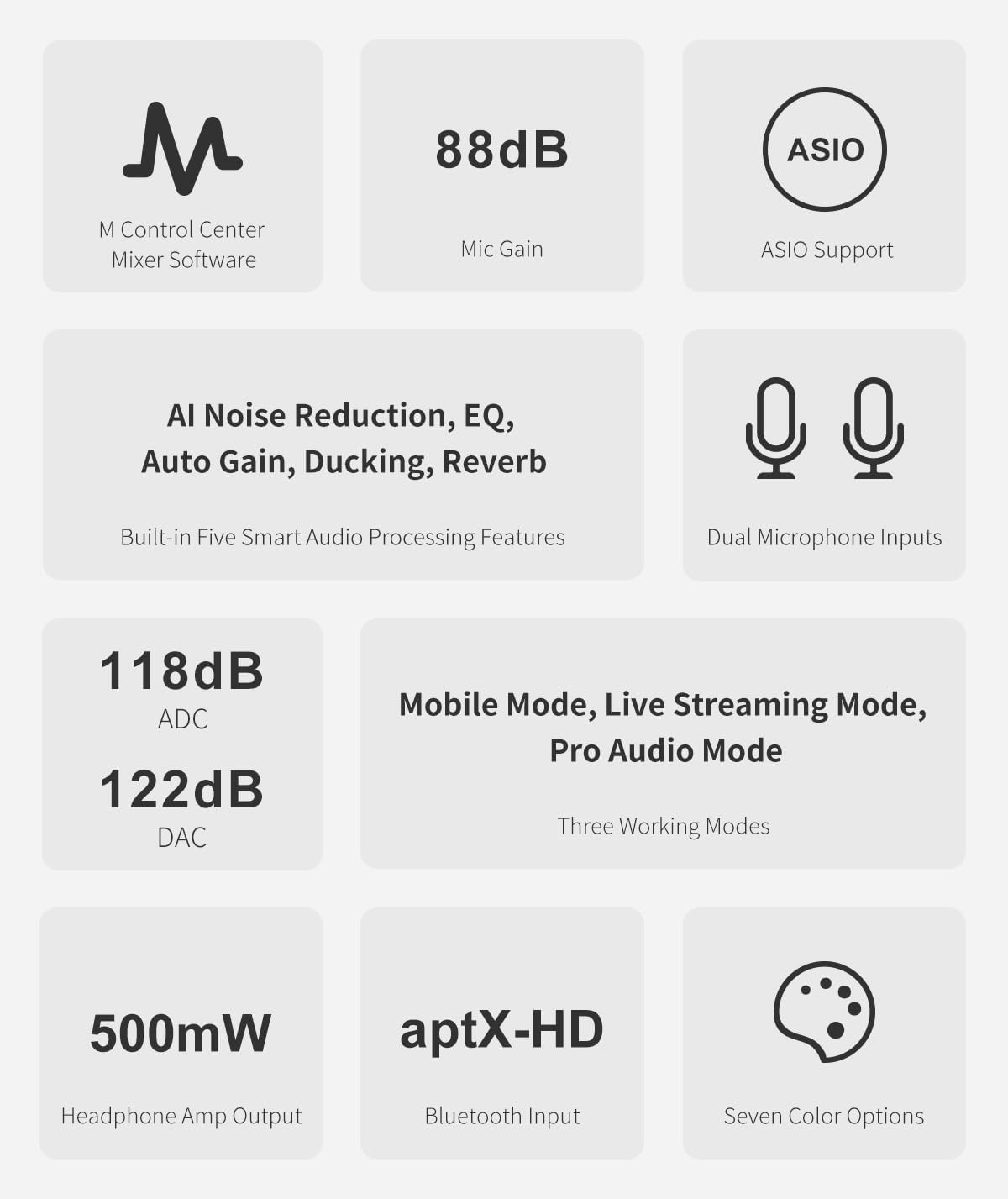
- Ultra-Linear Preamp & High Dynamic Range: Achieve up to 88dB gain with an Equivalent Input Noise (EIN) as low as -129.5dBu, ensuring ultra-low noise and clear, natural sound.
- Smart Audio Processing: Features AI noise reduction, noise gate, auto gain, and three reverb modes (Studio/Live/Hall) for one-touch vocal optimization.
- Elastīga savienojamība: Supports smartphone OTG, Bluetooth (aptX-HD/aptX-LL/AAC/SBC), AUX, and PC/Mac via USB-C for lossless transmission and multi-source mixing.
- Real-Time EQ & Monitoring: Input EQ enhances source recordings, Output EQ customizes listening, with zero-latency monitoring for accurate sound control.
- Ilgs akumulatora darbības laiks: A 5000mAh battery provides up to 8.5 hours of operation with dynamic microphones or 6.5 hours with dual condenser microphones, suitable for extended sessions.
- Powerful Headphone Output: 500mW x2 @32Ω with ultra-low 1Ω output impedance, capable of driving headphones up to 600Ω for precise monitoring.
3. Produkts beidziesview
Priekšējā paneļa vadības elementi un ieejas
The front panel of the M62 features essential controls and inputs for immediate access during recording and streaming.
Attēls: priekšpuse view of the TOPPING M62, showing dual XLR/TRS combo inputs, 48V phantom power buttons, input gain knobs, monitor level, and headphone output.
- Mic1 / Mic2 Inputs: XLR/TRS combo jacks for connecting microphones or instruments.
- 48V pogas: Aktivizē 48 V fantoma barošanu kondensatora mikrofoniem.
- INST Buttons: Engages instrument mode for high-impedance inputs.
- Monitora poga: Adjusts the volume for direct monitoring.
- Input/Playback Mix: Blends the direct input signal with playback from the connected device.
- Pastiprinājuma pogas: Kontrolē katra kanāla ieejas pastiprinājumu.
- Austiņu izeja: 6.35 mm ligzda austiņu pievienošanai.
- Līmeņa mērītāji: LED indicators for input and output signal levels.
Aizmugurējā paneļa savienojumi
The rear panel provides various connectivity options for power, data, and audio output.
Attēls: Aizmugure view of the TOPPING M62, showing USB-C ports, OTG port, and line outputs.
- Power USB-C Port: For charging the internal battery and powering the device.
- USB-C datu ports: Connects to a computer for audio transmission and control.
- OTG ports: Connects to mobile devices for direct audio streaming and recording.
- Līnijas izeja (K/L): Balanced TRS outputs for connecting to studio monitors or other audio equipment.
- Strāvas slēdzis: Ieslēdz vai izslēdz ierīci.
4. Iestatīšanas rokasgrāmata
4.1 Sākotnējā ieslēgšana un uzlāde
- Connect the M62 to a power source using the provided USB-C cable and a compatible power adapter.
- Press the power switch on the rear panel to turn on the device. The power indicator LED will illuminate.
- Ensure the device is fully charged before portable use to maximize battery life.
4.2 Mikrofonu un instrumentu pievienošana
- Plug your XLR or 1/4-inch TRS microphone/instrument cable into the Mic1 or Mic2 combo jacks on the front panel.
- Kondensatora mikrofoniem nospiediet 48V button for the corresponding channel to supply phantom power.
- For instruments (e.g., guitar), press the INST button for the corresponding channel.
4.3 Pievienošana datoram (PC/Mac)
- Connect the M62's USB-C data port to your computer using a USB-C cable.
- The M62 will be recognized as an audio device. Install any necessary drivers (usually generic drivers are sufficient, but check TOPPING's website for specific ASIO drivers for optimal performance).
- Select the M62 as your input/output device in your Digital Audio Workstation (DAW) or system sound settings.
4.4 Connecting to a Smartphone/Tablet (OTG)
The M62 supports direct connection to smartphones via its OTG port for mobile live streaming and recording.
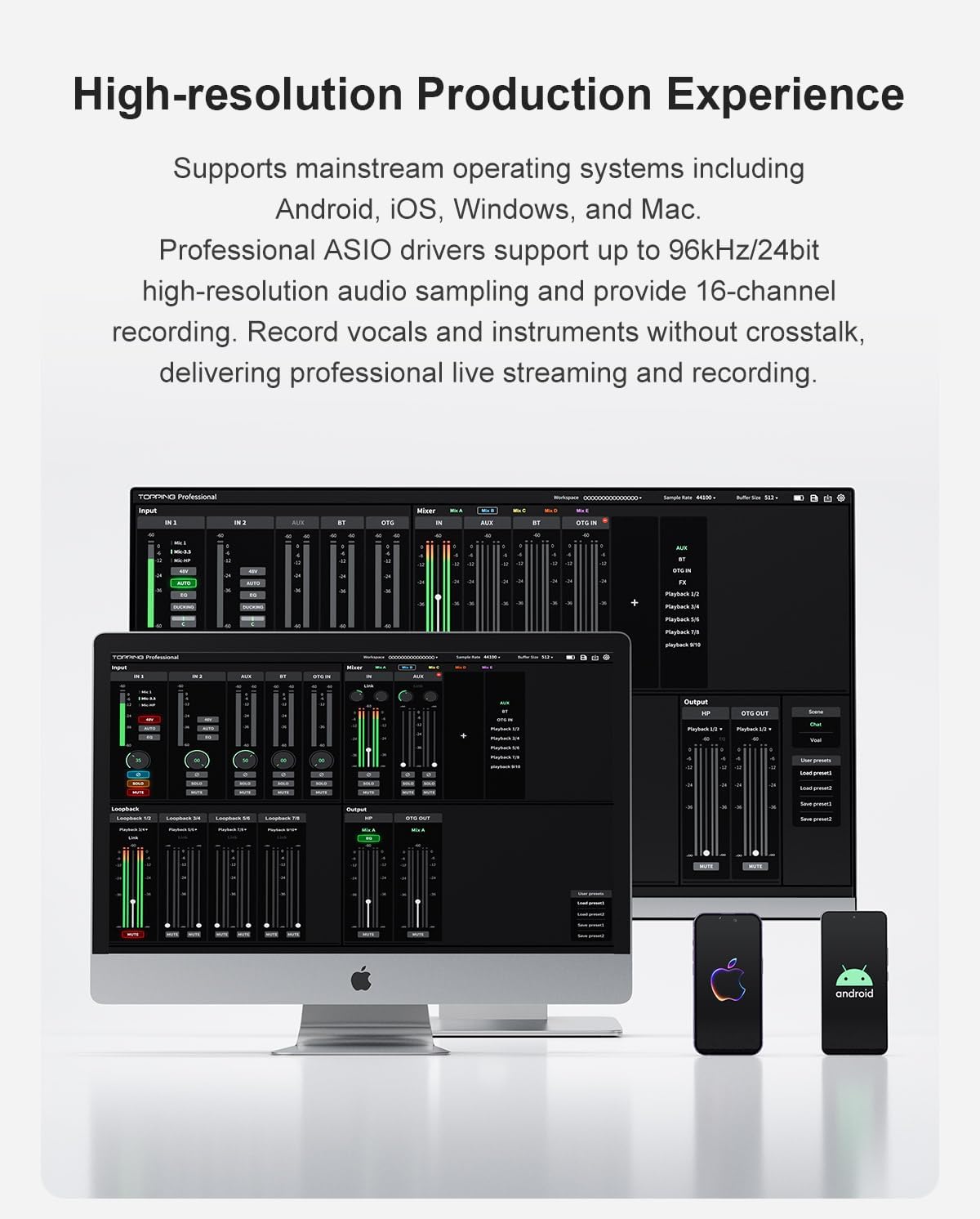
Image: The TOPPING M62 connected directly to a smartphone via an OTG cable, illustrating lossless audio transmission without adapters.
- Connect your smartphone to the M62's OTG port using a compatible OTG cable.
- Ensure your smartphone supports OTG functionality.
- The M62 will act as the audio interface for your mobile device.
5. Lietošanas instrukcijas
5.1 Input Gain and Monitoring
- Pielāgojiet Ieguvums knobs for each input channel until the level meters show a healthy signal without clipping (red lights).
- Izmantojiet Monitors knob to control the volume of your headphones for zero-latency monitoring of your input signal and playback.
5.2 Smart Audio Processing
The M62 offers various audio processing features to enhance your sound:
- AI trokšņu samazināšana: Reduces background noise for clearer vocals.
- Trokšņa vārti: Eliminates unwanted low-level noise.
- Automātiska pastiprināšana: Automatically adjusts input levels for consistent volume.
- Reverb režīmi: Select from Studio, Live, or Hall reverb effects to add ambiance to your vocals.
5.3 Darba režīmi
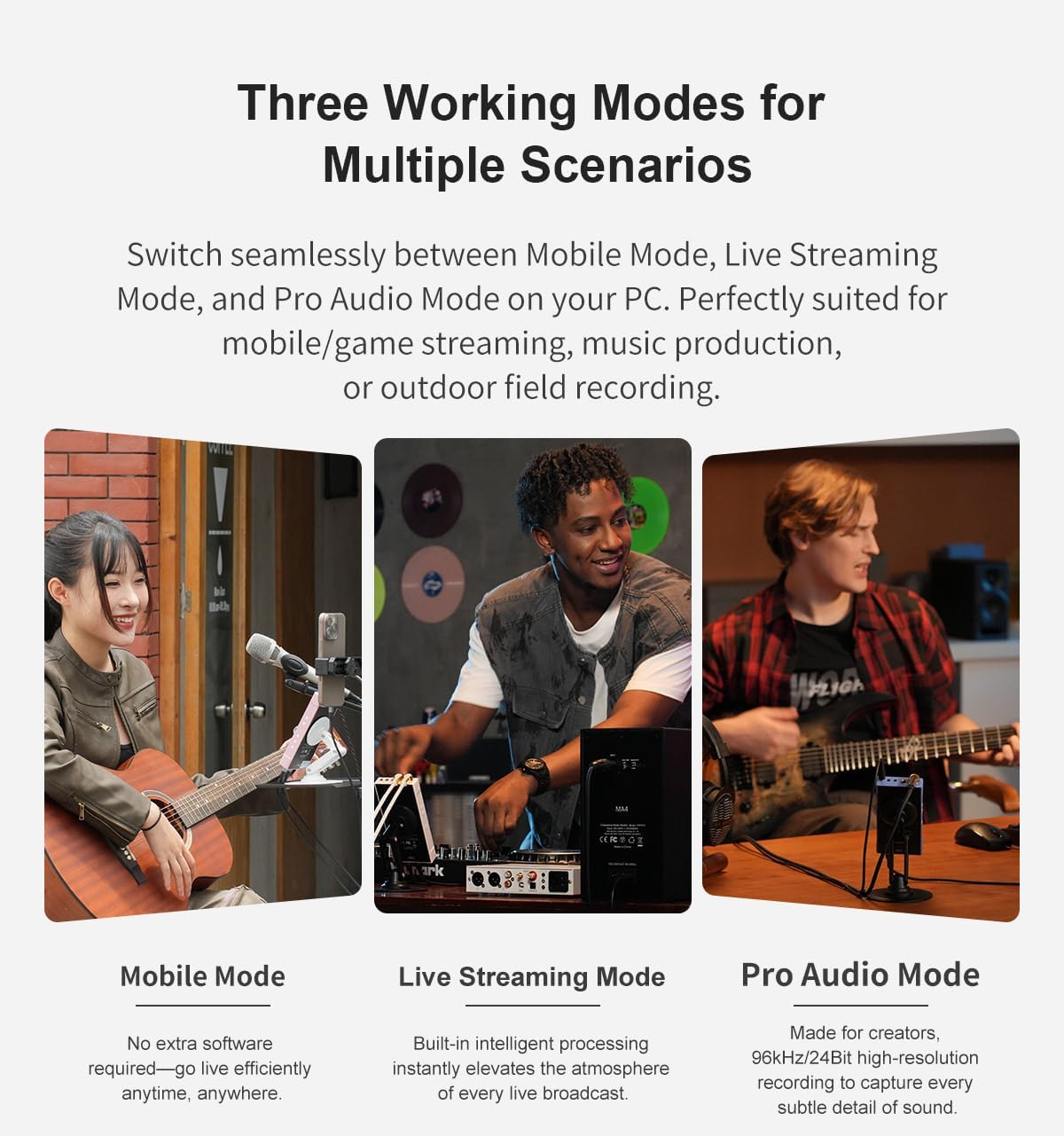
The M62 supports three distinct working modes for different scenarios:
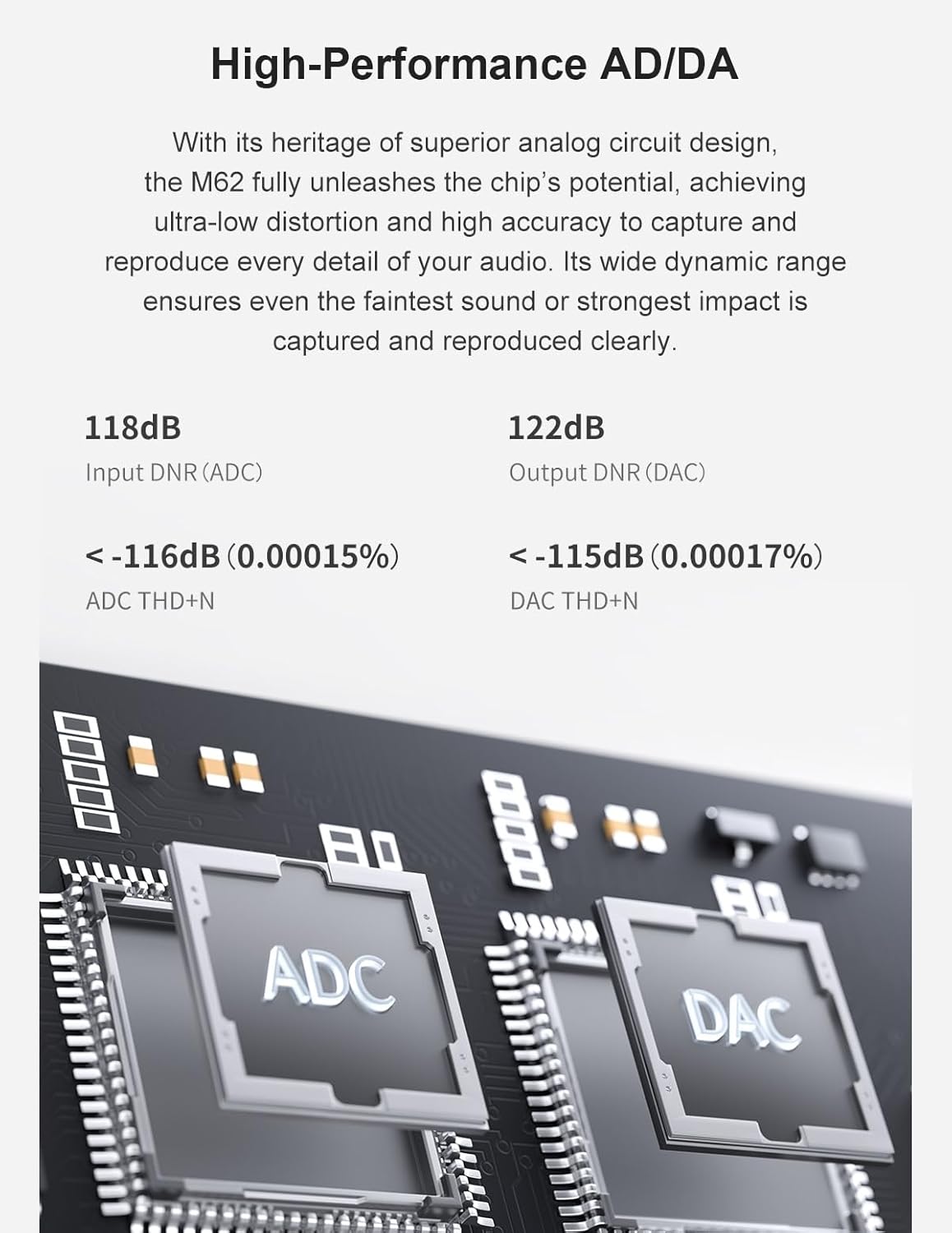
Image: Illustration of the three working modes: Mobile Mode (for mobile/game streaming), Live Streaming Mode (for music production), and Pro Audio Mode (for 96kHz/24bit high-resolution recording).
- Mobilais režīms: Optimized for mobile/game streaming, requiring no extra software.
- Live Streaming Mode: Built-in intelligent processing enhances live broadcasts.
- Pro Audio Mode: Designed for 96kHz/24bit high-resolution recording, capturing subtle audio details.
5.4 Multi-Source Mixing and PC Synchronization
The M62 allows for flexible audio routing and mixing, including synchronizing smartphone streams with PC audio.

Image: The TOPPING M62 connected to both a smartphone and a PC, demonstrating how to optimize smartphone live streams with PC synchronization using DAW software for vocal clarity.
6. Savienojuma iespējas
The M62 offers diverse connectivity to integrate with various devices.
- USB-C: For high-speed digital audio connection to computers (PC/Mac).
- OTG: On-The-Go connection for direct digital audio with compatible smartphones and tablets.
- Bluetooth: Supports aptX-HD, aptX-LL, AAC, and SBC codecs for high-quality wireless audio input.
- AUX: 3.5mm analog input for connecting external audio sources.
7. Akumulatora un enerģijas pārvaldība
The M62 is equipped with a robust 5000mAh battery for extended portable use.
- Akumulatora darbības laiks: Up to 8.5 hours when using dynamic microphones, and up to 6.5 hours when using dual condenser microphones (due to 48V phantom power consumption).
- Uzlāde: Charge the device via the dedicated USB-C power port. The charging indicator will show the battery status.
- It is recommended to fully charge the device before critical recording sessions.
8. Specifikācijas
| Funkcija | Detaļas |
|---|---|
| Preces svars | 1.1 mārciņas |
| Iepakojuma izmēri | 7.48 x 6.69 x 1.97 collas |
| Preces modeļa numurs | M62 |
| Krāsas nosaukums | Rozā |
| Saderīgas ierīces | Guitar, Headphone, Microphone, Personal Computer, Smartphone |
| Atbalstītā programmatūra | DAW software (wide range compatible), Generic drivers for supported OS |
| Operētājsistēma | Android, Windows, iOS, macOS |
| Savienojamības tehnoloģija | AUX, Bluetooth, USB |
| Kanālu skaits | 2 |
9. Oficiālais produkta video
Watch the official product video for a visual guide to the TOPPING M62 Portable Audio Interface's features and usage scenarios.
Video: oversview of the TOPPING M62 audio interface, demonstrating its features and applications in various recording and streaming environments.
10. Traucējummeklēšana
If you encounter issues with your TOPPING M62, please refer to the following common troubleshooting steps:
- Nav jaudas: Ensure the USB-C power cable is securely connected and the power switch is in the 'On' position. Check if the power adapter is functioning correctly.
- Nav skaņas izvades: Verify that the monitor volume is turned up and headphones/speakers are connected correctly. Check your computer's sound settings to ensure the M62 is selected as the output device.
- Nav ieejas signāla: Confirm microphones/instruments are properly connected and gain knobs are adjusted. For condenser microphones, ensure 48V phantom power is activated. Check input selection in your recording software.
- Izkropļots audio: Reduce input gain to prevent clipping. Check cable connections for any damage.
- Savienojamības problēmas: For USB-C connections, try a different USB port or cable. For OTG, ensure your mobile device supports OTG and the cable is compatible. For Bluetooth, ensure the M62 is in pairing mode and within range.
If problems persist, consult the TOPPING support webvietni vai sazinieties ar klientu apkalpošanas dienestu, lai saņemtu papildu palīdzību.
11. Garantija un atbalsts
The TOPPING M62 Portable Audio Interface comes with a standard manufacturer's warranty. Please retain your proof of purchase for warranty claims.
- Garantijas periods: Refer to the warranty card included with your product or the official TOPPING website for specific warranty duration and terms.
- Tehniskais atbalsts: For technical assistance, driver downloads, or firmware updates, visit the official TOPPING support page.
- Klientu apkalpošana: If you require further help, please contact TOPPING customer service through their official channels.


