1. Ievads
This manual provides detailed instructions for the safe and efficient operation of your Bigme B6 Color Ebook Reader. Please read this manual thoroughly before using the device and retain it for future reference.
Iepakojuma saturs
- Bigme B6 e-grāmatu lasītājs
- Aizsargmaciņa
- Lietotāja rokasgrāmata (šis dokuments)
- Uzlādes kabelis

Image 1.1: Bigme B6 Color Ebook Reader and included protective case.
2. Produkts beidziesview
Familiarize yourself with the components and features of your Bigme B6 device.
Galvenās iezīmes
- Displejs: 6-inch Color E-paper display, 300 PPI resolution.
- Procesors: Octa-core CPU for responsive performance.
- Atmiņa un atmiņa: 4GB RAM and 64GB internal storage, expandable via Micro-SD card (up to 1TB).
- Operētājsistēma: Android 14, providing access to various applications.
- Savienojamība: Bluetooth and Wi-Fi for wireless communication.
- Audio: Integrated Hi-Fi Speakers.
- Dizains: Īpaši plāns profesionālisfile at 6.98mm.
- Acu komforts: Features Zero Blue Light and Flicker-Free technology, TUV Rheinland certified for reduced eye strain.

2.1. attēls: beidziesview of the Bigme B6 Ebook Reader's main features.
3. Iestatīšana
3.1. Sākotnējā uzlāde
Before first use, fully charge your Bigme B6. Connect the device to a power source using the provided charging cable. The charging indicator will show the charging status.
3.2 Ieslēgšana/izslēgšana
- To power on: Press and hold the power button until the screen illuminates.
- To power off: Press and hold the power button, then select "Power Off" from the options.
- To sleep/wake: Briefly press the power button.
3.3 Tīkla savienojums (Wi-Fi)
- No sākuma ekrāna dodieties uz Iestatījumi.
- Izvēlieties Tīkls un internets.
- Pārslēgt Wi-Fi uz IESL.
- Sarakstā atlasiet vēlamo Wi-Fi tīklu.
- Ievadiet paroli, ja tā tiek prasīta, un pieskarieties Savienot.
3.4 Sākotnējā sistēmas konfigurācija
Upon first power-on or after a factory reset, follow the on-screen prompts to select your language, connect to Wi-Fi, and set up your Google account (optional, for app store access).
4. Lietošanas instrukcijas
4.1. Pamata navigācija
- Skārienekrāns: Tap to select items, swipe to scroll, pinch to zoom.
- Sākuma ekrāns: Displays installed applications and widgets.
- Paziņojumu panelis: Lai piekļūtu ātrajiem iestatījumiem un paziņojumiem, velciet uz leju no ekrāna augšdaļas.
- Vadības centrs: Access system settings like Wi-Fi, Bluetooth, brightness, and refresh modes.
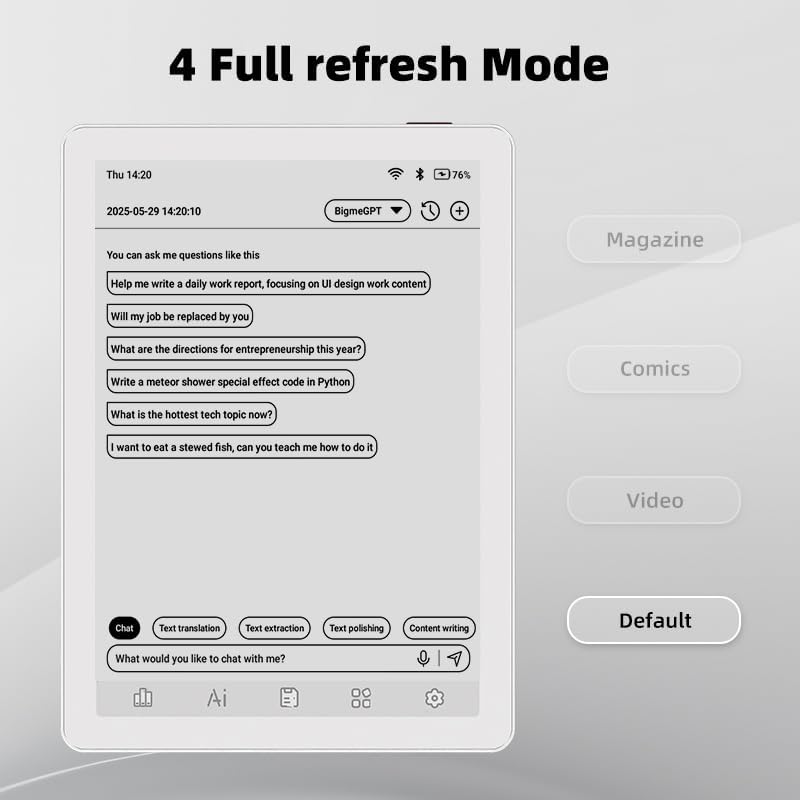
Image 4.1: The Bigme B6 home screen displaying various application icons.

Image 4.2: Accessing the Control Center for quick adjustments to device settings.
4.2 Reading eBooks
The Bigme B6 supports over 19 eBook formats, including PDF, TXT, EPUB, MOBI, and more. You can load books via USB or download them directly through reading applications.
- Open a reading application (e.g., the default reader or a downloaded app like Kindle or Libby).
- Select the book you wish to read from your library.
- Tap the left or right side of the screen to turn pages.
- Tap the center of the screen to access reading options (font size, line spacing, contrast, etc.).
- To highlight text: Press and hold on a word, then drag the selection handles to cover the desired text. Options for highlighting or notes will appear.

Image 4.3: Reading an eBook and highlighting text with color on the Bigme B6.
4.3. Lietotņu pārvaldība
As an Android 14 device, you can install applications from the Google Play Store or other compatible sources.
- Lietojumprogrammu instalēšana: Atveriet App Store icon (Google Play Store) on your home screen, search for the desired app, and follow the installation prompts.
- Lietotņu atinstalēšana: Dodieties uz Iestatījumi > Programmas, atlasiet lietotni un pieskarieties Atinstalēt.
4.4 Audiobooks and Media Playback
The device supports audiobook playback through its built-in Hi-Fi speakers or connected Bluetooth headphones.
- Playing Audiobooks: Use a compatible audiobook application.
- Connecting Bluetooth Headphones: Dodieties uz Iestatījumi > Pievienotās ierīces > Bluetooth, enable Bluetooth, and pair with your headphones.

Image 4.4: The Bigme B6 supports audiobooks, allowing for hands-free listening.
4.5 Display Refresh Modes
The Bigme B6 offers multiple refresh modes to optimize display performance for different content types.
- Access refresh modes from the Control Center or Display Settings.
- Bieži sastopamie režīmi ietver:
- Noklusējums: Standard reading mode.
- Žurnāls: Optimized for images and text in magazines.
- Comics: Enhanced for comic book viewing.
- Video: Provides a smoother refresh rate for video content (note: e-paper displays have limitations for video).

Image 4.5: Selecting from various refresh modes to suit different content types.
5. Apkope
5.1. Ierīces tīrīšana
- Izmantojiet mīkstu, nepūkošu drānu, lai maigi noslaucītu ierīces ekrānu un korpusu.
- Noturīgiem traipiem nedaudz uzdzerietampNoslaukiet drānu ar ūdeni vai ekrāna tīrīšanas līdzekli, kas īpaši paredzēts elektronikai.
- Izvairieties no spēcīgu ķīmisku vielu, abrazīvu materiālu vai pārmērīga mitruma lietošanas.
5.2 Akumulatora kopšana
- Regulāri uzlādējiet ierīci, taču neatstājiet to pilnībā izlādētu ilgstoši.
- Do not expose the device to extreme temperatures, as this can affect battery life.
- Use only the provided or a certified charging cable and adapter.
5.3. Uzglabāšana
When not in use for extended periods, store the device in a cool, dry place, away from direct sunlight and extreme temperatures. It is recommended to charge the device to about 50% before long-term storage.
6. Traucējummeklēšana
| Problēma | Iespējamais cēlonis | Risinājums |
|---|---|---|
| Ierīce neieslēdzas. | Zems akumulatora uzlādes līmenis; ierīce sastingusi. | Charge the device for at least 30 minutes. Perform a forced restart by holding the power button for 10-15 seconds. |
| Ekrāns nereaģē vai ir lēns. | Pagaidu programmatūras kļūme; darbojas pārāk daudz lietotņu. | Restart the device. Close unnecessary background applications. Check for system updates. |
| Nevar izveidot savienojumu ar Wi-Fi. | Nepareiza parole; maršrutētāja problēma; Wi-Fi ir atspējots. | Ensure Wi-Fi is enabled and the password is correct. Restart your Wi-Fi router. Try connecting to a different network. |
| Akumulators ātri izlādējas. | High screen brightness; many background apps; frequent Wi-Fi/Bluetooth use. | Reduce screen brightness. Close unused applications. Disable Wi-Fi and Bluetooth when not needed. Adjust refresh mode settings. |
| Applications crash or freeze. | App incompatibility; insufficient memory. | Update the application. Clear the app's cache (Settings > Apps > [App Name] > Storage & cache). If issues persist, uninstall and reinstall the app. |
7. Specifikācijas
| Modeļa nosaukums | US-B6 |
| Displejs | 6-inch Color E-paper, Electronic Ink, 300 PPI |
| Operētājsistēma | Android 14 |
| RAM | 4GB |
| Iekšējā krātuve | 64GB |
| Paplašināma krātuve | Micro-SD card (up to 1TB support) |
| Savienojamība | Bluetooth, WiFi |
| Akumulators | 1 nestandarta akumulators (iekļauts komplektā) |
| Izmēri (G x P x Biezums) | 5.88 collas x 4.25 collas x 0.28 collas (14.94 cm x 10.8 cm x 0.71 cm) |
| Preces svars | 6.2 unces (175.77 grami) |
| Atbalstītie e-grāmatu formāti | PDF, TXT, EPUB, EPUB3, HTML, HTM, AZW3, FB2, DOC, DOCX, MOBI, OEB, CBR, RPC, RTF, DJVU, ZIP |
8. Garantija un atbalsts
8.1 Informācija par garantiju
Please refer to the warranty card included with your product for specific warranty terms and conditions. The warranty typically covers manufacturing defects for a specified period from the date of purchase.
8.2 Klientu atbalsts
For technical assistance, troubleshooting not covered in this manual, or warranty claims, please contact Bigme customer support. Contact details can usually be found on the Bigme official webvietnē vai uz produkta iepakojuma.
Varat arī apmeklēt Bigme Store on Amazon lai iegūtu papildu informāciju par produktu un atbalsta resursus.


