1. Produkts beidziesview
The KLIM Cassette Player Boombox is a versatile audio device combining classic cassette playback with modern features like AM/FM radio, Bluetooth connectivity, and USB playback/recording. Its portable design allows for use at home or on the go.
Galvenās funkcijas:
- Kasešu atskaņotājs un ierakstītājs
- AM/FM Radio Tuner
- Bluetooth Connectivity for wireless streaming
- USB Port for MP3 playback and recording
- Integrated Microphone for direct recording
- Headphone Jack for private listening
- Dual Power: AC power cord or 4 x C-type batteries (not included)
- Portable design with a carrying handle
Kastītē:
- KLIM Cassette Player Boombox
- Maiņstrāvas vads
- Lietotāja rokasgrāmata

1. attēls. Priekšpuse view of the KLIM Cassette Player Boombox, showcasing its controls and cassette compartment.
2. Iestatīšana
Ierīces barošana:
The KLIM Cassette Player Boombox can be powered in two ways:
- Maiņstrāvas jauda: Connect the included AC power cord to the device's power input and then to a standard wall outlet.
- Akumulatora jauda: For portable use, insert 4 x C-type batteries (not included) into the battery compartment located on the underside of the device. Ensure correct polarity.

2. attēls: apakšdaļa view showing the battery compartment for portable power.
3. Lietošanas instrukcijas
3.1. Cassette Player/Recorder
- Slide the function selector to 'TAPE'.
- Press the 'OPEN' button to open the cassette compartment.
- Insert a cassette tape with the open side facing up.
- Aizveriet kasešu nodalījumu.
- Use the 'PLAY', 'STOP/EJECT', 'FFWD' (Fast Forward), and 'REW' (Rewind) buttons to control playback.
- To record, ensure a blank tape is inserted. Press the 'REC' button to start recording from the built-in microphone, radio, or USB.

3. attēls: augšdaļa view of the boombox with a cassette tape inserted into the compartment.
3.2. AM/FM radio
- Slide the function selector to 'RADIO'.
- Lai nodrošinātu optimālu uztveršanu, izstiepiet teleskopisko antenu.
- Use the 'BAND' switch to select between AM and FM frequencies.
- Rotate the 'TUNING' knob to find your desired radio station.
3.3. Bluetooth savienojums
- Slide the function selector to 'BT' (Bluetooth).
- The device will enter pairing mode, indicated by a flashing light or audible prompt.
- Viedtālrunī vai planšetdatorā iespējojiet Bluetooth un meklējiet pieejamās ierīces.
- Select 'KLIM Cassette Player' (or similar name) from the list to pair.
- Kad ierīces ir savienotas pārī, varat bezvadu režīmā straumēt audio no savas ierīces.
3.4. Atskaņošana un ierakstīšana, izmantojot USB
- Slide the function selector to 'USB'.
- Ievietojiet USB zibatmiņas disku, kurā ir MP3 audio ieraksts. files USB portā.
- The device will automatically begin playing the audio files. Use the playback controls (play/pause, skip) to navigate.
- To record to USB, ensure a USB drive is inserted. Press the 'REC' button while in radio or cassette mode to record the audio source directly to the USB drive.
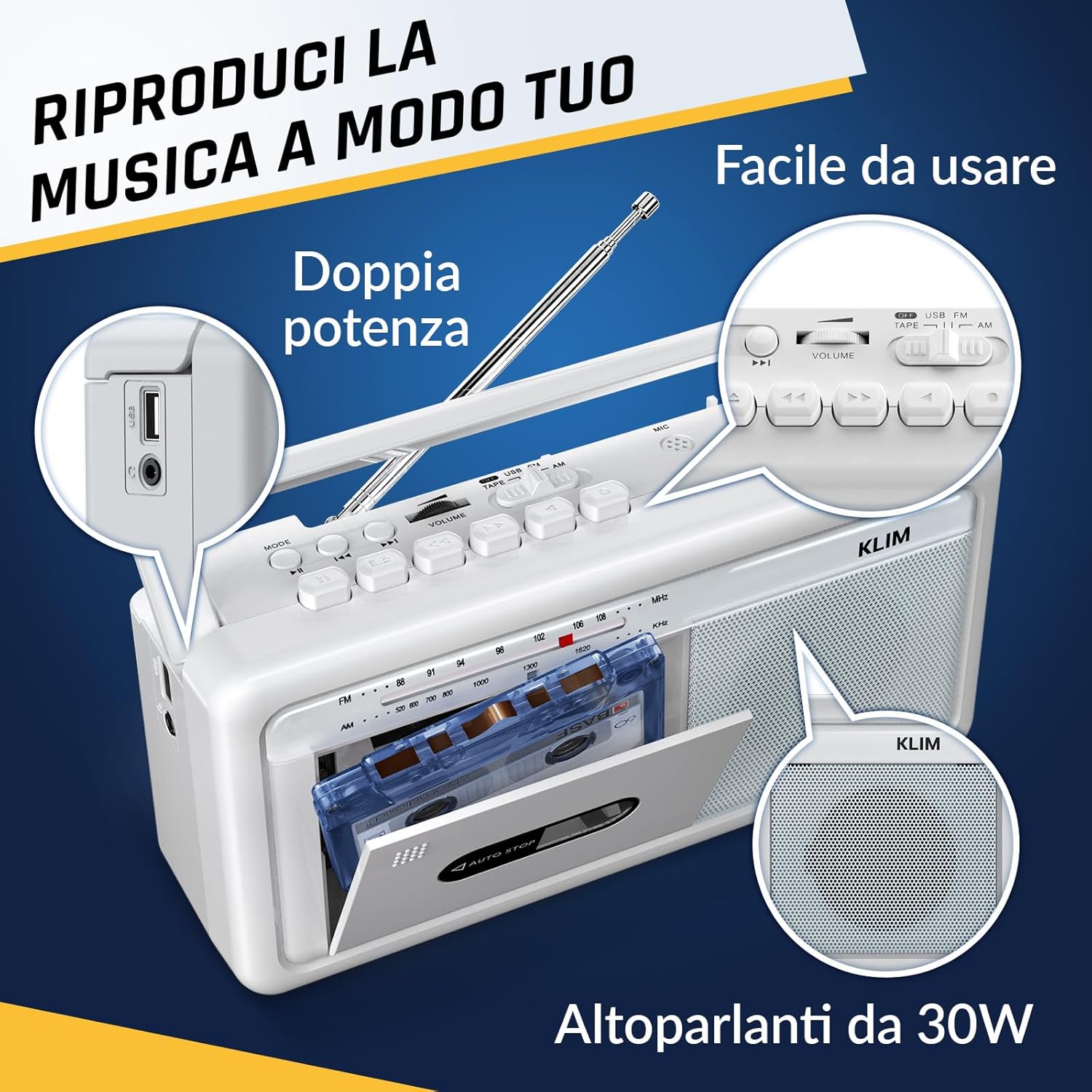
4. attēls: sāni view highlighting the USB port for media playback and recording.
3.5. Austiņu lietošana
Connect standard 3.5mm headphones to the headphone jack for private listening. The internal speakers will automatically mute when headphones are connected.
Video 1: Instructions on how to record a tape to USB using the WTB-795 model. This video demonstrates the USB recording functionality.
2. video: Virsview of a retro cassette player with USB, Bluetooth, and AM/FM radio features, similar to the KLIM Cassette Player Boombox.
4. Apkope
- Uzturiet ierīci tīru, noslaukot to ar mīkstu, sausu drānu. Izvairieties no šķidru tīrīšanas līdzekļu vai šķīdinātāju lietošanas.
- Regularly clean the cassette head and pinch rollers with a cotton swab lightly dampapstrādāts ar izopropilspirtu, lai nodrošinātu optimālu skaņas kvalitāti un novērstu lentes bojājumus.
- Keep the device away from direct sunlight, heat sources, and excessive dust or moisture.
- Ja ilgstoši nelietojat, izņemiet baterijas, lai novērstu to noplūdi.
5. Traucējummeklēšana
| Problēma | Iespējamais risinājums |
|---|---|
| Nav jaudas | Check if the AC power cord is securely connected. If using batteries, ensure they are inserted correctly and are not depleted. |
| Nav skaņas no skaļruņiem | Increase the volume. Ensure headphones are not connected. Check the function selector is in the correct mode (TAPE, RADIO, BT, USB). |
| Slikta radio uztveršana | Extend the telescopic antenna fully. Adjust the antenna direction. Try moving the unit to a different location. |
| Kasete netiek atskaņota/ierakstīta | Ensure the tape is inserted correctly. Check if the tape is damaged. Clean the cassette head and pinch rollers. |
| Bluetooth netiek savienots | Ensure the unit is in Bluetooth mode. Make sure your device's Bluetooth is enabled and within range. Try unpairing and re-pairing the device. |
| USB atskaņošanas problēmas | Ensure the USB drive is formatted correctly (FAT32) and contains compatible audio files (MP3, WAV, WMA, AAC, FLAC). Try a different USB drive. |
6. Specifikācijas
- Zīmols: KLIM
- Modelis: Kasešu atskaņotājs
- Produkta izmēri: 25 x 13.1 x 7.6 cm
- Preces svars: 1 kg
- Saderīgas ierīces: MP3 atskaņotājs, viedtālrunis, planšetdators
- Audio izvades režīms: Stereo
- Atbalstītie audio formāti: Cassette, Analog Radio, MP3, WAV, WMA, AAC, FLAC, Bluetooth
- Barošanas avots: Corded Electric (AC) / 4 x C-type Batteries (not included)
- Savienojamības tehnoloģija: USB, Bluetooth
- Krāsa: Frost White
- Preces numurs: KLSIN4825
7. Garantija un atbalsts
The KLIM Cassette Player Boombox comes with a 5 gada garantija. For any questions, technical assistance, or warranty claims, please contact KLIM customer support. Our team is available 24/7 to assist you.
Please refer to the contact information provided in your product packaging or visit the official KLIM webvietni, lai iegūtu sīkāku informāciju.