1. Ievads
Thank you for choosing the Dexnor Keyboard Case. This manual provides essential information for setting up, operating, and maintaining your keyboard case to ensure optimal performance and longevity.
Kas atrodas kastē
- Slim Folio Magnetic Keyboard Case
- USB kabelis
- Ātrā pamācība
- Lietotāja rokasgrāmata
Saderība
This keyboard case is designed for the following iPad models:
- iPad Air 11-inch 2025 M3 (Models: A3266/A3267/A3270)
- iPad Air 11-inch 2024 M2 (Models: A2902/A2903/A2904)
- iPad Pro 11-inch 2022 4th Gen (Models: A2435/A2759/A2761/A2762)
- iPad Pro 11-inch 2021 3rd Gen (Models: A2377/A2301/A2459/A2460)
- iPad Pro 11-inch 2020 2nd Gen (Models: A2228/A2068/A2231)
- iPad Pro 11-inch 2018 1st Gen (Models: A1980/A2013/A1934/A1979)
- iPad Air 5th Gen 2022 (Models: A2588/A2589/A2591)
- iPad Air 4th Gen 2020 (Models: A2072/A2316/A2324/A2325)
Please double-check the 'A' code on the back of your device for compatibility. This case is NOT compatible with iPad Pro 11 M4/M5 2024/2025 or iPad (A16) 11th/10th Gen. iPad and Apple Pencil are not included.

Image: Compatibility chart for Dexnor Keyboard Case.
2. Iestatīšana
2.1 iPad pievienošana
- Atveriet tastatūras vāciņu.
- Align your compatible iPad with the magnetic back cover of the case. The strong magnets will securely attach the iPad.
- Position the bottom edge of your iPad into the designated slot on the keyboard for a stable viewing angle. The ergonomic 120-degree viewing angle is designed for comfort during study, work, and entertainment.
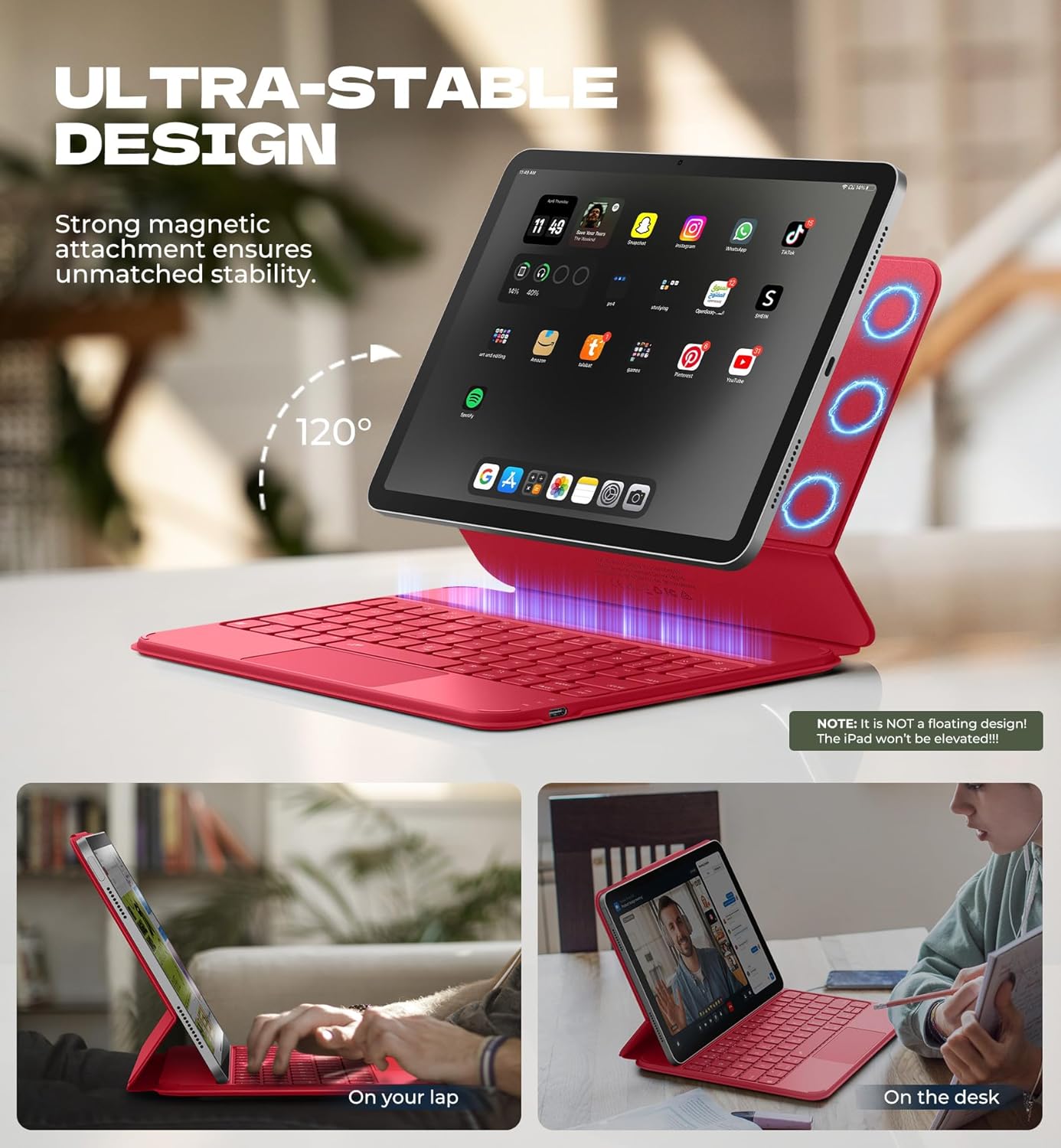
Image: iPad attached to the keyboard case, demonstrating the stable viewleņķis.
2.2 Bluetooth savienošana pārī
- Ensure your keyboard case is charged.
- Turn on the keyboard using the side power button.
- Savā iPad ierīcē dodieties uz Iestatījumi > Bluetooth un ieslēdziet Bluetooth.
- Nospiediet pogu Fn atslēga un Pāris key (often indicated by a Bluetooth symbol) simultaneously on the keyboard. The Bluetooth indicator light on the keyboard will flash.
- On your iPad, locate "Dexnor Keyboard" in the "Other Devices" list and tap to connect. A pairing request pop-up will appear; tap "Pair".
- Once connected, the Bluetooth indicator light on the keyboard will stop flashing, and your iPad will show "Connected" next to "Dexnor Keyboard".
Video: Demonstrates the setup and magnetic attachment of the Dexnor Ultra-light Folio Keyboard Case with Trackpad.
Video: Shows the connection process for the Dexnor Keyboard Case for iPad Air 11/Pro 11/Air 5th/4th Gen.
3. Lietošanas instrukcijas
3.1 Tastatūras funkcijas
- Taustiņi ar aizmugurgaismojumu: The keyboard features a single-color backlight with 3 adjustable brightness levels for comfortable typing in low-light conditions. Use the dedicated backlight keys (often Fn + light icon) to adjust brightness.
- Funkciju taustiņi: Utilize the function keys for quick access to iPad features such as media control, volume adjustment, and screen lock.
- Auto-Wake/Sleep: The case supports auto-wake/sleep functionality, preserving battery life by automatically turning your iPad screen on or off when the case is opened or closed.
3.2 daudzskārienu skārienpaliktnis
The integrated multi-touch trackpad provides precise navigation and supports various gestures for a laptop-like experience on your iPad.
- Tuvināt/tālināt: Use pinch gestures on the trackpad.
- Pārvaldīt Files: Utilize standard trackpad gestures for file navigācija un atlase.
- Pārlūkot Weblapas: Scroll and navigate with ease.
- Pārslēgt lietotnes: Use multi-finger gestures to switch between applications.
- Disable Trackpad: To prevent accidental touches during typing, press Fn + atstarpes taustiņš to disable or enable the trackpad.

Image: Multi-touch trackpad with gesture illustrations.

Image: Backlit keyboard keys.
4. Apkope
4.1 Akumulatora kopšana
The keyboard case is equipped with a 650mAh lithium polymer battery. To maximize battery life:
- Charge the keyboard using the provided USB cable when the battery indicator is low.
- Izvairieties no biežas akumulatora pilnīgas izlādes.
- Ja tastatūru ilgstoši nelietojat, glabājiet to vēsā, sausā vietā.
Expected battery performance:
- Gaidīšanas režīma laiks līdz 720 stundām.
- Up to 200 hours of use without backlight.
- Up to 10 hours of continuous use with the brightest backlight setting.
4.2. Tīrīšana
To clean your keyboard case:
- Noslaukiet ārpusi ar mīkstu, damp audums.
- Izvairieties no skarbu ķīmisko vielu vai abrazīvu tīrīšanas līdzekļu lietošanas.
- Ensure no moisture enters the keyboard or charging port.
5. Traucējummeklēšana
Tastatūra neizveido savienojumu, izmantojot Bluetooth
- Pārbaudiet akumulatoru: Pārliecinieties, vai tastatūra ir pietiekami uzlādēta.
- Restartējiet tastatūru: Izslēdziet tastatūru un pēc tam atkal ieslēdziet.
- Atkārtoti savienojiet Bluetooth pārī: Go to your iPad's Bluetooth settings, forget the "Dexnor Keyboard" device if it appears, and then repeat the pairing steps in Section 2.2.
- Restartējiet iPad: Sometimes a simple iPad restart can resolve connectivity issues.
Skārienpaliktnis nereaģē
- Check if Disabled: Ensure the trackpad is not disabled (press Fn + atstarpes taustiņš lai pārslēgtu).
- Tīrs skārienpaliktnis: Pārliecinieties, vai skārienpaliktņa virsma ir tīra un bez gružiem.
- Restart Keyboard/iPad: Perform a restart of both devices.
Taustiņi nereaģē
- Pārbaudiet akumulatoru: A low battery can cause keys to become unresponsive.
- Atkārtoti savienojiet Bluetooth pārī: Follow the steps to re-pair the keyboard.
- Tīras atslēgas: Pārliecinieties, ka zem atslēgām nav iesprūduši gruži.
6. Specifikācijas
| Funkcija | Detaļas |
|---|---|
| Modeļa numurs | DK015 |
| Preces svars | 1.06 mārciņas (482 grami) |
| Iepakojuma izmēri | 10.43 x 9.05 x 1.05 collas |
| Ražotājs | Deksnors |
| Savienojamības tehnoloģija | Bluetooth |
| Tastatūras apraksts | Daudzfunkcionāls |
| Īpašas funkcijas | Backlit keys, Long-lasting rechargeable battery, Auto-wake/sleep, High precision click-anywhere trackpad, Magnetic detachable, Magnetic clasp, Pencil Holder, Smart Magnetic Keyboard Folio with Rock-solid stability (NOTE: NOT Floating), Ultra-thin slim lightweight portable compact |
| Krāsa | Rose Red (Current Product Variant) |
| Tastatūras fona apgaismojums | Vienkrāsains |
| Materiāls | Polycarbonate, Polyurethane (PU) |
| Akumulators | 1 A battery required (included) - 650mAh Lithium Polymer |
7. Garantija un atbalsts
Dexnor is committed to providing high-quality products and customer satisfaction. For any inquiries or support needs, please refer to the following:
- Garantija: This product comes with a 10-year warranty for phone/tablet cases.
- Atgriešanas politika: A 60-day return policy is available.
- Klientu atbalsta dienesta atbilde: Expect a response within 24 hours on business days and 48 hours on weekends/holidays.
For further assistance, please visit the official Dexnor store or contact customer service through your purchase platform.