1. Ievads
This manual provides essential information for the safe and efficient operation, installation, and maintenance of your Candy Pro Wash&Dry 300 GWD 4968-S washer dryer. Please read these instructions carefully before using the appliance and keep them for future reference.
2. Drošības informācija
Lietojot elektriskās ierīces, vienmēr ievērojiet pamata drošības pasākumus, lai samazinātu ugunsgrēka, elektriskās strāvas trieciena un traumu risku. Šī ierīce ir paredzēta tikai lietošanai mājsaimniecībā.
- Pārliecinieties, vai ierīce ir pareizi iezemēta.
- Neļaujiet bērniem spēlēties ar ierīci vai to darbināt.
- Glabājiet iepakojuma materiālus bērniem nepieejamā vietā.
- Neaiztieciet ierīci ar mitrām rokām.
- Pirms tīrīšanas vai jebkādas apkopes atvienojiet ierīci no strāvas.
- Do not overload the washer dryer. Refer to load capacities.
- Pārliecinieties, vai visi ūdens savienojumi ir droši un bez noplūdēm.
3. Produkts beidziesview
The Candy Pro Wash&Dry 300 GWD 4968-S is a combined washer and dryer designed for efficient laundry care. It features a 9 kg washing capacity and a 6 kg drying capacity, powered by an Inverter Speed Drive motor for quiet and durable performance.
Galvenās funkcijas:
- ProActive Wash: Deep cleaning system that removes up to 99% of daily stains without pre-treatment.
- Inverter SpeedDrive Motor: Offers enhanced durability, reduced vibrations, and optimized performance with a low noise level of 70 dB during spin.
- Smart Spray and Clean Shield System: Improves hygiene by cleaning detergent residues and protecting against bacteria and mold.
- Fresh Vapor Function: Steam function to relax fibers and reduce wrinkles, simplifying ironing.
- 16 Wash and Dry Cycles: A variety of programs to suit different fabric types and laundry needs.
- 24-Hour Delay Start: Allows you to program the start of a cycle for convenience.
- Bērnu slēdzene: Novērš nejaušas iestatījumu izmaiņas darbības laikā.
Produkta izmēri:
- Augstums: 850 mm
- Platums: 595 mm
- Dziļums: 601 mm
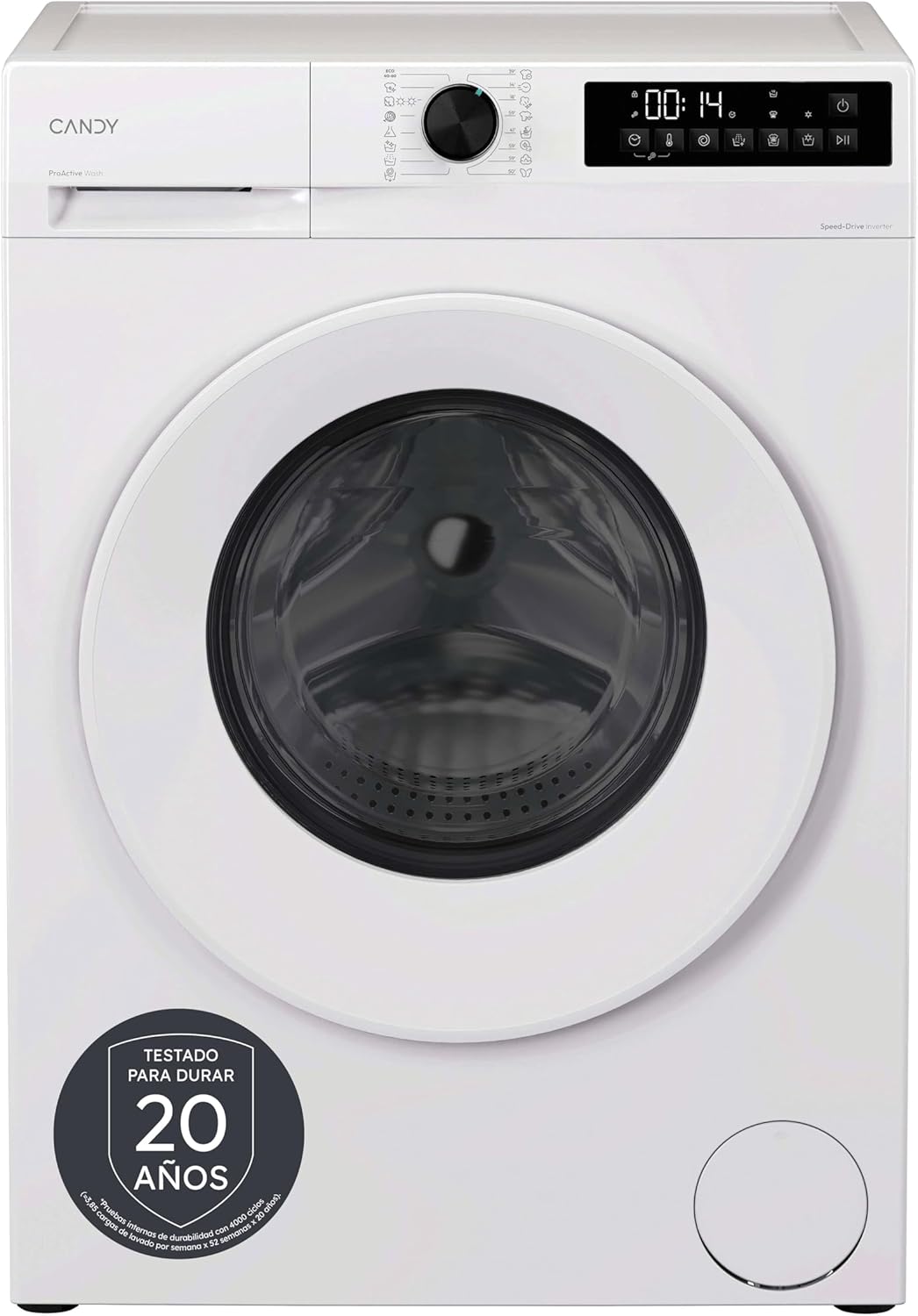
3.1. attēls: Priekšpuse view of the Candy Pro Wash&Dry 300 GWD 4968-S washer dryer, showcasing tā balto apdari un vadības paneli.

3.2. attēls: Diagram illustrating the height (85 cm), width (59.5 cm), and depth (60.1 cm) of the washer dryer.
4. Uzstādīšana un iestatīšana
The Candy Pro Wash&Dry 300 GWD 4968-S is a freestanding appliance. Proper installation is crucial for its performance and safety.
Izpakošana:
- Noņemiet visus iepakojuma materiālus, tostarp polistirola pamatni un jebkuru aizsargplēvi.
- Remove the transport bolts located at the rear of the appliance. Keep these bolts for future transport if needed.
Pozicionēšana:
- Place the appliance on a firm, flat floor.
- Adjust the feet to ensure the machine is perfectly level. This prevents excessive vibration and noise during operation.
Ūdens pieslēgums:
- Pievienojiet ūdens ieplūdes šļūteni aukstā ūdens krānam ar 3/4 collu vītni.
- Ensure the drain hose is correctly positioned in a standpipe or connected to a sink trap, preventing siphoning.
Elektriskais savienojums:
- Connect the power cord to a properly grounded electrical outlet (230 Volts).
- Neizmantojiet pagarinātājus vai adapterus.
5. Lietošanas instrukcijas
Operating your Candy Pro Wash&Dry 300 GWD 4968-S is intuitive with its touch screen and rotary knob controls.
Veļas ielāde:
- Open the door and load laundry, ensuring not to exceed the maximum capacity (9 kg for wash, 6 kg for dry).
- Stingri aizveriet durvis.
Adding Detergent and Additives:
- Izvelciet mazgāšanas līdzekļa atvilktni.
- Add detergent to the main wash compartment and fabric softener to its designated compartment.
- Aizveriet mazgāšanas līdzekļa atvilktni.

5.1. attēls: Close-up of the control panel, showing the rotary program selector and digital display with touch buttons.
Programmas izvēle:
- Turn the rotary knob to select one of the 16 available programs (e.g., Cotton, Synthetics, Eco 40-60, Rapid 15', Wash+Dry, Steam Function).
- The digital display will show the default time and settings for the selected program.
Iestatījumu pielāgošana:
- Use the touch buttons to adjust temperature, spin speed, delay start (up to 24 hours), or activate special functions like Fresh Vapor.
- To activate the Child Lock, press and hold the designated button for a few seconds until the indicator appears.

5.2. attēls: Illustration of the ProActive Wash technology, showing water droplets penetrating fabric to remove stains effectively.

5.3. attēls: Before and after comparison of a shirt, demonstrating the wrinkle-reducing effect of the Fresh Vapor steam function.
Cikla sākšana:
- Lai sāktu izvēlēto programmu, nospiediet pogu Sākt/Pauze.
Cikla beigas:
- The appliance will signal the end of the cycle.
- Atveriet durvis un izņemiet veļu.
6. Apkope
Regulāra apkope nodrošina veļas mazgājamās mašīnas ar žāvētāju ilgmūžību un optimālu veiktspēju.
Mazgāšanas līdzekļa atvilktnes tīrīšana:
- Remove the detergent drawer and rinse it under running water to remove any residue.
- Notīriet atvilktnes korpusu ar birsti.
Bungas tīrīšana:
- Use the dedicated drum cleaning program (if available) or run an empty cycle with a descaling agent.
- The Smart Spray and Clean Shield system helps maintain drum hygiene by preventing detergent buildup.
Filtra tīrīšana:
- Regularly check and clean the filter located at the bottom front of the appliance. This prevents blockages and ensures efficient drainage.
Ārpuses tīrīšana:
- Noslaukiet ārējās virsmas ar mīkstu, damp audums. Neizmantojiet abrazīvus tīrīšanas līdzekļus vai šķīdinātājus.
7. Traucējummeklēšana
If you encounter issues with your washer dryer, refer to the following common troubleshooting steps. For more detailed solutions, consult the full user manual.
Ierīce neieslēdzas:
- Pārbaudiet, vai strāvas vads ir droši pievienots.
- Pārliecinieties, vai durvis ir pilnībā aizvērtas.
- Verify that the water tap is open.
- Check if a program has been selected and the Start/Pause button pressed.
Pārmērīga vibrācija vai troksnis:
- Ensure the appliance is level by adjusting its feet.
- Pārbaudiet, vai transportēšanas skrūves ir noņemtas.
- Verify that the load is balanced inside the drum.
Slikta žāvēšanas veiktspēja:
- Do not overload the dryer. Ensure the load size is appropriate for the 6 kg drying capacity.
- Notīriet savārstījuma filtru.
- Izvēlieties pareizo žāvēšanas programmu atbilstoši auduma tipam.
8. Specifikācijas
| Funkcija | Specifikācija |
|---|---|
| Zīmols | Konfektes |
| Modeļa numurs | 31020955 (GWD 4968-S) |
| Produkta izmēri (A x P x D) | 85 cm x 59.5 cm x 60.1 cm |
| Svars | 66 kg |
| Mazgāšanas jauda | 9 kg |
| Žāvēšanas jauda | 6 kg |
| Maksimālais griešanās ātrums | 1400 XNUMX RPM |
| Programmu skaits | 16 |
| Motora tips | Inverter SpeedDrive |
| Trokšņa līmenis (griešanās) | 70 decibeli |
| Voltage | 230 volts |
| Instalācijas veids | Brīvi stāvoši |
| Vadības veids | Touch and Rotary Knob |
| Īpašas funkcijas | Steam Function, ProActive Wash, Smart Spray, Clean Shield, Child Lock, Delay Start |

8.1. attēls: Energy efficiency label for the Candy GWD 4968-S washer dryer, detailing energy consumption, capacities, and noise levels. For more information, visit the official EPREL database: EPREL produkta informācija
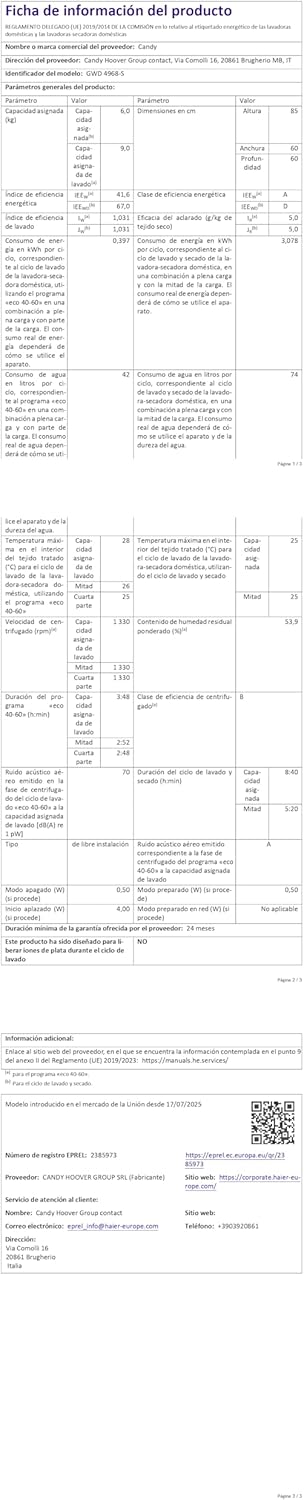
8.2. attēls: Detailed product information sheet, providing comprehensive technical data and compliance details for the appliance.
9. Garantija un atbalsts
Your Candy Pro Wash&Dry 300 GWD 4968-S comes with a standard manufacturer's warranty. Please refer to the warranty card included with your purchase for specific terms and conditions.
Klientu atbalsts:
For technical assistance, spare parts, or service requests, please contact Candy customer support. Ensure you have your appliance's model number (GWD 4968-S) and serial number ready when contacting support.
A detailed user manual is included with the appliance for further information.


